4 Best OMTech Laser Engravers Under $2500, Compared
As Amazon Associates, we earn from qualifying purchases. This means we may receive a small commission at no extra cost to you if you click through and make a purchase.
As an Amazon Associate we earn from qualifying purchases. Links on this page are affiliate links.
You need the best OMTech laser engravers under $2500 for your specific workflow. We compared 4 models using only the specifications published on their listings. The OMTech 30W Fiber Laser Engraver takes the top spot because its 30W fiber laser delivers precise metal etching and jewelry marking. This power level ensures fast, accurate results for small businesses. Other picks cover large nonmetallic projects and leather engraving with different CO2 and fiber options. Use this guide to decide which machine fits your material needs and workspace constraints.
Match laser type to your materials
Choose a fiber laser for metal and aluminum. The top pick uses a 30W fiber unit for precise jewelry marking. Select a CO2 laser for wood, acrylic, and leather. The best budget option offers 60W CO2 power for large nonmetallic projects. Verify your primary material before buying to ensure compatibility with the laser type.
| # | Product | Best for | Price |
|---|---|---|---|
| 1 | OMTech 30W Fiber Laser Engraver Best overall | precise metal etching and jewelry marking | |
| 2 | OMTech 60W CO2 Laser Engraver Best budget | large nonmetallic projects with long materials | |
| 3 | OMTech 50W Fiber Laser Engraver with Rotary Axis Best rotary roller | precision metal jewelry engraving | |
| 4 | OMTech 60W CO2 28×20 Best leather | large format wood and leather engraving |
The best fit for you
- You need precise metal etching for jewelry – OMTech 30W Fiber Laser Engraver – The 30W fiber laser and LightBurn support enable fast, accurate metal marking.
- You require a large workspace for long materials – OMTech 60W CO2 Laser Engraver – The 16×24 inch bed with pass-through capability handles long nonmetallic projects.
- You want to engrave cylindrical jewelry items – OMTech 50W Fiber Laser Engraver with Rotary Axis – The included rotary axis allows for precise metal marking on round objects.
- You process large sheets of leather or wood – OMTech 60W CO2 28×20 – The 20×28 inch work area and air assist suit large format engraving.

OMTech 30W Fiber Laser Engraver
Best for: precise metal etching and jewelry marking
- Laser Power
- 30W
- Laser Type
- Fiber
- Work Area
- 6.9×6.9 in. (175×175 mm)
- Engraving Speed
- Up to 10,000 mm/s
- Safety Class
- Class 2
- Software Compatibility
- EzCad2, LightBurn
This OMTech 30W fiber laser engraver targets metal and jewelry work with a 6.9×6.9 inch work area. It features a high-speed galvanometric system reaching 10,000 mm/s and includes LightBurn compatibility. The compact design fits small shops, while the 100,000-hour laser source offers durability. You get precise etching on precious metals and gemstones with included safety eyewear.
- 30W solid-state fiber laser source
- Up to 10,000 mm/s engraving speed
- LightBurn and EzCad2 software support
- 6.9×6.9 inch work area
- 6.9×6.9 inch work area is smaller than the 16×24 inch or 28×20 inch beds on other OMTech models
- 30W power is lower than the 50W fiber marking machine listed
- Rotary axis is not included
- You need precise metal etching for jewelry
- You work in a compact space
- You require fast marking speeds
- You need to engrave large wooden panels
- You want a higher 50W power output
- You require an included rotary axis
Verdict: OMTech 30W Fiber Laser Engraver fits jewelers and small businesses needing fast, precise metal marking. It suits users prioritizing speed and software flexibility over large bed size.
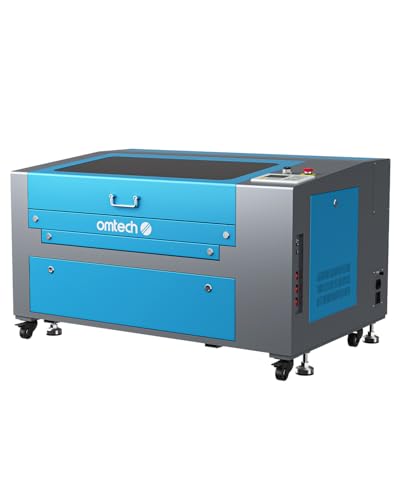
OMTech 60W CO2 Laser Engraver
Best for: large nonmetallic projects with long materials
- Laser Power
- 60W
- Laser Type
- CO2
- Work Area
- 16"x24" (400×600 mm)
- Safety Class
- Class 2
- Software Compatibility
- RDWorks
- Features
- Air Assist
This OMTech 60W CO2 laser engraver offers a 16"x24" work area for large projects. It features two-way pass-through doors to handle long materials easily. The DC tube provides 60W power and is designed for up to 1000 hours of use. It includes an air assist system to keep lenses clean. You will get 2 years of support. This machine suits users needing a spacious build area for wood, acrylic, or glass.
- 60W CO2 laser power for deep engraving
- 16"x24" work area with pass-through doors
- Built-in air assist for clean cuts
- Cover interlock safety feature
- 2 years of comprehensive support
- Heavier at 187 pounds compared to lighter desktop units
- Smaller 16"x24" work area than the 28"x20" option
- Limited to RDWorks software compatibility
- You need to engrave long items using pass-through doors
- You work with nonmetallic materials like wood or acrylic
- You want a 60W power level for consistent results
- You require fiber laser marking for metals
- You need LightBurn compatibility without extra setup
- You want a lighter machine for easy moving
Verdict: OMTech 60W CO2 Laser Engraver fits users who prioritize a large 16"x24" workspace and pass-through capability for long materials. It is a solid choice for nonmetallic engraving tasks where size matters more than portability.

OMTech 50W Fiber Laser Engraver with Rotary Axis
Best for: precision metal jewelry engraving
- Laser Power
- 50W
- Laser Type
- Fiber
- Work Area
- 5.9" x 5.9"
- Engraving Speed
- 10000 mm/s
- Spot Size
- 0.01 mm
- Safety Class
- Class 2
This OMTech 50W fiber laser engraver is designed for precision marking on metal and aluminum. It features a 5.9 x 5.9 inch work area and a 0.01 mm spot size for fine details. The unit includes a rotary axis for cylindrical items. It reaches engraving speeds up to 10,000 mm/s. You can use LightBurn or EzCad2 software to control the process. This model is ideal for jewelry and small metal parts.
- 50W fiber laser power for metal engraving
- 0.01 mm spot size for high precision
- Engraving speed up to 10,000 mm/s
- Includes rotary axis for cylindrical objects
- Compatible with LightBurn software
- Smaller 5.9 x 5.9 inch work area
- Limited to metal and aluminum materials
- Class 2 safety rating requires caution
- You need to engrave jewelry or small metal items
- You require a rotary axis for cylindrical parts
- You prefer LightBurn software compatibility
- You need to engrave wood or acrylic
- You require a large work area over 10 inches
- You want to cut thick materials
Verdict: OMTech 50W Fiber Laser with Rotary is a compact solution for precise metal marking. It fits users who need a rotary axis for jewelry or small metal components.
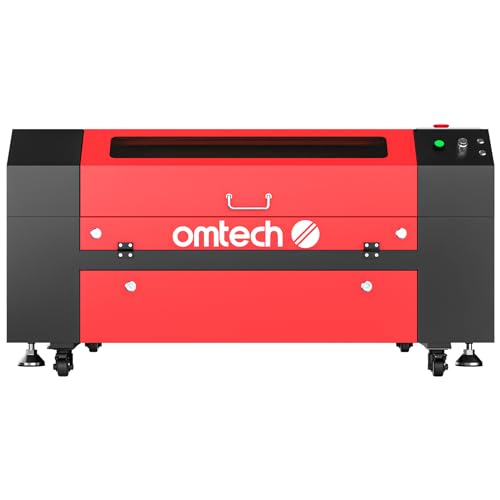
OMTech 60W CO2 28×20
Best for: large format wood and leather engraving
- Laser Power
- 60W
- Laser Type
- CO2
- Work Area
- 20"x28" (500×700 mm)
- Engraving Speed
- 23.6 ips (600 mm/s)
- Safety Class
- Class 2
- Features
- Air Assist
This OMTech 60W CO2 laser engraver offers a 20×28 inch work area for large projects. It reaches speeds of 23.6 ips and engraves up to 0.4 inches deep. The motorized autolift bed simplifies focus adjustments. Four-way pass-through doors handle long items easily. It suits users needing a spacious workspace for wood and leather.
- 60W CO2 laser tube delivers strong power for deep engraving
- 20×28 inch honeycomb bed accommodates large and long materials
- Motorized autolift workbed removes manual focus guesswork
- Four-way pass-through doors allow easy loading of extended items
- Weighs 223 pounds, making it significantly heavier than smaller desktop units
- Class 2 safety rating limits power output compared to industrial Class 4 machines
- Maximum engraving depth is 0.4 inches, restricting deep relief work
- You need a large 20×28 inch workspace for big projects
- You frequently engrave long materials that require pass-through doors
- You want motorized bed adjustments to simplify setup
- You have limited floor space for a 48.8 inch long machine
- You require engraving on metals, as this is a CO2 unit
- You need a lightweight, portable device for easy transport
Verdict: OMTech 60W CO2 28×20 Laser is ideal for makers who prioritize a large work area and automated bed height adjustments. It fits those who process long materials like leather or wood sheets regularly.
Specifications side by side
| Spec | OMTech 30W Fiber Laser Engraver | OMTech 60W CO2 Laser Engraver | OMTech 50W Fiber Laser Engraver with Rotary Axis | OMTech 60W CO2 28×20 |
|---|---|---|---|---|
| Laser Power | 30W | 60W | 50W | 60W |
| Laser Type | Fiber | CO2 | Fiber | CO2 |
| Work Area | 6.9×6.9 in. (175×175 mm) | 16"x24" (400×600 mm) | 5.9" x 5.9" | 20"x28" (500×700 mm) |
| Engraving Speed | Up to 10,000 mm/s | – | 10000 mm/s | 23.6 ips (600 mm/s) |
| Spot Size | – | – | 0.01 mm | – |
| Safety Class | Class 2 | Class 2 | Class 2 | Class 2 |
| Software Compatibility | EzCad2, LightBurn | RDWorks | LightBurn, EzCad2 | – |
| Features | LightBurn Support | Air Assist | Rotary Roller, LightBurn Support | Air Assist |
| Compatible Material | Metal, Aluminum | Wood, Acrylic, Glass | Metal, Aluminum | Wood, Leather, Glass |
| Application | Jewelry | – | Jewelry | – |
| Dimensions | 30.5 × 17.7 × 31.1 inches | 44.9 × 30.7 × 25.4 inches | – | 48.8 × 34.3 × 26.4 inches |
| Weight | – | 187 pounds | – | 223 pounds |
| Size | 30W | MF 60W | Galvo 50W with Rotary Axis | 60W with 20"x28" |
| Color | Galvo Basic | MF 60W | – | Black, Red |
| Model | LYF-30W | RYGEL-USB0604US | – | – |
Key Specs to Check Before Buying
Match laser type to material
Choose a fiber laser if you work with metal or aluminum. The OMTech 30W Fiber Laser Engraver uses a fiber unit for precise jewelry marking. Select a CO2 laser for wood, acrylic, or leather. The best budget option offers 60W CO2 power for large nonmetallic projects. Your material choice determines the correct laser technology. Fiber lasers etch metal quickly. CO2 lasers cut and engrave organic materials and plastics effectively. Pick the type that matches your primary workload.
Check workspace dimensions carefully
Verify the bed size fits your largest projects. The best budget model features a 16 by 24 inch workspace with pass-through capability. This allows you to engrave long materials like pipes or boards. The OMTech 60W CO2 28×20 Laser offers an even larger area for wood and leather sheets. Measure your workpieces before buying. A small bed limits what you can produce. A large bed requires more floor space. Ensure your workspace accommodates the machine's physical footprint.
Verify software compatibility early
Ensure the engraver supports your preferred design software. The top pick and the best rotary roller model both support LightBurn. LightBurn is a popular, user-friendly program for laser control. If you rely on specific software, check the attributes list first. Compatibility issues can slow down your workflow significantly. Some models may only work with proprietary software. Confirming support before purchase saves time. It ensures you can send designs directly to the machine without complex conversions or extra steps.
Consider rotary axis needs
Add a rotary axis if you engrave cylindrical items. The OMTech 50W Fiber Laser with Rotary is ideal for jewelry. It allows you to mark rings, tumblers, and pens evenly. Without a rotary attachment, you can only engrave flat surfaces. If your business involves metal accessories, this feature is essential. It expands your product range significantly. Check if the rotary is included or sold separately. This accessory changes the machine's versatility for round objects.
Review air assist features
Look for air assist if you cut or engrave deeply. The CO2 models listed include air assist technology. This feature blows air onto the material during operation. It keeps the lens clean and reduces flare-ups. This is crucial for wood and acrylic cutting. It improves cut quality and extends lens life. Fiber lasers may not always require this for etching. Check the attributes to confirm its presence. It is a valuable feature for maintaining consistent results over long production runs.
Frequently asked questions
Which OMTech laser engraver is best for metal jewelry?
The OMTech 30W Fiber Laser Engraver is the top choice for precise metal etching and jewelry marking. It uses a 30W fiber laser to deliver fast, accurate results on metal and aluminum. The unit supports LightBurn software, giving you flexibility in your design workflow. This model is ideal if you prioritize speed and precision over a large bed size.
What is the largest OMTech CO2 laser engraver available?
The OMTech 60W CO2 28×20 offers the largest workspace for nonmetallic projects. It features a 20×28 inch bed with automated height adjustments. This model is perfect for makers who process long materials like leather or wood sheets regularly. It includes air assist and handles wood, leather, and glass effectively.
Does OMTech offer a fiber laser with a rotary axis?
Yes, the OMTech 50W Fiber Laser Engraver with Rotary Axis is designed for this purpose. It is a compact solution for precise metal marking on cylindrical items. This model includes a rotary roller and supports LightBurn software. It is best suited for users who need to engrave jewelry or small metal components with high precision.
Which OMTech laser is best for large wood projects?
The OMTech 60W CO2 Laser Engraver is the best budget option for large nonmetallic projects. It provides a spacious 16×24 inch workspace with pass-through capability for long materials. This unit uses a 60W CO2 laser and includes air assist. It is a solid choice for engraving wood, acrylic, and glass where size matters more than portability.
How heavy is the OMTech 60W CO2 28×20?
The OMTech 60W CO2 28×20 weighs 223 pounds. Its dimensions are 34.3 inches wide, 26.4 inches high, and 48.8 inches long. This substantial weight reflects its large 20×28 inch work area and automated bed height adjustments. You should plan for a sturdy surface to support this machine during operation.
Can I use LightBurn software with OMTech fiber lasers?
Yes, both the OMTech 30W Fiber Laser Engraver and the 50W Fiber Laser with Rotary Axis support LightBurn. This compatibility allows for greater control over your engraving settings and design files. Using LightBurn can enhance the precision of your metal etching and jewelry marking tasks significantly.