3 Best VEVOR Laser Engravers with Air Assist, Compared
As Amazon Associates, we earn from qualifying purchases. This means we may receive a small commission at no extra cost to you if you click through and make a purchase.
As an Amazon Associate we earn from qualifying purchases. Links on this page are affiliate links.
Finding the best VEVOR laser engravers with air assist requires looking at specific capabilities rather than marketing claims. We compared 3 models using only the specifications published on their official listings. This approach ensures you see what each machine can actually do.
The VEVOR 100W 24 x 35 in CO2 Laser Engraver leads because its 100W power and 24 x 35 inch working area handle thick materials and large formats effectively. This guide helps you decide which size and wattage suit your workshop needs.
Match Laser Power to Your Project Needs
VEVOR offers three CO2 laser power levels: 50W, 80W, and 100W. The 50W model suits detailed engraving on wood and acrylic. The 80W option handles mid-range tasks. The 100W machine cuts thick materials and provides a large 24 by 35 inch workspace. Choose the wattage that matches your material thickness and workspace requirements.
| # | Product | Best for | Price |
|---|---|---|---|
| 1 | VEVOR 100W 24 x 35 in CO2 Laser Engraver Best overall | large format cutting and thick material processing | |
| 2 | VEVOR 80W CO2 Laser Engraver 20 x 28 in Best budget | Mid-range projects needing air assist | |
| 3 | VEVOR 50W CO2 Laser 12×20 in Best 50w | Small detailed engraving and light cutting |
The best fit for you
- You need a large workspace for thick materials – VEVOR 100W 24 x 35 in CO2 Laser Engraver – Its 100W power and 24 x 35 inch working area handle complex, large projects.
- You want a capable mid-range machine with air assist – VEVOR 80W CO2 Laser Engraver 20 x 28 in – The 80W CO2 laser offers a balanced 20 x 28 inch bed for versatile work.
- You prioritize safety and precision for detailed work – VEVOR 50W CO2 Laser 12×20 in – Its 50W power and compact 12 x 20 inch area suit small, detailed engraving.

VEVOR 100W 24 x 35 in CO2 Laser Engraver
Best for: large format cutting and thick material processing
- Features
- Air Assist, LightBurn Support
- Laser Power
- 100W
- Laser Type
- CO2
- Work Area
- 24 x 35 in (600 x 900 mm)
- Engraving Speed
- Up to 19.7 ips
- Software Compatibility
- LightBurn, CorelDRAW, AutoCAD
This VEVOR 100W CO2 laser engraver offers a 24 x 35 inch working area for large projects. It cuts materials up to 0.59 inches thick in one pass. The machine features a 2-way pass air assist and supports LightBurn software. You get a spacious 840 square inch workspace with honeycomb bed stability. It is designed for users needing high power and a large cutting area for wood, acrylic, and leather.
- 100W CO2 laser power for fast cutting
- 24 x 35 inch large working area
- 2-way pass air assist system
- Supports LightBurn and CorelDRAW software
- Heavy 551-pound build limits portability
- Large footprint requires significant floor space
- Slower 19.7 ips engraving speed
- You need to cut thick materials up to 0.59 inches
- You require a large workspace for big projects
- You use LightBurn or CorelDRAW software
- You need a portable machine for small spaces
- You only engrave small items under 12 inches
- You prefer faster engraving speeds over cutting power
Verdict: VEVOR 100W CO2 Laser 24 x 35 in is the best overall choice for makers who need to cut thick materials and require a large workspace for complex projects.

VEVOR 80W CO2 Laser Engraver 20 x 28 in
Best for: Mid-range projects needing air assist
- Features
- Air Assist, LightBurn Support
- Laser Power
- 80W
- Laser Type
- CO2
- Work Area
- 20 x 28 in (500 x 700 mm)
- Engraving Speed
- Up to 19.7 ips
- Software Compatibility
- LightBurn, CorelDRAW, AutoCAD
This VEVOR machine offers an 80W CO2 laser source with a 20 by 28 inch working area. It reaches engraving speeds up to 19.7 ips and includes a 2-way pass air assist system. The unit weighs 282 pounds and measures 57.1 inches in length. It supports LightBurn and connects via USB or network. This model suits users needing a mid-range workspace with solid cutting power for wood and acrylic.
- 80W CO2 laser power for efficient cutting
- 20 x 28 inch honeycomb bed area
- 2-way pass air assist reduces smoke
- Supports LightBurn and CorelDRAW software
- Emergency stop button for safety
- Lower 80W laser power compared to 100W alternatives
- Heavier 282-pound build limits portability
- Smaller 20 x 28 inch area than 24 x 35 inch options
- You need a balance between power and workspace size
- You require air assist for cleaner cuts
- You prefer software compatibility with LightBurn
- You need maximum 100W cutting speed
- You require a large 24 x 35 inch bed
- You need a lightweight portable unit
Verdict: VEVOR 80W CO2 Laser Engraver fits users who want a capable mid-range machine with air assist. It is ideal for those who do not need the largest bed or highest wattage available on the market.
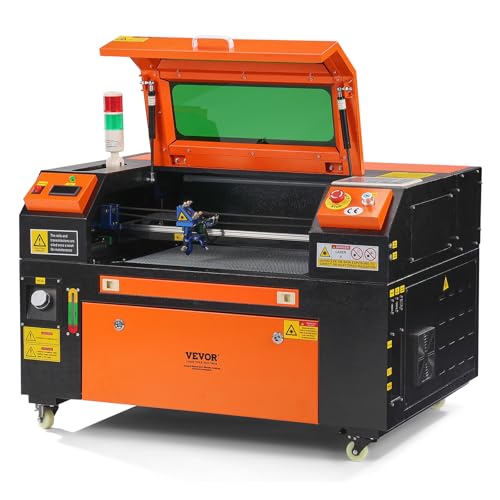
VEVOR 50W CO2 Laser 12×20 in
Best for: Small detailed engraving and light cutting
- Features
- Air Assist, LightBurn Support
- Laser Power
- 50W
- Laser Type
- CO2
- Work Area
- 12 x 20 in (300 x 500 mm)
- Engraving Speed
- Up to 19.7 ips
- Software Compatibility
- LightBurn, CorelDRAW, AutoCAD
This VEVOR 50W CO2 laser engraver offers a 12 x 20 inch working area for your projects. It cuts materials up to 0.24 inches thick in a single pass. The machine includes a 2-way pass air assist to clear debris. You get a honeycomb bed for stability and a tinted safety window. It weighs 172 pounds and fits smaller workspaces than larger 80W or 100W models.
- 50W CO2 laser power for precise engraving
- 12 x 20 inch spacious working area
- 2-way pass air assist system
- Cuts materials up to 0.24 inches thick
- Compatible with LightBurn and CorelDRAW
- Lower 50W laser power compared to 80W and 100W alternatives
- Smaller 12 x 20 inch workspace limits large projects
- Heavier 172 pound build requires more floor space
- You need a compact machine for smaller projects
- You want air assist for cleaner cuts
- You prefer a Class 1 safety rating
- You require cutting thicker than 0.24 inches
- You need a workspace larger than 12 x 20 inches
- You want faster processing with higher wattage
Verdict: VEVOR 50W CO2 Laser 12 x 20 in suits hobbyists who need a safe, compact engraver for detailed work on wood and acrylic. It is ideal for users prioritizing safety and precision over raw speed or large format capabilities.
Specifications side by side
| Spec | VEVOR 100W 24 x 35 in CO2 Laser Engraver | VEVOR 80W CO2 Laser Engraver 20 x 28 in | VEVOR 50W CO2 Laser 12×20 in |
|---|---|---|---|
| Laser Power | 100W | 80W | 50W |
| Laser Type | CO2 | CO2 | CO2 |
| Work Area | 24 x 35 in (600 x 900 mm) | 20 x 28 in (500 x 700 mm) | 12 x 20 in (300 x 500 mm) |
| Engraving Speed | Up to 19.7 ips | Up to 19.7 ips | Up to 19.7 ips |
| Software Compatibility | LightBurn, CorelDRAW, AutoCAD | LightBurn, CorelDRAW, AutoCAD | LightBurn, CorelDRAW, AutoCAD |
| Features | Air Assist, LightBurn Support | Air Assist, LightBurn Support | Air Assist, LightBurn Support |
| Compatible Material | Wood, Acrylic, Fabric | Wood, Acrylic, Fabric | Wood, Acrylic, Fabric |
| Compatible Operating System | Windows, macOS | Windows, macOS | Windows, macOS |
| Dimensions | 64.6 × 39.4 × 39.4 inches | 57.1 × 35.4 × 29.5 inches | 40.9 × 29.1 × 31.5 inches |
| Weight | 551 pounds | 282 pounds | 172 pounds |
| Size | Working Area: 24" x 35" | – | Working Area: 12" x 20" |
| Color | Orange | Orange | Orange |
| Model | KH9060 | KH7050 | KH5030 |
Choosing Your VEVOR Laser Engraver
Assess Your Workspace Dimensions
The physical footprint of the machine matters as much as the bed size. The 100W model measures 64.6 inches in length and weighs 551 pounds, requiring significant floor space and a sturdy surface. In contrast, the 50W unit is 40.9 inches long and weighs 172 pounds, making it easier to position in a smaller garage or workshop. Measure your available area carefully before purchasing to ensure the frame fits through doors and leaves room for operation.
Match Laser Power to Tasks
Select wattage based on whether you prioritize cutting speed or fine detail. The 100W CO2 laser delivers high power for cutting thick materials quickly. The 80W option provides a balanced approach for mid-range projects. The 50W model offers sufficient power for detailed engraving on wood and acrylic without the intensity of higher wattages. Higher wattage does not always mean better results for delicate work; choose the level that aligns with your typical material thickness and project complexity.
Verify Software Compatibility
Ensure your computer can run the required software before buying. All listed VEVOR models support LightBurn, a popular third-party engraving program, and are compatible with both Windows and macOS operating systems. This broad compatibility means you do not need specialized hardware or specific brand restrictions to operate the machine. Check your current system requirements against the software needs to avoid setup issues after delivery. This flexibility allows you to use the engraver with your existing workflow tools.
Consider Working Area Size
The engraving bed dimensions dictate the maximum size of your projects. The 100W machine features a generous 24 x 35 inch working area, ideal for large formats. The 80W model offers a 20 x 28 inch bed, suitable for standard-sized items. The 50W unit provides a 12 x 20 inch area, perfect for small, detailed pieces. If you plan to engrave large signs or cut wide sheets of acrylic, prioritize the larger bed sizes. Smaller beds restrict the dimensions of single-piece projects.
Check Material Compatibility
Confirm the machine handles your intended materials safely. These CO2 lasers are compatible with wood, acrylic, and fabric. CO2 lasers are generally effective on organic materials and certain plastics. Ensure you do not attempt to engrave reflective metals or PVC, which can damage the lens or release toxic fumes. The air assist feature helps clear debris from these specific materials, improving cut quality. Always verify material safety guidelines before processing new substances to protect both the machine and your health.
Frequently asked questions
Can I use LightBurn software with these VEVOR laser engravers?
Yes, all three models in this list support LightBurn. This compatibility allows you to use advanced vector graphics and cutting settings. LightBurn works with both Windows and macOS operating systems, giving you flexibility in your software choice regardless of your computer type.
What is the largest working area available on these machines?
The 100W model offers the largest workspace at 24 by 35 inches. This size is ideal for cutting thick materials or handling complex projects that require a broad surface. The other two models provide smaller areas of 20 by 28 inches and 12 by 20 inches respectively.
Which VEVOR laser is best for detailed engraving work?
The 50W CO2 laser is the best choice for small, detailed engraving and light cutting. Its compact 12 by 20 inch bed suits hobbyists who prioritize precision over raw speed. It handles wood and acrylic safely without the bulk of larger industrial machines.
Do these machines include air assist functionality?
Yes, every model listed features air assist. This feature helps clear away smoke and debris from the cutting or engraving area. It improves cut quality and protects the lens by keeping the work zone clear during operation on materials like wood and acrylic.
How much floor space does the 100W model require?
The 100W unit measures 64.6 inches in length and 39.4 inches in width. It also weighs 551 pounds, so you need a sturdy surface to support it. Ensure your workspace can accommodate these dimensions and the significant weight of the machine.
Are these CO2 lasers compatible with macOS?
Yes, all three models are compatible with macOS. They also work with Windows operating systems. This cross-platform support means you can connect your preferred computer without needing specific hardware adapters or proprietary software drivers from the manufacturer.