15 Best Laser Engravers with Camera, Compared
As Amazon Associates, we earn from qualifying purchases. This means we may receive a small commission at no extra cost to you if you click through and make a purchase.
As an Amazon Associate we earn from qualifying purchases. Links on this page are affiliate links.
Choosing the best laser engravers with camera requires comparing how each system handles positioning and safety. We analyzed 15 models based strictly on the specifications published on their listings. The xTool F2 15W Diode & 5W IR Laser Engraver leads because its dual-laser setup supports fast batch processing and metal color marking. This guide helps you decide which machine fits your workspace size, material compatibility, and required power levels.
Choose Laser Type for Your Material
The camera helps position designs, but laser type determines what you can mark. Diode lasers work well on wood, leather, and acrylic. Fiber lasers are required for metal. CO2 lasers handle thick materials. Pick the laser type that matches your primary material before relying on the camera for alignment.
| # | Product | Best for | Price |
|---|---|---|---|
| 1 | xTool F2 15W Diode & 5W IR Laser Engraver Best overall | fast batch processing and metal color marking | |
| 2 | xTool P3 80W CO2 Laser Cutter Bundle Best premium | large format industrial cutting and automation | |
| 3 | BlazeX M3 10W Laser Engraver with Camera Also great | Beginners needing a safe, enclosed camera-guided setup | |
| 4 | xTool F1 Ultra 20W Dual Fiber and Diode Engraver Best fiber laser | fast metal and wood engraving | |
| 5 | Ortur R2 10W Enclosed Laser Engraver Also great | Beginners wanting a safe, standalone engraver | |
| 6 | Carverall A1 Pro 10W Laser Engraver Best budget | safe home use and small batch customization | |
| 7 | Creality Falcon A1C 10W Enclosed Laser Engraver Also great | Safe home engraving with AI tools | |
| 8 | Creality Falcon A1 10W Enclosed Laser Engraver Also great | Safe, large-area desktop engraving | |
| 9 | Creality Falcon A1 10W Enclosed Engraver Also great | Safe desktop engraving on wood | |
| 10 | Creality Falcon 10W Enclosed Laser Engraver Also great | Safe, AI-assisted small-format engraving | |
| 11 | WECREAT Vision 20W Enclosed Laser Engraver Also great | safe, tall material engraving with camera | |
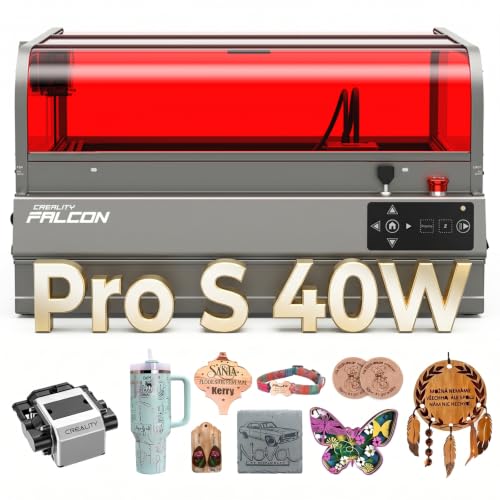
| 12 | Creality Falcon2 Pro S 40W Enclosed Laser Cutter Also great | batch production with thick wood cutting | |
| 13 | Creality Falcon2 Pro 60W Enclosed Laser Cutter Best lightburn support | Workshops needing enclosed Class 1 safety and adjustable power | |
| 14 | Creality Falcon A1C 5W Enclosed Engraver Also great | Beginners seeking safe, AI-assisted desktop engraving | |
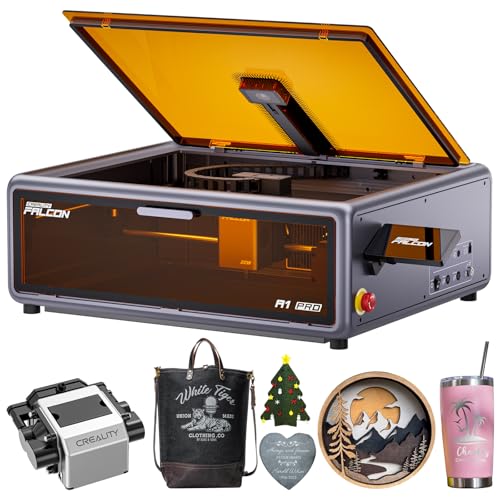
| 15 | Creality Falcon A1 Pro 20W Enclosed Laser Best app control | Safe home use with smart controls |
The best fit for you
- You need fast batch processing and metal color marking – xTool F2 15W Diode & 5W IR Laser Engraver – The xTool F2 uses a dual-laser setup with 5W IR for industrial speed and metal color marking.
- You want large format industrial cutting and automation – xTool P3 80W CO2 Laser Cutter Bundle – The xTool P3 offers an 80W CO2 laser with auto focus for large workspace precision.
- You are a beginner needing a safe enclosed setup – BlazeX M3 10W Laser Engraver with Camera – The BlazeX M3 provides a 10W enclosed structure with camera guidance for delicate work on multiple materials.
- You require fast metal and wood engraving for jewelry – xTool F1 Ultra 20W Dual Fiber and Diode Engraver – The xTool F1 Ultra features 20W dual fiber and diode lasers for rapid batch production.
- You need safe home use with smart app controls – Creality Falcon A1 Pro 20W Enclosed Laser – The Creality Falcon A1 Pro 20W includes app control, a touchscreen, and an enclosed design for safety.

xTool F2 15W Diode & 5W IR Laser Engraver
Best for: fast batch processing and metal color marking
- Features
- Camera
- Laser Power
- 15W, 5W
- Laser Type
- Diode, IR
- Engraving Speed
- 6000mm/s
- Safety Class
- Class 4
- Compatible Material
- Metal
The xTool F2 combines a 15W diode laser and a 5W infrared laser for versatile material handling. A built-in 50MP camera ensures precise alignment for small pieces. It reaches engraving speeds of 6000mm/s for rapid batch processing. The fully enclosed design supports safe indoor use. This dual-laser system suits users needing color marking on metal and deep embossing on wood.
- Dual 15W diode and 5W IR lasers for diverse materials
- Built-in 50MP camera for 0.1 mm alignment accuracy
- Engraving speeds up to 6000mm/s
- Fully enclosed Class 4 design for indoor safety
- Class 4 safety rating requires strict precautions
- Weighs 10 pounds, limiting portability compared to lighter models
- You need to engrave color on metal using infrared
- You require high-speed batch processing for commercial use
- You want precise alignment for small, detailed pieces
- You prefer a lighter, more portable machine for markets
- You want a Class 1 enclosed machine for home use
- You only need diode lasers for wood and acrylic
Verdict: The xTool F2 15W Diode 5W IR Engraver fits users who need industrial speed and metal color marking in a single unit. Its dual-laser setup and camera system make it ideal for professional customization services.

xTool P3 80W CO2 Laser Cutter Bundle
Best for: large format industrial cutting and automation
- Features
- Camera, Rotary Roller, Auto Focus
- Laser Power
- 80W (80000mW)
- Laser Type
- CO2
- Work Area
- 36" × 18"
- Engraving Speed
- 1200mm/s
- Safety Class
- Class 1
The xTool P3 is an 80W CO2 laser engraver with a 36" x 18" work area. It features a dual HD camera system for precise alignment and autofocus. This machine cuts thick materials like 20mm wood and 25mm acrylic at speeds up to 1200mm/s. It suits users needing large format industrial-grade cutting and automated workflows with smart nesting.
- 80W CO2 laser power for thick material cutting
- 36" x 18" large desktop work area
- Dual HD camera system with 0.0079" alignment accuracy
- 1200mm/s maximum engraving speed
- CO2 laser type limits clear acrylic cutting compared to fiber options
- Larger footprint requires more desk space than mini engravers
- You need to cut materials thicker than 10mm
- You require a large workspace for big projects
- You want automated autofocus and positioning
- You only engrave small items on a tight desk
- You prefer diode lasers for portability
- You need a Class 1 enclosed machine for metal
Verdict: xTool P3 80W CO2 Laser Engraver is best for users needing large format industrial cutting. It fits those prioritizing workspace size and automated precision over compact portability.

BlazeX M3 10W Laser Engraver with Camera
Best for: Beginners needing a safe, enclosed camera-guided setup
- Features
- Camera, Enclosure
- Laser Power
- 10W
- Safety Class
- Class 1
- Software Compatibility
- LightBurn, CutLabX, LaserGRBL
- Compatible Material
- Wood, Metal, Leather, Glass
- Structure
- Enclosed
The BlazeX M3 is a 10W enclosed laser engraver featuring a smart camera for precise positioning. It offers 0.01mm ultra-precision for complex patterns on metal, glass, wood, and leather. The Class 1 safety rating ensures eye protection, while software compatibility with LightBurn and CutLabX simplifies operation. This bundle includes a protective enclosure and honeycomb bed, making it suitable for beginners seeking a complete, safe setup for DIY projects.
- 10W laser power for cutting wood and acrylic
- 0.01mm ultra-precision for detailed engraving on metal and glass
- Smart camera syncs with LightBurn and CutLabX for zero material waste
- Class 1 enclosed safety design filters harmful radiation
- Includes protective enclosure, honeycomb bed, and tool kit
- 10W laser power is lower than the 20W and 60W options on this list
- Standard 10W model lacks the rotary roller or risers for 360-degree cylindrical engraving
- You need a Class 1 enclosed machine for safe home or studio use
- You want a bundled setup with a camera and enclosure for beginners
- You require precise engraving on hard materials like metal and glass
- You need higher cutting power than 10W for thick materials
- You want to engrave cylindrical items without buying separate rotary accessories
- You prefer a machine with a higher wattage for faster cutting speeds
Verdict: The BlazeX M3 10W Laser Engraver fits users who prioritize safety and precision in a complete, enclosed package. It is ideal for beginners who need a camera-guided setup for delicate work on metal, glass, and wood.

xTool F1 Ultra 20W Dual Fiber and Diode Engraver
Best for: fast metal and wood engraving
- Features
- Camera
- Laser Power
- 20W (20,000mW)
- Laser Type
- Fiber & Diode
- Work Area
- 220mm x 220mm
- Engraving Speed
- 10,000mm/s
- Safety Class
- Class 4
The xTool F1 Ultra combines a 20W fiber laser and a 20W diode laser for dual-material processing. It features a 16MP camera and reaches engraving speeds of 10,000mm/s. The working area measures 220mm x 220mm. This machine handles metals and wood with high precision. It suits users needing fast batch production and deep engraving capabilities for professional or commercial applications.
- 20W fiber and 20W diode dual laser system
- 16MP built-in smart camera
- Engraving speed up to 10,000mm/s
- 220mm x 220mm working area
- Class 4 safety rating requires strict precautions
- 43.9 pounds weight makes it less portable
- 220mm x 220mm area is smaller than some CO2 alternatives
- You need to engrave metals like stainless steel and brass
- You require high-speed batch production for commercial work
- You want dual laser versatility for wood and metal
- You need a Class 1 enclosed machine for office use
- You prioritize a larger working area over speed
- You are looking for a lightweight portable device
Verdict: The xTool F1 Ultra 20W Fiber & Diode is a high-speed dual-laser solution for professionals engraving metals and wood. It fits users who need rapid batch production and precise metal marking capabilities.

Ortur R2 10W Enclosed Laser Engraver
Best for: Beginners wanting a safe, standalone engraver
- Features
- Camera, Enclosure, Touchscreen
- Laser Power
- 10W
- Work Area
- 300 × 210 mm
- Engraving Speed
- 20,000 mm/min
- Safety Class
- Class 1
- Compatible Material
- Wood, Metal, Acrylic, Leather
The Ortur R2 is a Class 1 enclosed laser engraver with a built-in HD camera. It features a 10W laser module and a 300 x 210 mm work area. You control it via a touchscreen without needing a computer. The camera helps you align designs precisely. This machine suits beginners who want a safe, standalone unit for wood, leather, and acrylic projects.
- Class 1 fully enclosed safety design
- Built-in HD camera for precise alignment
- Touchscreen control without a computer
- 300 x 210 mm work area
- 10W laser power is lower than the 20W and 60W options on this list
- 300 x 210 mm work area is smaller than larger cutters in the guide
- You want a safe, enclosed machine for home use
- You prefer controlling the laser via a touchscreen
- You need a compact footprint for a desk
- You require high-power cutting for thick materials
- You need a large work area for big projects
- You want to use a computer or app for control
Verdict: The Ortur R2 10W Enclosed Laser is a practical choice for beginners who value safety and simplicity. It fits users who want a standalone machine for small to medium projects without complex software setups.

Carverall A1 Pro 10W Laser Engraver
Best for: safe home use and small batch customization
- Features
- Camera
- Laser Power
- 10W
- Engraving Speed
- 12,000 mm/min
- Safety Class
- Class 1
- Compatible Material
- Wood, Metal, Leather, Glass
- Application
- DIY Projects, Small Business
The Carverall A1 Pro is a Class 1 enclosed laser engraver with a built-in HD camera for precise positioning. It delivers 10W of laser power and engraves at 12,000 mm/min. The device supports mobile WiFi and Type-C connections for flexible operation. It is suitable for DIY projects and small business customization on materials like wood and leather.
- Built-in HD camera for real-time preview and drag-and-drop positioning
- Class 1 fully enclosed safety design stops laser when cover opens
- Engraving speed of 12,000 mm/min for efficient processing
- Supports mobile WiFi and Type-C connections for flexible operation
- 10W laser power is lower than the 20W or 60W options on this list
- Maximum cut depth of 12mm plywood is less than higher-power competitors
- You need a Class 1 enclosed machine for safe home or classroom use
- You want precise positioning via a built-in camera for small items
- You prioritize portability and lightweight design for desktop use
- You require cutting thick materials beyond 12mm plywood
- You need higher power for engraving uncoated metals without upgrades
- You prefer a machine with significantly faster engraving speeds
Verdict: The Carverall A1 Pro 10W Laser Engraver fits users who need a safe, enclosed desktop unit for small batch customization. It suits those who value precise camera positioning over raw cutting power.

Creality Falcon A1C 10W Enclosed Laser Engraver
Best for: Safe home engraving with AI tools
- Features
- Camera, Auto Focus
- Laser Power
- 10W
- Laser Type
- Diode
- Engraving Speed
- 15,000 mm/min
- Safety Class
- Class 1
- Software Compatibility
- Falcon Design Space
The Creality Falcon A1C is a Class 1 enclosed laser engraver with a built-in HD smart camera and auto focus. It features a 10W diode laser that engraves at speeds up to 15,000 mm/min. The quick-swap module design allows for future upgrades. This compact unit suits beginners who want AI-assisted design and safety features in a portable desktop package.
- Built-in HD smart camera with auto focus
- Quick-swap laser module system
- Engraving speeds up to 15,000 mm/min
- Class 1 enclosed safety design
- 10W laser power is lower than the 20W, 40W, and 60W options on this list
- 15,000 mm/min speed is slower than the 80W output models available elsewhere
- 13.2 x 14.8 x 13.4 inch footprint is smaller than larger cutting bundles
- You want a Class 1 enclosed machine for safe home use
- You value AI image generation and auto focus features
- You need a portable desktop engraver for small projects
- You require high-power cutting for thick materials
- You need a machine larger than 14 inches wide
- You prefer a non-enclosed open-frame design
Verdict: The Creality Falcon A1C 10W AI Laser Engraver fits hobbyists who prioritize safety and smart software over raw cutting power. Its enclosed Class 1 design and quick-swap modules make it a practical entry point for desktop engraving.

Creality Falcon A1 10W Enclosed Laser Engraver
Best for: Safe, large-area desktop engraving
- Features
- Camera, Enclosure
- Laser Power
- 10W
- Laser Type
- Diode
- Work Area
- 15.0" × 12.0"
- Engraving Speed
- 600 mm/s
- Spot Size
- 0.06 × 0.08 mm
The Creality Falcon A1 is a fully enclosed Class 1 diode laser engraver with a built-in camera for precise design positioning. It features a 10W laser output and achieves engraving speeds up to 600 mm/s via a CoreXY system. The machine offers a 15.0" x 12.0" work area and supports LightBurn and LaserGRBL software. It suits users who need a safe, pre-assembled desktop unit for wood and acrylic projects.
- Built-in camera for auto positioning
- Class 1 safety with full enclosure
- 600 mm/s engraving speed
- 15.0" x 12.0" work area
- 10W laser power is lower than the 20W and 60W options on this list
- 28.7-pound weight makes it less portable than mini engravers
- You want a Class 1 enclosed machine for safe home use
- You need a large 15.0" x 12.0" work area
- You prefer a pre-assembled unit with auto-tensioned belts
- You require higher power than 10W for thick materials
- You need a portable machine under 20 pounds
- You want to engrave highly reflective metals
Verdict: The Creality Falcon A1 10W Laser Engraver fits users who prioritize safety and a large work area over raw cutting power. It is a practical choice for those who need a stable, enclosed desktop system for detailed wood and acrylic work.

Creality Falcon A1 10W Enclosed Engraver
Best for: Safe desktop engraving on wood
- Features
- Camera, Enclosure, Air Assist
- Laser Power
- 10W
- Work Area
- 381 × 305mm
- Engraving Speed
- 600mm/s
- Safety Class
- Class 1
- Software Compatibility
- LightBurn, LaserGRBL, Cutlabx
The Creality Falcon A1 is a Class 1 enclosed laser engraver with a 10W diode laser. It features a built-in HD camera for precise object locking and a CoreXY motion system that reaches 600mm/s. The 381 x 305mm work area fits most desktops. This machine includes air assist and supports third-party software like LightBurn. It is designed for users who want fast, safe engraving on wood and coated acrylic.
- 10W laser power for reliable cutting
- 600mm/s engraving speed
- Built-in HD camera for alignment
- Class 1 enclosed safety design
- 381 x 305mm work area is smaller than many competitors
- Cannot cut acrylic or engrave reflective metals
- Incompatible with 500 x 500mm honeycomb panels
- You need a Class 1 safe machine for home use
- You want fast engraving speeds up to 600mm/s
- You prefer enclosed designs with air assist
- You need to cut clear acrylic
- You want to engrave highly reflective metals
- You require a larger than 381 x 305mm build area
Verdict: The Creality Falcon A1 10W Laser Engraver suits users who prioritize safety and speed in a compact footprint. It is ideal for hobbyists who need reliable performance on wood and coated materials without dealing with open laser hazards.

Creality Falcon 10W Enclosed Laser Engraver
Best for: Safe, AI-assisted small-format engraving
- Features
- Camera, AI Camera, Auto Focus
- Laser Power
- 10W
- Work Area
- 150 × 150 × 148 mm
- Engraving Speed
- 15,000 mm/min
- Safety Class
- Class 1
- Compatible Material
- Wood, Acrylic, Leather
The Creality Falcon A1C is a Class 1 enclosed laser engraver featuring a 10W diode laser and an AI camera with auto focus. It offers a 150 x 150 mm work area and engraving speeds up to 15,000 mm/min. The AI workflow simplifies design conversion and layout optimization. This compact desktop unit suits users who want precise, safe engraving with interchangeable laser modules for varying power needs.
- 10W laser power for detailed engraving
- AI camera with auto focus for 0.1 mm positioning accuracy
- Engraving speeds up to 15,000 mm/min
- Interchangeable laser platform supports 5W, 10W, and 1.2W modules
- Class 1 safety certification for enclosed operation
- 150 x 150 mm work area is smaller than many competitors
- 10W laser power is lower than the 20W or 60W options available in this guide
- Maximum engraving speed of 15,000 mm/min is slower than some higher-end models
- You need a Class 1 enclosed machine for safe indoor use
- You want AI-assisted design tools to simplify engraving workflows
- You prefer a compact desktop footprint for limited workspace
- You require a large work area for bigger projects
- You need high-power cutting capabilities beyond 10W
- You prioritize maximum engraving speed over AI convenience
Verdict: The Creality Falcon A1C 10W AI Engraver fits users who value safety and AI-assisted design in a compact, enclosed unit. It is ideal for those who need precise, small-format engraving with the flexibility to swap laser modules.

WECREAT Vision 20W Enclosed Laser Engraver
Best for: safe, tall material engraving with camera
- Features
- Camera, Enclosure, Rotary Roller, Air Assist
- Laser Power
- 20W
- Laser Type
- Diode
- Engraving Speed
- 600 mm/s
- Safety Class
- Class 1
- Software Compatibility
- LightBurn, WeCreat software
The WECREAT Vision 20W is a 4-in-1 desktop diode laser with a built-in smart HD camera. It features a Class 1 enclosed design, 20W power, and 600 mm/s speed. The auto-lifting bed handles materials up to 140mm thick. You get rotary and air assist support. It suits users needing precise, safe engraving on wood, acrylic, and metal without extra safety gear.
- Built-in HD camera with quick view matrix
- Class 1 enclosed safety design
- Auto-lifting bed for 1mm to 140mm materials
- 600 mm/s engraving speed
- Compatible with LightBurn and proprietary software
- 20W power is lower than 40W or 60W options on this list
- 21 by 24 inch footprint is bulkier than mini engravers
- You want Class 1 safety without goggles
- You need to engrave tall objects up to 140mm
- You prefer LightBurn software compatibility
- You require 40W or higher cutting power
- You need a portable mini engraver under 10 inches
- You only engrave small items under 1 inch tall
Verdict: The WECREAT Vision 20W Laser Engraver fits users who value safety and versatility over raw cutting power. It is ideal for hobbyists who engrave varied heights and use LightBurn.
Creality Falcon2 Pro S 40W Enclosed Laser Cutter
Best for: batch production with thick wood cutting
- Features
- Camera, Air Assist, Auto Focus
- Laser Power
- 40W
- Laser Type
- Diode
- Engraving Speed
- 600mm/s
- Safety Class
- Class 1
- Printing Speed
- 600 mm/s
The Creality Falcon2 Pro S 40W is a Class 1 enclosed diode laser engraver featuring a built-in camera and auto focus. It delivers 40W optical output and reaches speeds of 600mm/s. This machine handles 20mm basswood and 30mm black acrylic in a single pass. The integrated enclosure and debris drawer support batch production in small studios. You get one-key intelligent control for efficient workflow management.
- 40W optical output for thick material cutting
- 600mm/s engraving speed for high efficiency
- Built-in camera with intelligent auto focus
- Class 1 safety certification with full enclosure
- Debris drawer simplifies cleaning
- 40W power is lower than the 60W options on this list
- 50.5 pounds weight makes it less portable than mini models
- Diode laser type limits metal engraving to thin sheets
- You need to cut 20mm basswood in one pass
- You want a Class 1 enclosed machine for indoor use
- You require auto focus for batch processing
- You need to engrave thick metals
- You require a portable desktop unit
- You want a 60W cutting machine
Verdict: Creality Falcon2 Pro S 40W suits makers who need reliable batch production with thick material cutting. It fits small studios that prioritize safety and speed over maximum power.

Creality Falcon2 Pro 60W Enclosed Laser Cutter
Best for: Workshops needing enclosed Class 1 safety and adjustable power
- Features
- Camera, Enclosure, LightBurn Support
- Laser Power
- 60W (Adjustable 60W/40W/22W)
- Safety Class
- Class 1
- Software Compatibility
- LightBurn, LaserGRBL
- Compatible Material
- Wood, Metal, Acrylic, Leather
- Structure
- Enclosed
The Creality Falcon2 Pro 60W is a fully enclosed Class 1 laser engraver with a built-in HD camera for precise alignment. It features adjustable power settings of 60W, 40W, and 22W, allowing you to switch between heavy-duty cutting and fine engraving. The dual laser system includes a 1.6W positioning laser. It supports LightBurn and LaserGRBL software, making it suitable for workshops needing reliable, high-power output and safety compliance.
- Adjustable 60W, 40W, and 22W laser power
- Built-in HD camera for accurate positioning
- Fully enclosed Class 1 safety design
- Compatible with LightBurn and LaserGRBL software
- 60W power is lower than the 80W CO2 option on the list
- Larger footprint at 26 inches long compared to mini engravers
- Only two software options listed versus more on other models
- You need a Class 1 enclosed machine for office or home use
- You require adjustable power for different material thicknesses
- You want LightBurn support for advanced workflows
- You need the highest possible power output available
- You prefer a compact desktop size under 20 inches
- You require a wider range of supported software platforms
Verdict: The Creality Falcon2 Pro 60W Laser Engraver fits users who prioritize safety and adjustable power over maximum raw output. It is a solid choice for those who need a Class 1 enclosed system with LightBurn compatibility.

Creality Falcon A1C 5W Enclosed Engraver
Best for: Beginners seeking safe, AI-assisted desktop engraving
- Features
- Camera, AI Camera, Auto Focus
- Laser Power
- 5W
- Work Area
- 150 × 150 × 148 mm
- Engraving Speed
- 15,000 mm/min
- Safety Class
- Class 1
- Compatible Material
- Wood, Leather
The Creality Falcon A1C is a Class 1 desktop engraver with a 5W diode laser and a built-in AI camera. It features a 150 x 150 mm work area and speeds up to 15,000 mm/min. The AI camera handles auto-focus and positioning. You get interchangeable laser platforms for future upgrades. This model suits beginners who want a safe, compact machine for wood and leather projects.
- Built-in AI camera with auto-focus
- Class 1 enclosed safety design
- Interchangeable laser platform system
- Engraving speed up to 15,000 mm/min
- 5W laser power is lower than many competitors
- 150 x 150 mm work area is smaller than larger units
- You need a Class 1 safe machine for home use
- You want AI-assisted photo engraving workflows
- You prefer a compact desktop footprint
- You require high power for thick materials
- You need a large work area for big projects
- You want a faster engraving speed than 15,000 mm/min
Verdict: The Creality Falcon A1C 5W AI Laser is best for beginners who prioritize safety and AI ease over raw power. It fits users who want a compact, enclosed machine for small wood and leather items.
Creality Falcon A1 Pro 20W Enclosed Laser
Best for: Safe home use with smart controls
- Features
- Camera, Enclosure, Air Assist, Touchscreen, Auto Focus
- Laser Power
- 20W
- Engraving Speed
- 600 mm/s
- Safety Class
- Class 1
- Compatible Material
- Wood, Metal
- Structure
- Enclosed
The Creality Falcon A1 Pro is a 20W enclosed laser engraver with Class 1 safety. It features an HD camera with autofocus and a smart touchscreen for real-time previews. You get CoreXY motion for speeds up to 600 mm/s. The app control interface simplifies file management. This machine suits users who want fast batch production and a clean, enclosed workspace.
- 20W laser power for cutting up to 10 mm basswood
- HD camera with ~3s autofocus for precise placement
- Smart touchscreen for history files and real-time previews
- Enclosed Class 1 design with air assist
- 20W power is lower than the 60W option on this list
- Specs list width as 94.5 inches, indicating a large footprint
- Engraving speed of 600 mm/s is slower than higher-end models
- You need a Class 1 enclosed machine for home use
- You want app control with a smart touchscreen
- You require autofocus for precise material placement
- You need more than 20W of laser power
- You prefer a smaller desktop footprint
- You want speeds exceeding 600 mm/s
Verdict: Creality Falcon A1 Pro 20W fits users who prioritize a safe, enclosed environment and smart touchscreen control over raw speed or higher wattage.
Specifications side by side
| Spec | xTool F2 15W Diode & 5W IR Laser Engraver | xTool P3 80W CO2 Laser Cutter Bundle | BlazeX M3 10W Laser Engraver with Camera | xTool F1 Ultra 20W Dual Fiber and Diode Engraver | Ortur R2 10W Enclosed Laser Engraver | Carverall A1 Pro 10W Laser Engraver | Creality Falcon A1C 10W Enclosed Laser Engraver | Creality Falcon A1 10W Enclosed Laser Engraver | Creality Falcon A1 10W Enclosed Engraver | Creality Falcon 10W Enclosed Laser Engraver | WECREAT Vision 20W Enclosed Laser Engraver | Creality Falcon2 Pro S 40W Enclosed Laser Cutter | Creality Falcon2 Pro 60W Enclosed Laser Cutter | Creality Falcon A1C 5W Enclosed Engraver | Creality Falcon A1 Pro 20W Enclosed Laser |
|---|---|---|---|---|---|---|---|---|---|---|---|---|---|---|---|
| Laser Power | 15W, 5W | 80W (80000mW) | 10W | 20W (20,000mW) | 10W | 10W | 10W | 10W | 10W | 10W | 20W | 40W | 60W (Adjustable 60W/40W/22W) | 5W | 20W |
| Laser Type | Diode, IR | CO2 | – | Fiber & Diode | – | – | Diode | Diode | – | – | Diode | Diode | – | – | – |
| Work Area | – | 36" × 18" | – | 220mm x 220mm | 300 × 210 mm | – | – | 15.0" × 12.0" | 381 × 305mm | 150 × 150 × 148 mm | – | – | – | 150 × 150 × 148 mm | – |
| Engraving Speed | 6000mm/s | 1200mm/s | – | 10,000mm/s | 20,000 mm/min | 12,000 mm/min | 15,000 mm/min | 600 mm/s | 600mm/s | 15,000 mm/min | 600 mm/s | 600mm/s | – | 15,000 mm/min | 600 mm/s |
| Spot Size | – | – | – | – | – | – | – | 0.06 × 0.08 mm | – | – | – | – | – | – | – |
| Safety Class | Class 4 | Class 1 | Class 1 | Class 4 | Class 1 | Class 1 | Class 1 | Class 1 | Class 1 | Class 1 | Class 1 | Class 1 | Class 1 | Class 1 | Class 1 |
| Software Compatibility | – | – | LightBurn, CutLabX, LaserGRBL | – | – | – | Falcon Design Space | LightBurn, LaserGRBL | LightBurn, LaserGRBL, Cutlabx | – | LightBurn, WeCreat software | – | LightBurn, LaserGRBL | – | – |
| Printing Speed | – | – | – | – | – | – | – | 600 mm/s | 600 mm/s | – | – | 600 mm/s | – | – | – |
| Features | Camera | Camera, Rotary Roller, Auto Focus | Camera, Enclosure | Camera | Camera, Enclosure, Touchscreen | Camera | Camera, Auto Focus | Camera, Enclosure | Camera, Enclosure, Air Assist | Camera, AI Camera, Auto Focus | Camera, Enclosure, Rotary Roller, Air Assist | Camera, Air Assist, Auto Focus | Camera, Enclosure, LightBurn Support | Camera, AI Camera, Auto Focus | Camera, Enclosure, Air Assist, Touchscreen, Auto Focus |
| Compatible Material | Metal | – | Wood, Metal, Leather, Glass | Wood, Metal | Wood, Metal, Acrylic, Leather | Wood, Metal, Leather, Glass | – | Wood, Metal | Wood, Metal | Wood, Acrylic, Leather | Wood, Metal, Acrylic | Wood, Acrylic | Wood, Metal, Acrylic, Leather | Wood, Leather | Wood, Metal |
| Application | – | – | – | Jewelry | DIY Projects | DIY Projects, Small Business | – | – | – | – | – | – | – | DIY Projects | – |
| Structure | – | – | Enclosed | – | Enclosed | – | – | Enclosed | Enclosed | – | Enclosed | – | Enclosed | – | Enclosed |
| Control Interface | – | – | – | – | – | – | – | – | – | – | – | – | – | – | App Control |
| Dimensions | 6.89 × 9.33 × 0.1 inches | – | 4.3 × 1.2 × 4.7 inches | 18 × 17 × 24 inches | 18.5 × 15.7 × 8.43 inches | – | 13.2 × 14.8 × 13.4 inches | 30 × 25 × 15 inches | – | 18.5 × 16.5 × 15.7 inches | 24 × 21 × 10 inches | 26 × 22 × 12.9 inches | 26 × 22.4 × 13 inches | 18.5 × 16.5 × 15.7 inches | 177 × 94.5 × 256 inches |
| Weight | 10 pounds | – | – | 43.9 pounds | – | – | – | 28.7 pounds | – | – | – | 50.5 pounds | – | – | – |
| Length | – | – | – | – | – | 3.94 inches | – | – | – | – | – | – | – | – | – |
| Width | – | – | – | – | – | 3.94 inches | – | – | – | – | – | – | – | – | – |
| Size | xTool F2 Basic | P3 All-in-One Bundle | 10W | xTool F1 Ultra Standalone | R2 10W Camera Laser Engraver | – | – | Falcon-A1 | Creality Falcon A1 | – | 20W | Falcon2 Pro S 40W with Integrated Enclosure | – | – | – |
| Color | Orange | White | 10w With Camera | – | R2 10W Camera Laser Engraver | 10w | Purple Gray | Falcon-A1 10W Gray | Gray | Purple Gray | Rotary Pack | Falcon2 Pro S 40W | Falcon2 Pro 60W | Purple Gray | Dark Gray |
| Model | MXF-K005-002 | – | – | MXF-K002-B20 | Ortur R2 | A1 PRO | Creality Falcon A1C | Laser Engraver | Creality Falcon A1 | Falcon A1C | LC2320 | Falcon2 pro 40W | Falcon2 Pro 60W | Falcon A1C | Creality Falcon A1 |
You can evaluate standalone hardware picks among the best laser engravers with camera organized strictly by verified specifications.
Key Specs for Camera Engravers
Check Laser Power Ratings
You must verify the wattage to determine cutting depth and speed. Higher power handles thicker materials faster. The xTool F1 Ultra offers 20W for rapid wood and metal engraving. The Creality Falcon2 Pro S provides 40W for batch production with thick wood. The Creality Falcon2 Pro lists 60W but attributes specify 40W, so you should check the details carefully. Lower power options like the 5W xTool F2 suit delicate tasks. Match the wattage to your material thickness needs.
Identify Laser Type
The laser type dictates which materials you can process. Diode lasers work on wood, leather, and acrylic. Fiber lasers are essential for marking metals. The xTool F2 combines a diode laser with an infrared laser for metal color marking. The xTool P3 uses an 80W CO2 laser for large format industrial cutting. The WECREAT Vision uses a diode laser. You should select the type that matches your primary material, such as fiber for jewelry or CO2 for thick acrylics.
Evaluate Safety Enclosures
An enclosed structure protects you from laser radiation and fumes. This is critical for home or office use. The BlazeX M3 and Ortur R2 are fully enclosed for safe beginners. The Creality Falcon A1C and Falcon A1 also feature enclosed Class 1 designs. The Carverall A1 Pro offers an enclosed desktop unit for small batches. Open systems require extra ventilation and protective gear. If you prioritize safety, choose a model with a built-in enclosure.
Review Camera Features
The camera system ensures precise alignment of your designs. It helps you position small objects accurately. Some models include AI camera tools for automated design assistance. The Creality Falcon A1C and Falcon A1C 5W both feature AI cameras. The xTool F2 uses a camera system for professional customization. Auto focus is another helpful feature found in the xTool P3 and Creality Falcon2 Pro S. Check if the camera supports auto focus for faster setup times.
Assess Work Area Size
The build dimensions determine the maximum size of your projects. Larger machines handle bigger items but require more space. The Creality Falcon A1 measures 25 inches by 30 inches for large-area engraving. The xTool F1 Ultra is 17 inches by 18 inches. The xTool F2 is compact at 9.33 inches by 6.89 inches. The WECREAT Vision is 21 inches by 24 inches. Measure your workspace before buying to ensure the machine fits comfortably on your desk or table.
Frequently asked questions
Does a camera on a laser engraver replace the need for manual focusing?
Yes, many models include auto-focus features that adjust the lens based on camera input. The xTool P3 bundle lists auto focus as a key feature to maintain precision. The Creality Falcon A1C also uses AI camera technology for quick setup. This reduces the time spent adjusting height manually before starting a job.
Can I use these machines to engrave on metal surfaces?
You can engrave metal if the machine uses a fiber or infrared laser. The xTool F2 includes a 5W IR laser specifically for metal color marking. The xTool F1 Ultra uses a 20W fiber laser for fast metal engraving. Most diode-only models are not suitable for bare metal without special coatings.
Is an enclosed laser engraver safer for home use?
Enclosed designs provide Class 1 safety by blocking laser radiation during operation. The BlazeX M3 and Ortur R2 are fully enclosed units ideal for beginners. The Creality Falcon A1C offers a safe environment with AI tools. This setup allows you to use the machine in living spaces without open laser hazards.
Which camera engraver supports LightBurn software?
Several models offer compatibility with LightBurn for advanced design control. The WECREAT Vision 20W is noted for its support of this software. The Creality Falcon2 Pro 60W also highlights LightBurn support in its features. This allows you to use professional vector editing tools for complex projects.
Do these machines include air assist for cleaner cuts?
Air assist helps remove debris and improves cut quality on various materials. The Creality Falcon A1 includes air assist in its feature list. The WECREAT Vision 20R also features air assist for better performance. The Creality Falcon A1 Pro 20W includes this feature along with a touchscreen interface for easier operation.
Can I engrave cylindrical objects like tumblers or pens?
You need a rotary roller accessory to engrave round objects. The xTool P3 bundle includes a rotary roller for automation. The WECREAT Vision 20W also lists a rotary roller in its features. This attachment allows you to wrap designs around cylinders for consistent results on items like metal bottles.