Best Laser Engravers for Beginners in 2026: 12 Picks Ranked by Specs
As Amazon Associates, we earn from qualifying purchases. This means we may receive a small commission at no extra cost to you if you click through and make a purchase.
As an Amazon Associate we earn from qualifying purchases. Links on this page are affiliate links.
Finding the best laser engravers for beginners requires looking strictly at published specifications. We compared 12 models to help you choose based on data, not hype. The LaserPecker LP1 Plus Portable Engraver leads this list because its compact 1 by 1 inch size makes it ideal for portable personalization of small items. Each pick here is ranked by specs like power, workspace, and safety features. This guide helps you decide which machine fits your specific project needs.
Match laser power to your materials
Your choice depends on what you plan to engrave. Lower power models like the 5.5W Woxcker are safe for wood and leather. Higher power units like the 20W WECREAT Vision handle metal and acrylic faster. Check the wattage and compatible material list before buying. This ensures the machine can actually process your desired items without damage or poor results.
| # | Product | Best for | Price |
|---|---|---|---|
| 1 | LaserPecker LP1 Plus Portable Engraver Best overall | portable personalization of small items | |
| 2 | AlgoLaser 10W Engraver with Rotary Roller Also great | beginners wanting rotary engraving and touchscreen control | |
| 3 | Ortur H10 10W Desktop Laser Engraver Best aluminum | Beginners wanting a sturdy aluminum frame | |
| 4 | WECREAT Vision 20W Enclosed Laser Engraver Best premium | Beginners needing enclosed safety and auto-lifting | |
| 5 | Ophiner MK3 15W Diode Engraver Also great | large batch projects and offline design | |
| 6 | Woxcker 300x300mm 5.5W Enclosed Laser Engraver Best budget | Beginners seeking a safe, enclosed desktop laser | |
| 7 | AlgoLaser Pixi 1064nm Infrared Metal Engraver Best infrared laser | metal jewelry and tag engraving | |
| 8 | Creality Falcon A1C 5W Enclosed Engraver Best ai camera | Safe home studio engraving with auto focus | |
| 9 | Aliencell 60W X1 Laser Engraver Best 60w | Large-scale batch production and offline use | |
| 10 | Ophiner Pixi 10W Laser Engraver Also great | portable tumblers and small flat gifts | |
| 11 | AlgoLaser MK3 8W DIY Engraver Also great | Beginners needing a large 400x400mm area | |
| 12 | BlazeX M3 10W Enclosed Laser Engraver Also great | Precise engraving on small to medium items |
The best fit for you
- You want the most compact model on the list – LaserPecker LP1 Plus Portable Engraver – It measures 1 by 1 inch for maximum portability.
- You need a safe enclosed unit for home use – Woxcker 300x300mm 5.5W Enclosed Laser Engraver – It features an enclosed structure to contain laser light.
- You require a large workspace for batch projects – Aliencell 60W X1 Laser Engraver – It offers a 26 by 21 inch workspace for large items.
- You want to engrave metal jewelry with precision – AlgoLaser Pixi 1064nm Infrared Metal Engraver – It uses a dedicated infrared laser for metal engraving.

LaserPecker LP1 Plus Portable Engraver
Best for: portable personalization of small items
- Target Audience
- Beginners
- Compatible Material
- Wood, Leather, Paper
- Application
- DIY Projects
- Dimensions
- 1 × 1 × 1 inches
The LaserPecker LP1 Plus is a pocket-sized laser engraver designed for beginners who value portability. It features an automated stand and protective panel for safe operation. The device supports 360-degree multi-angle engraving, allowing you to work on diverse surfaces. It is compatible with wood, leather, and paper. You can start using it in under two minutes with minimal calibration. This compact unit fits easily in a backpack for on-the-go creativity.
- Compact, pocket-sized design fits in a backpack
- Automated stand enables 360-degree multi-angle engraving
- Includes protective panel for safety
- Compatible with wood, leather, and paper materials
- Limited to small work area compared to desktop models
- Requires separate power bank for portable use
- You need a portable engraver for travel
- You want to engrave small items at various angles
- You prefer a quick setup with minimal calibration
- You require a large work area for big projects
- You need to engrave hard materials like metal or glass
- You prefer a stationary desktop machine with built-in power
Verdict: The LaserPecker LP1 Plus Portable Engraver is ideal for beginners who prioritize mobility and ease of use over large work areas. It suits those who want to personalize small items like wood or leather while on the go.

AlgoLaser 10W Engraver with Rotary Roller
Best for: beginners wanting rotary engraving and touchscreen control
- Target Audience
- Beginners
- Laser Power
- 10W
- Engraving Speed
- 12,000 mm/min
- Safety Class
- Class 1
- Software Compatibility
- LightBurn, LaserGRBL
- Features
- Rotary Roller, Touchscreen
This desktop laser engraver features a 10W module with speeds up to 12,000 mm/min. It includes a 3.5-inch smart touchscreen and AlgoOS for standalone operation. The unit comes with a rotary roller and riser kit for cylindrical objects. It supports LightBurn and LaserGRBL via WiFi or USB. The Class 1 design includes flame detection and an emergency stop. It suits beginners who want a pre-assembled machine with expanded material handling.
- 10W laser power for precise engraving and cutting
- 3.5-inch smart touchscreen with AlgoOS for standalone use
- Includes rotary roller and riser for tumblers and thicker materials
- Class 1 safety with flame detection and emergency stop
- Compatible with LightBurn and LaserGRBL software
- Smaller 3.5-inch touchscreen compared to larger displays on other list items
- Lower laser power than the 60W and 20W options available
- 14.3-pound weight is heavier than some compact competitors
- You want a machine with a built-in touchscreen for easy setup
- You need to engrave cylindrical items like tumblers or mugs
- You prefer a Class 1 safety rating for home use
- You require high-speed production with over 20W of power
- You need a large work area exceeding 300mm
- You prefer a lighter, more portable desktop unit
Verdict: AlgoLaser 10W Laser Engraver with Touchscreen offers a balanced mix of power and ease for beginners who value standalone control and rotary capabilities. It is ideal for hobbyists creating personalized gifts on wood, metal, and glass without complex software setups.

Ortur H10 10W Desktop Laser Engraver
Best for: Beginners wanting a sturdy aluminum frame
- Target Audience
- Beginners
- Laser Power
- 10W
- Work Area
- 300×300mm
- Engraving Speed
- 20000mm/min
- Compatible Material
- Wood, Metal, Acrylic, Aluminum
- Application
- DIY Projects, Small Business
The Ortur H10 is a pre-assembled desktop laser engraver with a 300x300mm workspace. It features a 10W laser module and an all-aluminum frame for stability. You get speeds up to 20000mm/min and support for WiFi, USB, and TF card connections. This unit is ready for beginners who want a sturdy build without assembly. It handles wood, metal, and acrylic for hobby or small business projects.
- Pre-assembled all-aluminum frame avoids wobble
- 10W laser cuts 8mm pine in one pass
- Engraving speed reaches 20000mm/min
- Supports WiFi, USB, and TF card offline engraving
- Five built-in safety detections for exposure and tilt
- 300x300mm workspace is smaller than 400x400mm options
- 10W power is lower than 20W or 60W alternatives
- 19.3×24.4×12.6 inch footprint is bulkier than handheld units
- You want a sturdy aluminum frame that does not require assembly
- You need a 300x300mm workspace for standard hobby projects
- You prefer offline engraving via TF card or USB
- You need a workspace larger than 300x300mm
- You require higher cutting power than 10W for thick materials
- You prefer a compact handheld form factor for portability
Verdict: Ortur H10 10W Aluminum Laser Engraver fits beginners who value a stable, pre-assembled aluminum build over maximum workspace size. It suits users who want reliable 10W performance for small to medium projects.

WECREAT Vision 20W Enclosed Laser Engraver
Best for: Beginners needing enclosed safety and auto-lifting
- Target Audience
- Beginners
- Laser Power
- 20W (20,000mW)
- Laser Type
- Diode
- Engraving Speed
- 600mm/s
- Safety Class
- Class 1
- Software Compatibility
- wecreat software, LightBurn
The WECREAT Vision 20W is a desktop diode laser engraver designed for beginners who need speed and safety. It delivers 20W of output power and reaches engraving speeds of 600mm/s. The enclosed Class 1 design ensures eye protection without goggles. A built-in HD camera and auto-lifting mechanism simplify material setup. It supports LightBurn and proprietary software for flexible workflow management.
- 20W (20,000mW) output power for fast cutting
- 600mm/s engraving speed for efficient batch work
- Class 1 safety enclosure with 99% laser light filtering
- Built-in HD camera for precise positioning
- Auto-lifting design accommodates materials up to 140mm
- 21-inch width is bulkier than compact 300x300mm desktop models
- 20W power is lower than the 45W and 60W options available
- Basic Pack does not include the rotary roller kit
- You want a fully enclosed Class 1 machine for safe home use
- You need auto-lifting to handle materials up to 140mm thick
- You require LightBurn software compatibility for advanced control
- You need a rotary kit included in the base price
- You prefer a smaller footprint under 20 inches wide
- You require more than 20W of laser power
Verdict: WECREAT Vision 20W Laser Engraver fits beginners who prioritize safety and speed in a compact desktop form factor. It is ideal for users who want to engrave various materials without manual riser adjustments.

Ophiner MK3 15W Diode Engraver
Best for: large batch projects and offline design
- Target Audience
- Beginners
- Laser Power
- 15W
- Laser Type
- Diode
- Work Area
- 400 x 400mm
- Software Compatibility
- AlgoOS
- Compatible Material
- Wood, Metal, Acrylic, Leather
The Ophiner MK3 is a 15W diode laser engraver with a 400 x 400 mm work area. It arrives 95% pre-assembled and includes a 3.5-inch touchscreen running AlgoOS. You can design offline or connect to LightBurn. This machine suits beginners who want a large space for signs and batch projects without immediate PC setup.
- 15W diode laser for cutting and engraving
- 400 x 400 mm spacious work area
- 95% pre-assembled with built-in focus stick
- 3.5-inch touchscreen with AlgoOS software
- 7.61 pounds weight is heavier than many desktop units
- Light Gray 15 color option limits aesthetic choices
- You need a large 400 x 400 mm area for batch work
- You want to design offline using the touchscreen
- You prefer a 15W laser for thicker materials
- You require a fully enclosed Class 1 safety system
- You need a machine under 7 pounds for portability
- You only want to engrave metal with infrared
Verdict: The Ophiner MK3 15W 400x400mm fits beginners who need a large workspace and offline design tools. It is ideal for makers who want to cut and engrave multiple items at once without complex computer setup.

Woxcker 300x300mm 5.5W Enclosed Laser Engraver
Best for: Beginners seeking a safe, enclosed desktop laser
- Target Audience
- Beginners
- Laser Power
- 5.5W (5500mW)
- Laser Type
- Semiconductor
- Work Area
- 300 x 300mm
- Engraving Speed
- 20,000mm/min
- Spot Size
- 0.01mm
This Woxcker desktop laser engraver offers a 300x300mm work area and a 5.5W semiconductor laser. It features a fully enclosed Class 1 design for safety and supports speeds up to 20,000mm/min. The unit includes a modular assembly that simplifies setup for beginners. It connects via Wi-Fi, USB, or TF card and works with LightBurn and LaserGRBL software. This model suits users who prioritize a contained workspace and straightforward operation.
- Class 1 safety rating with full enclosure
- 300 x 300mm work area
- 20,000mm/min engraving speed
- Modular assembly for quick setup
- 5.5W laser power is lower than many competitors
- 300x300mm bed size is smaller than 400x400mm options
- 5.5-pound weight adds bulk for portability
- You want a fully enclosed Class 1 laser for safe indoor use
- You prefer a modular design that requires minimal assembly
- You need a 300x300mm workspace for small to medium projects
- You require high-power cutting capabilities above 10W
- You need a larger work area than 300x300mm
- You want a machine with a built-in camera or auto-lifting features
Verdict: Woxcker 300x300mm 5.5W Enclosed Laser is a safe, contained option for beginners who value simplicity and safety over raw power. It fits users who prioritize a tidy workspace and easy setup for small-scale engraving tasks.

AlgoLaser Pixi 1064nm Infrared Metal Engraver
Best for: metal jewelry and tag engraving
- Target Audience
- Beginners
- Laser Type
- Infrared
- Spot Size
- 0.04 x 0.05 mm
- Software Compatibility
- AlgoOS, LightBurn, LaserGRBL
- Features
- Touchscreen
- Compatible Material
- Metal
The Ophiner Pixi is a compact infrared laser engraver designed for metal personalization. It features a 0.04 x 0.05 mm spot size for detailed work on jewelry and small tags. The device includes a 3.5-inch IPS touchscreen and runs AlgoOS, allowing you to engrave without a computer. Weighing 6.61 pounds, it fits easily on a counter. This model suits beginners who want to create metal keepsakes directly on the machine.
- 1064nm infrared laser targets metal surfaces effectively
- 0.04 x 0.05 mm spot size for high precision
- 3.5-inch IPS touchscreen for standalone operation
- Compact 6.61-pound build fits on small desks
- 6.61-pound weight is heavier than many desktop competitors
- Infrared laser limits use to metal rather than wood or acrylic
- Small work area restricts larger project dimensions
- You want to engrave metal tags or jewelry
- You prefer using a touchscreen instead of a computer
- You need a compact machine for a retail counter
- You primarily engrave wood or plastic materials
- You require a large bed for big projects
- You want to cut thick materials with high power
Verdict: The Ophiner Pixi Infrared Laser Engraver is a specialized tool for beginners focusing on metal personalization. Its standalone touchscreen and precision spot size make it ideal for small metal gifts.
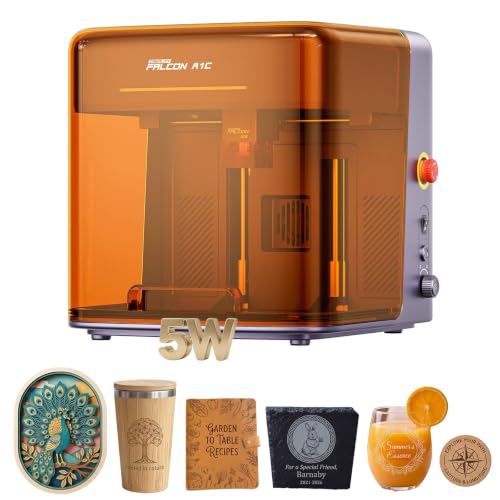
Creality Falcon A1C 5W Enclosed Engraver
Best for: Safe home studio engraving with auto focus
- Target Audience
- Beginners
- Laser Power
- 5000mW
- Engraving Speed
- 15,000 mm/min
- Safety Class
- Class 1
- Features
- Camera, Enclosure, AI Camera, Auto Focus
- Compatible Material
- Wood, Leather, Fabric
The Creality A1C 5W is a Class 1 enclosed laser engraver designed for beginners. It offers a 5000mW laser output and engraving speeds up to 15,000 mm/min. The unit includes an AI camera for auto recognition and focus. You get a safe, fully enclosed housing with flame detection. It is ideal for home studios or schools where safety and ease of use are priorities.
- Class 1 safety rating with fully enclosed housing
- AI camera enables auto recognition and focus
- Fast engraving speed of 15,000 mm/min
- Interchangeable 1.2W IR module available for metals
- 5000mW laser power is lower than many competitors
- Compact build limits work area compared to larger beds
- Requires optional IR module for metal engraving
- You need a Class 1 safe machine for home use
- You want AI-assisted auto focus and recognition
- You prioritize safety features like flame detection
- You require high power for fast deep cutting
- You need a large bed for big projects
- You want metal engraving without extra modules
Verdict: Creality A1C 5W Enclosed Laser suits beginners who prioritize safety and automated setup over raw power. It is a practical choice for small-scale personal projects in shared spaces.

Aliencell 60W X1 Laser Engraver
Best for: Large-scale batch production and offline use
- Target Audience
- Beginners
- Laser Power
- 60W
- Work Area
- 26" × 21"
- Engraving Speed
- 600mm/s
- Software Compatibility
- Aliencell Space
- Dimensions
- 35.6 × 31 × 35.6 inches
The Aliencell X1 is a 60W laser engraver designed for beginners who need a large workspace. It features a 26 by 21 inch bed and reaches 600mm per second engraving speeds. The unit includes a 6.86 inch touchscreen for offline operation, removing the need for a PC. Dual cameras assist with precision positioning. This machine suits users tackling large-scale projects or batch production with materials like wood and leather.
- 60W laser power for fast cutting
- 26 by 21 inch work area
- 600mm/s engraving speed
- 6.86 inch touchscreen for offline use
- Larger footprint than compact desktop units
- Higher power output requires careful handling
- You need to engrave large materials like full sheets of wood
- You want to operate the machine without connecting a computer
- You are a beginner seeking automated safety features
- You have limited desk space for a 31 inch long device
- You prefer a compact unit for small jewelry or detailed items
- You want to control the laser exclusively via a smartphone app
Verdict: Aliencell X1 60W Laser Engraver fits beginners who prioritize a massive 26 by 21 inch workspace and high speed over a compact footprint. It is ideal for users making large batches who want to avoid using a PC for operation.

Ophiner Pixi 10W Laser Engraver
Best for: portable tumblers and small flat gifts
- Target Audience
- Beginners
- Laser Power
- 10W
- Work Area
- 100 x 100 mm
- Software Compatibility
- AlgoOS
- Features
- Rotary Roller, Touchscreen
- Compatible Material
- Wood, Acrylic, Leather
The AlgoLaser Pixi is a 10W laser engraver designed for beginners who want a compact, all-in-one solution. It features a 100 x 100 mm work area and includes a rotary roller kit for cylindrical items. The unit runs on AlgoOS via a 3.5-inch touchscreen, removing the need for a computer. Its small footprint and pre-assembled design make it easy to move between counters and event tables.
- 10W laser power for cutting and engraving wood, acrylic, and leather
- Includes RR3 rotary roller for tumblers and cups
- 3.5-inch touchscreen with AlgoOS for direct operation without a PC
- Six height settings allow for items up to 134 mm tall
- 100 x 100 mm work area is smaller than most competitors
- 6.83 pounds weight is higher than lighter portable units
- Limited to 10W power compared to 15W or 20W models
- You need a portable unit for events or shop counters
- You want to engrave cylindrical items like tumblers
- You prefer a touchscreen interface over computer software
- You require a large work area for big projects
- You need high-speed cutting for thick materials
- You want to engrave metal directly without coatings
Verdict: The AlgoLaser Pixi 10W suits beginners who prioritize portability and cylindrical personalization over large work areas. It is ideal for sellers offering custom drinkware and small flat gifts.

AlgoLaser MK3 8W DIY Engraver
Best for: Beginners needing a large 400x400mm area
- Target Audience
- Beginners
- Laser Power
- 8W
- Laser Type
- Diode
- Work Area
- 400 x 400mm
- Engraving Speed
- 15000mm/min
- Safety Class
- Class 1
This 8W diode laser engraver offers a 400 x 400mm work area and speeds up to 15,000mm/min. It arrives 95% pre-assembled with a 3.5-inch touchscreen and AlgoOS interface. The Class 1 safety rating and emergency stop button make it suitable for beginners. You get flexible connectivity via WiFi or USB. It supports LightBurn and LaserGRBL for straightforward project management.
- 8W diode laser delivers clean lines and fine details
- 400 x 400mm large working area for batch projects
- 15,000mm/min engraving speed for efficient operation
- 3.5-inch touchscreen with intuitive AlgoOS interface
- Class 1 safety structure with emergency stop button
- 8W laser power is lower than the 10W, 15W, 20W, and 60W options on this list
- DIY kit format requires final assembly despite being 95% pre-assembled
- Smaller maximum power limits cutting depth compared to higher-wattage competitors
- You want a large 400 x 400mm work area for bigger designs
- You prefer a beginner-friendly touchscreen interface over computer-only control
- You need Class 1 safety features for home workshop use
- You require higher cutting power than 8W can provide
- You want a fully pre-assembled unit without any setup
- You need a laser with more than 10W power output
Verdict: AlgoLaser MK3 8W DIY Engraver fits beginners who need a large 400 x 400mm area and a simple touchscreen interface. It suits those who value safety features and are comfortable with minimal final assembly.

BlazeX M3 10W Enclosed Laser Engraver
Best for: Precise engraving on small to medium items
- Target Audience
- Beginners
- Laser Power
- 10W
- Safety Class
- Class 1
- Features
- Enclosure
- Compatible Material
- Wood, Metal, Leather, Glass
- Structure
- Enclosed
The BlazeX M3 is a 10W enclosed laser engraver designed for beginners. It features 0.01mm ultra-precision accuracy for detailed work on wood, leather, glass, and coated metal. The Class 1 safety rating allows for safer operation. Weighing 8 pounds, it is a compact desktop unit. This machine suits users who need precise engraving capabilities in a secure, enclosed frame.
- 10W laser power for cutting and engraving
- 0.01mm ultra-fine accuracy for high detail
- Class 1 safety rating for enclosed operation
- Compatible with wood, metal, leather, and glass
- 8-pound weight makes it less portable than lighter models
- 10W power is lower than the 15W and 20W options on this list
- Work area size is not specified in the data
- You want high precision for detailed designs
- You need a Class 1 enclosed safety rating
- You are engraving materials like coated metal or glass
- You require a large work area for big projects
- You need more than 10W of laser power
- You prefer a lighter, more portable unit
Verdict: BlazeX M3 10W Enclosed Laser Engraver is a precise, safe option for beginners focused on detail work. It fits users who prioritize accuracy and safety over raw power or large bed sizes.
Specifications side by side
| Spec | LaserPecker LP1 Plus Portable Engraver | AlgoLaser 10W Engraver with Rotary Roller | Ortur H10 10W Desktop Laser Engraver | WECREAT Vision 20W Enclosed Laser Engraver | Ophiner MK3 15W Diode Engraver | Woxcker 300x300mm 5.5W Enclosed Laser Engraver | AlgoLaser Pixi 1064nm Infrared Metal Engraver | Creality Falcon A1C 5W Enclosed Engraver | Aliencell 60W X1 Laser Engraver | Ophiner Pixi 10W Laser Engraver | AlgoLaser MK3 8W DIY Engraver | BlazeX M3 10W Enclosed Laser Engraver |
|---|---|---|---|---|---|---|---|---|---|---|---|---|
| Laser Power | – | 10W | 10W | 20W (20,000mW) | 15W | 5.5W (5500mW) | – | 5000mW | 60W | 10W | 8W | 10W |
| Laser Type | – | – | – | Diode | Diode | Semiconductor | Infrared | – | – | – | Diode | – |
| Work Area | – | – | 300×300mm | – | 400 x 400mm | 300 x 300mm | – | – | 26" × 21" | 100 x 100 mm | 400 x 400mm | – |
| Engraving Speed | – | 12,000 mm/min | 20000mm/min | 600mm/s | – | 20,000mm/min | – | 15,000 mm/min | 600mm/s | – | 15000mm/min | – |
| Spot Size | – | – | – | – | – | 0.01mm | 0.04 x 0.05 mm | – | – | – | – | – |
| Safety Class | – | Class 1 | – | Class 1 | – | Class 1 | – | Class 1 | – | – | Class 1 | Class 1 |
| Software Compatibility | – | LightBurn, LaserGRBL | – | wecreat software, LightBurn | AlgoOS | LightBurn, LaserGRBL, Cutlabx | AlgoOS, LightBurn, LaserGRBL | – | Aliencell Space | AlgoOS | LightBurn, LaserGRBL | – |
| Features | – | Rotary Roller, Touchscreen | – | Camera | – | Enclosure | Touchscreen | Camera, Enclosure, AI Camera, Auto Focus | – | Rotary Roller, Touchscreen | Touchscreen | Enclosure |
| Target Audience | Beginners | Beginners | Beginners | Beginners | Beginners | Beginners | Beginners | Beginners | Beginners | Beginners | Beginners | Beginners |
| Compatible Material | Wood, Leather, Paper | Wood, Metal, Glass | Wood, Metal, Acrylic, Aluminum | Wood, Metal, Acrylic, Leather | Wood, Metal, Acrylic, Leather | Wood, Metal, Leather, Glass | Metal | Wood, Leather, Fabric | – | Wood, Acrylic, Leather | Wood, Leather, Glass | Wood, Metal, Leather, Glass |
| Application | DIY Projects | Tumblers | DIY Projects, Small Business | DIY Projects | Small Business | – | Jewelry | DIY Projects | – | Tumblers | DIY Projects | – |
| Structure | – | – | – | – | – | Enclosed | – | Enclosed | – | – | – | Enclosed |
| Dimensions | 1 × 1 × 1 inches | 25.3 × 23.7 × 7.17 inches | 24.4 × 19.3 × 12.6 inches | 24.2 × 21 × 10 inches | 18.1 × 20.1 × 5.12 inches | 18.8 × 21.6 × 8.4 inches | 8.27 × 7.48 × 10.2 inches | 13.4 × 13.2 × 14.9 inches | 35.6 × 31 × 35.6 inches | 10.2 × 7.87 × 8.27 inches | 20.7 × 10.5 × 5.2 inches | 4.3 × 1.2 × 4.7 inches |
| Weight | – | 14.3 pounds | – | – | 7.61 pounds | 5.5 pounds | 6.61 pounds | – | 64.9 pounds | 6.83 pounds | – | 8 pounds |
| Size | LP1 Plus Deluxe | DIY KIT MK2 10W with Rotary Roller | H10 10W Fast Laser Engraver | 20W | – | 300x300mm Max 5W | – | – | 60W | – | – | 10W |
| Color | Blue | Size-2 | H10 10W Fast Laser Engraver | Basic Pack | Gray 15 | Orange | Red | 5w Laser | X1-white | Black 10w+RR3 | Grey-1 | 10w Standard |
| Model | L1PRO | Algolaser Laser Engraver | US Laser Engraving Machines 0720 A | LC2321 | DIY KIT MK3 | 5.5W | Pixi | Creality Falcon A1C 5W | X1-2418-A0 | Pixi black | DIY KIT MK3 | M3 |
You can compare diode wattage and working dimensions among the best laser engravers for beginners.
How to choose the right one
Check laser power needs
Laser power determines which materials you can process. The WECREAT Vision offers 20W, allowing you to cut thicker wood and engrave metal. The Woxcker provides 5.5W, which is sufficient for surface engraving on wood and leather. Higher wattage means faster processing but requires more safety precautions. Match the wattage to your heaviest material. If you only mark soft materials, a lower power unit saves space and cost.
Verify workspace dimensions
The build area size limits the maximum object you can engrave. The Aliencell X1 features a large 26 by 21 inch workspace, ideal for batch production. The LaserPecker LP1 Plus measures only 1 by 1 inch, restricting you to tiny items. Measure your largest project before buying. A larger bed accommodates bigger signs or multiple small items at once. Smaller beds are easier to store but limit your creative output significantly.
Assess enclosure safety
Enclosed structures contain laser light and fumes, making them safer for home use. The Woxcker and Creality Falcon A1C both feature enclosed designs to protect your eyes and lungs. Open-frame models like the AlgoLaser MK3 expose the laser beam during operation. If you share a living space, an enclosure is essential. It also reduces the need for active ventilation systems. Check the product structure description to confirm if the unit is fully contained.
Look for touchscreen controls
Touchscreen interfaces allow standalone operation without a computer. The AlgoLaser 10W and Ophiner Pixi 1064nm include touchscreens for direct input. This is useful for quick jobs or when you lack a nearby PC. Models without screens require software connection for every design. Touchscreens simplify the workflow for beginners. Verify if the interface supports file uploads directly from a USB drive for offline use.
Identify rotary capabilities
Rotary attachments enable engraving on cylindrical objects like tumblers or pens. The AlgoLaser 10W includes a rotary roller for this purpose. The Ophiner Pixi 10W also supports cylindrical personalization. If you plan to make custom drinkware, check for this feature. Standard flat beds cannot engrave curved surfaces effectively. Ensure the rotary accessory is compatible with your chosen model before purchasing.
Frequently asked questions
Which laser engraver is best for beginners who want portability?
The LaserPecker LP1 Plus is the top choice for mobility. Its compact 1 by 1 inch size allows you to take it anywhere. It works well for personalizing small wood or leather items. This makes it ideal for users who prioritize ease of use over a large workspace.
Do I need an enclosed laser engraver for home safety?
Yes, an enclosed model like the Woxcker 5.5W or Creality A1C is safer for home use. These units contain laser light and reduce exposure risks. The Woxcker offers a tidy workspace, while the Creality A1C adds an AI camera and auto-focus for automated setup in shared spaces.
What laser power is needed to engrave metal as a beginner?
You need at least 10W for reliable metal engraving. The AlgoLaser 10W and WECREAT Vision 20W handle metal effectively. The WECREAT Vision’s 20W power cuts thicker wood faster. The AlgoLaser 10W includes a rotary roller for tumblers, offering a balanced mix of power and standalone touchscreen control.
Which engraver is best for making jewelry or metal tags?
The AlgoLaser Pixi 1064nm Infrared Laser Engraver is specialized for metal jewelry. Its infrared laser provides precision on small metal gifts. The unit features a standalone touchscreen for easy operation. It is designed for beginners focusing specifically on metal personalization rather than general wood or acrylic projects.
Can I use a laser engraver without a computer connected?
Several models support offline design tools for independent operation. The Ophiner MK3 15W allows batch projects without complex computer setups. The AlgoLaser 10W and Pixi 10W units use touchscreens for direct control. These features help you create designs and start engraving without relying on a PC.
Which model offers the largest workspace for batch production?
The Aliencell X1 60W provides a massive 26 by 21 inch workspace. It is ideal for large-scale batch production. The Ophiner MK3 15W offers a 400x400mm area for multiple items at once. These large formats suit users who need to avoid manual riser adjustments and maximize output.