Best Laser Engravers Under $2500 in 2026: 15 Picks Ranked by Specs
As Amazon Associates, we earn from qualifying purchases. This means we may receive a small commission at no extra cost to you if you click through and make a purchase.
As an Amazon Associate we earn from qualifying purchases. Links on this page are affiliate links.
Choosing the best laser engravers under $2500 requires matching your material needs to specific hardware capabilities. We compared 15 models based strictly on published specifications. The xTool F1 Ultra 20W Dual Fiber and Diode Engraver leads because its dual-source design handles both metal and wood efficiently. This guide helps you decide which machine fits your workspace and production goals. You will find options for portable jewelry marking or large batch cutting. Each pick balances power, bed size, and safety features. Review the data to find the right tool for your projects.
Match laser type to your materials
You must align the laser type with your primary materials. Fiber lasers mark metal efficiently, while diode and CO2 sources cut wood and acrylic. If you need to process both, choose a dual-source model like the xTool F1 Ultra. For pure metal work, a dedicated fiber unit like the GWEIKE G2 Max offers speed. Select the source that matches your main substrate first.
| # | Product | Best for | Price |
|---|---|---|---|
| 1 | xTool F1 Ultra 20W Dual Fiber and Diode Engraver Best overall | Dual-material desktop engraving and batch work | |
| 2 | WECREAT Vision Pro 45W Enclosed Laser Engraver Best 45w | Large batch jobs and thick material cutting | |
| 3 | Aliencell X1 Lite 60W Laser Engraver Best premium | large bed batch production | |
| 4 | LaserPecker LP5 20W Dual Laser Engraver Also great | portable jewelry and metal engraving | |
| 5 | GWEIKE G2 Max 50W Fiber Engraver Also great | Portable high-speed metal marking and color engraving | |
| 6 | OMTech 30W Fiber Laser Engraver Also great | Small metal marking and jewelry engraving | |
| 7 | Creality Falcon T1 20W Enclosed Fiber Laser Also great | fast metal marking in enclosed spaces | |
| 8 | Creality Falcon T1 20W Diode Best budget | fast small-batch galvo engraving | |
| 9 | Aliencell 60W X1 Laser Engraver Best beginners | Beginners needing large format engraving | |
| 10 | Monport 30W Raycus Fiber Laser Engraver Also great | Small metal marking and jewelry engraving | |
| 11 | OMTech 60W CO2 Laser Engraver Also great | Large nonmetallic projects needing a spacious bed | |
| 12 | OMTech 50W Fiber Laser Engraver with Rotary Axis Also great | small metal marking and jewelry engraving | |
| 13 | Monport 60W Fiber Laser with Rotary Also great | fast, precise marking on small metal items | |
| 14 | OMTech 60W CO2 28×20 Also great | Large nonmetallic projects and deep engraving | |
| 15 | Oabduz 5W UV Laser Engraver Best 5w | small precision marking on glass and metal |
The best fit for you
- You need dual-source engraving for metal and wood – xTool F1 Ultra 20W Dual Fiber and Diode Engraver – The xTool F1 Ultra combines a 20W fiber laser with a diode laser for versatile material handling.
- You require a large bed for batch production – Aliencell X1 Lite 60W Laser Engraver – The Aliencell X1 Lite 60W offers a spacious workspace and LightBurn support for efficient large-format work.
- You prioritize portability for on-site jewelry marking – GWEIKE G2 Max 50W Fiber Engraver – The GWEIKE G2 Max 50W features a detachable design for precise metal marking away from a fixed workstation.

xTool F1 Ultra 20W Dual Fiber and Diode Engraver
Best for: Dual-material desktop engraving and batch work
- Laser Power
- 20W (20,000mW)
- Laser Type
- Fiber & Diode
- Work Area
- 220mm x 220mm
- Engraving Speed
- 10,000mm/s
- Safety Class
- Class 4
- Features
- Camera
The xTool F1 Ultra combines a 20W fiber laser and a 20W diode laser in one enclosed unit. It reaches engraving speeds of 10,000mm/s and offers a 220mm x 220mm working area. The 16MP camera and auto streamline features support batch processing. This dual-laser system handles metals and wood, making it a versatile desktop solution for detailed engraving and light cutting tasks.
- 20W fiber laser for metal engraving
- 20W diode laser for wood and acrylic
- 10,000mm/s maximum engraving speed
- 16MP camera with auto streamline
- 220mm x 220mm working area
- 20W power is lower than 60W competitors
- 220mm x 220mm area is smaller than 16×24 inch beds
- 43.9 pound weight adds bulk to desktop setups
- You need to engrave both metals and wood
- You require high-speed batch production capabilities
- You want a fully enclosed safety design
- You need to cut thick wood over 15mm
- You require a bed larger than 220mm wide
- You prefer a single laser type only
Verdict: The xTool F1 Ultra 20W Dual Laser fits users who need a compact, dual-source machine for fast metal and wood engraving. Its enclosed design and camera system support efficient desktop workflows.

WECREAT Vision Pro 45W Enclosed Laser Engraver
Best for: Large batch jobs and thick material cutting
- Laser Power
- 45W (45000mW)
- Laser Type
- Diode
- Work Area
- 22.83" x 15.75"
- Engraving Speed
- 600mm/s
- Spot Size
- 0.08mm
- Safety Class
- Class 1
The WECREAT Vision Pro 45W delivers 45W diode laser power with BeamFocus Tech for deep cutting. It features a large 22.83" x 15.75" work area and a 0.08mm spot size for precise engraving. The Class 1 enclosed structure ensures safety, while the auto-lifting system handles materials up to 140mm thick. This machine suits users needing high capacity and safety certification.
- 45W laser power output with BeamFocus technology
- Large 22.83" x 15.75" work area
- Class 1 safety certification with enclosed metal structure
- Auto-lifting system accommodates materials up to 140mm
- HD camera for precise positioning
- 45W power is lower than the 60W options on this list
- 77.2-pound weight makes it bulkier than lighter competitors
- 2W IR module is sold separately, not included
- You need a Class 1 enclosed machine for safe home or workshop use
- You require a large bed for batch processing or big projects
- You want to engrave thick materials without riser bases
- You need the highest 60W cutting speed available
- You prefer a lighter, more portable desktop unit
- You want the IR module included in the base price
Verdict: The WECREAT Vision Pro 45W Laser Engraver fits users who prioritize safety and large workspace over maximum raw power. Its enclosed design and auto-lifting bed make it ideal for thick materials and busy environments.

Aliencell X1 Lite 60W Laser Engraver
Best for: large bed batch production
- Laser Power
- 60W
- Work Area
- 26" × 21"
- Engraving Speed
- 600mm/s
- Safety Class
- Class 1
- Software Compatibility
- Lightburn, Aliencell Space
- Features
- Air Assist, LightBurn Support
The Aliencell X1 Lite is a Class 1 laser engraver with a 60W output and a 26" x 21" work area. It reaches engraving speeds of 600mm/s and includes LightBurn compatibility. This machine suits users who need a large bed for batch production or large-scale projects. The 65-pound build ensures stability during high-speed operations.
- 60W laser power for fast cutting
- 26" x 21" large work area
- 600mm/s engraving speed
- LightBurn software compatibility
- Class 1 safety rating
- 65-pound weight requires sturdy support
- 31-inch width takes up significant floor space
- 600mm/s speed is lower than some 20W competitors
- You need a large bed for big projects
- You want LightBurn software support
- You require a Class 1 enclosed machine
- You have limited floor space
- You prefer a lightweight portable unit
- You need speeds above 600mm/s
Verdict: The Aliencell X1 Lite 60W Large Laser Engraver fits users who need a large bed for big projects and want LightBurn software support. It is a stable choice for batch production but not for tight spaces.

LaserPecker LP5 20W Dual Laser Engraver
Best for: portable jewelry and metal engraving
- Laser Power
- 20W
- Laser Type
- Fiber & Diode
- Engraving Speed
- 10,000 mm/s
- Compatible Material
- Wood, Metal
- Application
- Jewelry
- Dimensions
- 7.8 × 11.3 × 14.4 inches
The LaserPecker LP5 is a portable dual-laser engraver combining 20W fiber and diode modules. It reaches 10,000 mm/s with 0.0027mm precision. This unit weighs 6.02kg, making it half the weight of similar 12kg machines. It handles metals like gold and non-metals like wood. The system includes 3D grayscale capabilities for detailed relief art.
- 20W dual fiber and diode laser system
- 10,000 mm/s engraving speed
- 0.0027mm high precision
- 6.02kg ultra-portable weight
- 3D grayscale function for depth control
- 20W laser power is lower than the 60W options on this list
- Smaller working area compared to 16×24 inch beds
- Heavier than some single-module portable units
- You need a lightweight machine for mobile services
- You require high precision for jewelry engraving
- You want to cut thick wood and thin metals
- You need to engrave large format materials
- You require higher than 20W cutting power
- You prefer a stationary industrial setup
Verdict: The LaserPecker LP5 20W Dual Laser suits makers who prioritize portability and fine detail work over raw cutting power. It is ideal for jewelry creators and mobile engravers who need a compact, dual-module tool.

GWEIKE G2 Max 50W Fiber Engraver
Best for: Portable high-speed metal marking and color engraving
- Laser Power
- 50W
- Laser Type
- Fiber
- Work Area
- 150*150mm
- Engraving Speed
- 15000 mm/s
- Safety Class
- Class 4
- Software Compatibility
- GLaser, LightBurn
The GWEIKE G2 Max is a portable 50W fiber laser engraver with a 150x150mm work area. It reaches speeds of 15000 mm/s and supports color engraving on metals like titanium. The detachable design allows handheld use, while electric lift focus simplifies setup. It fits users who need high-speed metal marking and deep engraving capabilities in a compact, mobile form factor.
- 50W fiber laser power for deep engraving and metal cutting
- High engraving speed of up to 15000 mm/s
- Supports 90+ color engraving on stainless steel and titanium
- Electric lift column for automated focus adjustment
- Compatible with LightBurn and GLaser software
- 150x150mm work area is smaller than many stationary competitors
- Class 4 safety rating requires strict protective measures
- Portable design may sacrifice stability compared to fixed beds
- You need high-speed marking on metals like titanium or steel
- You require a portable unit that can be used handheld
- You want electric focus adjustment to save setup time
- You primarily engrave non-metal materials like wood or acrylic
- You need a large work area larger than 150x150mm
- You prefer a Class 1 enclosed machine for safer operation
Verdict: The GWEIKE G2 Max 50W Fiber Engraver suits professionals who need rapid, precise metal marking and color engraving on the go. Its portable, detachable design makes it ideal for on-site jobs where a fixed bed is impractical.

OMTech 30W Fiber Laser Engraver
Best for: Small metal marking and jewelry engraving
- Laser Power
- 30W
- Laser Type
- Fiber
- Work Area
- 6.9×6.9 in. (175×175 mm)
- Engraving Speed
- Up to 10,000 mm/s
- Safety Class
- Class 2
- Software Compatibility
- EzCad2, LightBurn
The OMTech 30W fiber laser engraver targets metal and aluminum marking with a 6.9×6.9 inch work area. It reaches engraving speeds up to 10,000 mm/s using a galvanometric system. The unit supports LightBurn and EzCad2 software. You get a compact footprint suitable for jewelry or small part identification. This Class 2 machine includes protective eyewear and a red dot pointer for precise alignment.
- 30W fiber laser source for durable metal etching
- High-speed engraving up to 10,000 mm/s
- LightBurn and EzCad2 software compatibility
- Compact 6.9×6.9 inch work area
- Includes protective eyewear and red dot pointer
- Smaller 6.9×6.9 inch work area compared to larger CO2 models on this list
- Lower 30W power output limits cutting thickness versus 50W or 60W options
- Class 2 safety rating requires careful handling unlike enclosed Class 1 units
- You need precise marking on metals like jewelry or aluminum
- You require fast engraving speeds for small batch production
- You prefer LightBurn software compatibility for workflow integration
- You need to cut thick wood or acrylic materials
- You require a large work area for big projects
- You want an enclosed Class 1 safety system
Verdict: The OMTech 30W Fiber Laser Engraver fits users focused on small, high-speed metal marking tasks. Its compact design and software support make it ideal for jewelry makers or small business owners needing precise identification marks.

Creality Falcon T1 20W Enclosed Fiber Laser
Best for: fast metal marking in enclosed spaces
- Laser Power
- 20W
- Laser Type
- Fiber
- Engraving Speed
- Up to 10,000 mm/s
- Safety Class
- Class 1
- Software Compatibility
- Falcon Design Space, LightBurn
- Compatible Material
- Aluminum
The Creality Falcon T1 is a Class 1 enclosed fiber laser engraver with 20W power. It reaches engraving speeds up to 10,000 mm/s for fast production runs. You can swap laser modules in 15 seconds without tools, though this specific unit includes only the 20W fiber module. It supports LightBurn and Falcon Design Space software. This machine suits users who need industrial marking precision on metals in a safe, enclosed workspace.
- 20W fiber laser power for metal marking
- Engraving speeds up to 10,000 mm/s
- Class 1 enclosed safety system
- 15-second tool-free module swapping
- Compatible with LightBurn software
- 20W fiber power is lower than the 30W and 60W fiber options on this list
- Includes only one laser module, requiring extra purchases for other types
- Physical footprint of 25.2 x 27.2 x 27.2 inches requires dedicated bench space
- You need fast, high-precision marking on metals like stainless steel or aluminum
- You require a Class 1 enclosed laser for safe office or studio use
- You want to upgrade to diode or UV modules later without buying a new machine
- You need a single machine that cuts thick wood or acrylic without buying additional modules
- You prefer a larger bed size for engraving bigger items like signage or packaging
- You want to start with multiple laser types included in the base price
Verdict: The Creality Falcon T1 20W Fiber is a versatile platform for metal marking. It fits professionals who prioritize speed and safety over raw cutting power.

Creality Falcon T1 20W Diode
Best for: fast small-batch galvo engraving
- Laser Power
- 20W
- Laser Type
- Diode
- Engraving Speed
- Up to 10,000 mm/s
- Safety Class
- Class 1
- Software Compatibility
- Falcon Design Space
- Features
- Enclosure
The Creality Falcon T1 is a Class 1 enclosed galvo laser engraver with a 20W diode module. It reaches engraving speeds up to 10,000 mm/s, making it fast for small batches. The system supports quick-swap modules for future upgrades. It uses AI auto-focus and includes flame detection for safety. This machine suits users who need speed and modularity in a compact footprint.
- Galvo system achieves engraving speeds up to 10,000 mm/s
- Class 1 safety rating with enclosed design
- 15-second quick-swap modular design for future upgrades
- AI visual auto-focus system for precise setup
- Active flame detection and multi-layer safety protection
- 20W laser power is lower than many 30W or 60W competitors
- 54.3-pound weight is heavier than lighter desktop alternatives
- Requires the Falcon Design Space app for mobile control
- You need high-speed galvo engraving for small items
- You want a Class 1 enclosed machine for safer operation
- You plan to upgrade laser modules over time
- You require cutting thick materials with high power
- You prefer gantry-style engraving for large beds
- You want to use third-party software like LightBurn
Verdict: Creality Falcon T1 20W Diode is a fast, modular galvo engraver for users prioritizing speed and safety in a compact, enclosed unit. It fits small-batch producers who value quick module swaps over raw cutting power.

Aliencell 60W X1 Laser Engraver
Best for: Beginners needing large format engraving
- Laser Power
- 60W
- Work Area
- 26" × 21"
- Engraving Speed
- 600mm/s
- Software Compatibility
- Aliencell Space
- Target Audience
- Beginners
- Dimensions
- 31 × 8.4 × 35.6 inches
The Aliencell X1 is a 60W laser engraver and cutter with a 26 x 21 inch bed. It reaches 600mm/s engraving speed with 20,000mm/s² acceleration. The unit features a 6.86-inch touchscreen and dual 8MP cameras for AI positioning. It runs on Aliencell Space software and includes a Linux-based OS for offline operation. This machine targets beginners with automatic parameter suggestions and safety certifications.
- 60W laser power for fast cutting
- Large 26 x 21 inch work area
- Dual 8MP cameras for precise positioning
- 6.86-inch standalone touchscreen display
- Aliencell Space software limits third-party compatibility
- 600mm/s speed is slower than 20kHZ frequency options
- 60W power is lower than 60W CO2 alternatives
- You need a large 26 x 21 inch bed for big projects
- You prefer standalone operation without a PC
- You want AI-assisted precision with dual cameras
- You require LightBurn or third-party software support
- You need a smaller footprint for tight spaces
- You prioritize maximum speed over large bed size
Verdict: Aliencell X1 60W Laser Engraver fits beginners who want a large 26 x 21 inch bed and standalone touchscreen control. It suits users who value AI precision and safety features over third-party software flexibility.

Monport 30W Raycus Fiber Laser Engraver
Best for: Small metal marking and jewelry engraving
- Laser Power
- 30W
- Laser Type
- Fiber
- Work Area
- 5.9" x 5.9"
- Engraving Speed
- 10,000 mm/s
- Software Compatibility
- LightBurn
- Features
- Rotary Roller, LightBurn Support
The Monport YX1060 is a 30W fiber laser engraver with a 5.9" x 5.9" work area. It reaches engraving speeds of 10,000 mm/s and supports LightBurn software. The unit features a Raycus laser source with a 100,000-hour estimated lifetime. It includes manual focus controls and an external red dot locator. This machine suits users needing fast metal marking in a compact footprint.
- 30W Raycus fiber laser source for safe metal marking
- High engraving speed of 10,000 mm/s
- LightBurn software compatibility for precise control
- Built-in workspace grid with removable positioning bars
- 5.9" x 5.9" work area is smaller than many competitors
- 10,000 mm/s speed is lower than 20,000 mm/s options
- Requires manual focus adjustment via height wheel
- You primarily engrave small metal items like jewelry or tags
- You need a dedicated fiber laser for stainless steel or brass
- You prefer manual focus controls for precise depth setting
- You require a large bed for engraving full-size sheets
- You need automated focus to speed up workflow
- You want to engrave wood or acrylic with a fiber laser
Verdict: Monport 30W Fiber Laser 5.9" x 5.9" fits users who need a compact, fast fiber laser for small metal parts. It trades bed size for speed and precision in a small workspace. This model is ideal for detailed marking rather than large surface engraving.
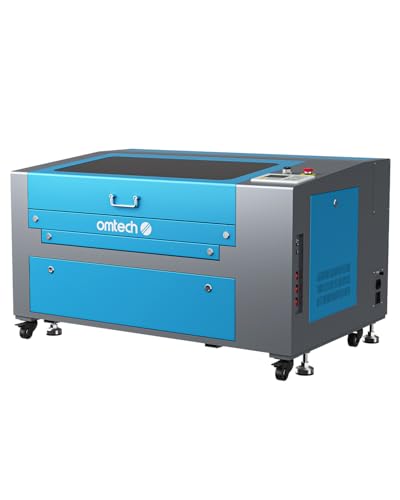
OMTech 60W CO2 Laser Engraver
Best for: Large nonmetallic projects needing a spacious bed
- Laser Power
- 60W
- Laser Type
- CO2
- Work Area
- 16"x24" (400×600 mm)
- Safety Class
- Class 2
- Software Compatibility
- RDWorks
- Features
- Air Assist
The OMTech 60W CO2 laser engraver features a 16×24 inch work area and two-way pass-through doors for large projects. It delivers 60W of power for deep engraving on nonmetallic materials like wood and acrylic. The machine includes air assist and safety interlocks. It suits users needing a spacious bed for bigger items.
- 60W CO2 laser power for deep engraving
- 16×24 inch honeycomb and aluminum blade beds
- Two-way pass-through doors for large items
- Built-in air assist removes smoke and dust
- Cover interlock cuts laser beam if opened
- 187 pounds weight is heavier than many compact units
- Limited to Class 2 safety rating
- Works with RDWorks software only
- You need a large 16×24 inch bed for big projects
- You engrave nonmetallic materials like wood or acrylic
- You want two-way pass-through doors for long items
- You require fiber laser marking for metals
- You need LightBurn software compatibility
- You prefer a lighter, portable machine
Verdict: OMTech 60W CO2 Laser Engraver fits users who prioritize a large 16×24 inch bed and two-way pass-through doors for handling big projects on wood or acrylic.

OMTech 50W Fiber Laser Engraver with Rotary Axis
Best for: small metal marking and jewelry engraving
- Laser Power
- 50W
- Laser Type
- Fiber
- Work Area
- 5.9" x 5.9"
- Engraving Speed
- 10000 mm/s
- Spot Size
- 0.01 mm
- Safety Class
- Class 2
The OMTech 50W Fiber Laser Marking Machine offers a 5.9 by 5.9 inch work area with a 0.01 mm spot size. It reaches engraving speeds up to 10000 mm/s and includes a rotary axis for cylindrical items. This Class 2 device supports LightBurn and EzCad2 software. It suits users needing precise metal marking and jewelry engraving within a compact footprint.
- 50W fiber laser power for metal marking
- 0.01 mm spot size for high precision
- 10000 mm/s maximum engraving speed
- Includes rotary axis for cylindrical objects
- Compatible with LightBurn and EzCad2 software
- 5.9 by 5.9 inch work area is smaller than the 16 by 24 inch beds found on other list items
- 50W power is lower than the 60W fiber options available elsewhere in this guide
- You need precise marking on small metal items like jewelry
- You require a rotary axis for cylindrical engraving tasks
- You prefer a compact machine with a 5.9 by 5.9 inch bed
- You need to engrave large sheets of material
- You want the highest available fiber laser power
- You require a Class 1 enclosed safety system
Verdict: The OMTech 50W Fiber Laser 5.9×5.9" fits professionals marking small metal parts who value precision and rotary capabilities over large bed sizes. Its compact design suits dedicated workstations rather than general-purpose cutting.

Monport 60W Fiber Laser with Rotary
Best for: fast, precise marking on small metal items
- Laser Power
- 60W
- Laser Type
- Fiber
- Work Area
- 150*150mm
- Engraving Speed
- 10000mm/s
- Safety Class
- Class 1, Class 5
- Software Compatibility
- LightBurn
This Monport fiber laser engraver delivers 60W of power in a compact 5.9 x 5.9 inch work area. It reaches marking speeds up to 10000mm/s with 0.01mm accuracy. The unit includes a D70 rotary axis and supports LightBurn software. It is designed for mild metal marking rather than deep engraving or cutting. You get a stable Class 1 and Class 5 laser system with a 100,000-hour lifespan.
- 60W fiber laser power output
- 10000mm/s maximum marking speed
- 0.01mm marking accuracy
- Includes D70 rotary axis
- LightBurn software compatibility
- Limited to mild metal marking without deep engraving
- 5.9 x 5.9 inch work area is smaller than many competitors
- Does not cut metal sheets
- You need high-speed marking on small metal parts
- You require a compact fiber laser for detailed work
- You want LightBurn support with included rotary axis
- You need to cut metal sheets
- You require deep engraving capabilities
- You need a larger work area than 5.9 x 5.9 inches
Verdict: Monport 60W Fiber Laser Engraver suits professionals who need fast, precise marking on small metal items. It fits users who prioritize speed and accuracy over large format capacity or deep cutting.
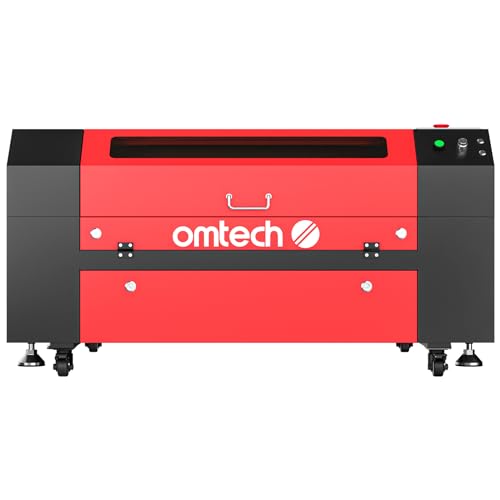
OMTech 60W CO2 28×20
Best for: Large nonmetallic projects and deep engraving
- Laser Power
- 60W
- Laser Type
- CO2
- Work Area
- 20"x28" (500×700 mm)
- Engraving Speed
- 23.6 ips (600 mm/s)
- Safety Class
- Class 2
- Features
- Air Assist
The OMTech 60W CO2 laser engraver offers a large 20×28 inch work area for substantial projects. It reaches speeds of 23.6 ips and engraves up to 0.4 inches deep. The motorized autolift bed simplifies focus adjustments. This machine suits users needing a spacious, high-power CO2 system for wood and leather.
- 60W CO2 laser power
- 20×28 inch work area
- Motorized autolift workbed
- Engraves up to 0.4 inches deep
- Speeds up to 23.6 ips
- Heavy at 223 pounds
- Class 2 safety rating
- Limited to nonmetallic materials
- You need a large 20×28 inch workspace
- You frequently engrave deep into wood or leather
- You prefer motorized bed adjustments
- You require metal engraving capabilities
- You need a portable, lightweight machine
- You prefer a Class 1 enclosed system
Verdict: OMTech 60W CO2 28×20 is a robust stationary engraver for makers who prioritize a large bed and deep cutting power on nonmetals. It fits workshops where weight is not a constraint.

Oabduz 5W UV Laser Engraver
Best for: small precision marking on glass and metal
- Laser Power
- 5W
- Work Area
- 200 x 200 mm (7.87" x 7.87")
- Safety Class
- Class 2
- Software Compatibility
- EzCad lite, LightBurn
- Laser Type
- UV Laser
- Compatible Material
- Wood, Metal, Glass, Plastic
The Oabduz 5W UV Laser Engraver uses a 355nm wavelength to mark glass, metal, and plastic. It features a 200 x 200 mm work area and includes water cooling for heat management. This Class 2 device supports EzCad lite and LightBurn software. It suits hobbyists needing precision on sensitive materials like jewelry or glass.
- 5W UV laser with 355nm wavelength
- 200 x 200 mm marking area
- Water cooling system
- LightBurn compatible
- 5W power is lower than the 20W to 60W options on this list
- 200 x 200 mm work area is smaller than the 16×24 inch beds on other models
- You need to engrave glass or delicate plastics
- You want LightBurn software support
- You require water cooling for stability
- You need to cut thick wood
- You want a large bed for big projects
- You prefer higher speed fiber lasers
Verdict: The Oabduz 5W UV Laser Engraver fits users who need precise marking on glass or metal rather than fast cutting. It is a specialized tool for small, detailed DIY projects.
Specifications side by side
| Spec | xTool F1 Ultra 20W Dual Fiber and Diode Engraver | WECREAT Vision Pro 45W Enclosed Laser Engraver | Aliencell X1 Lite 60W Laser Engraver | LaserPecker LP5 20W Dual Laser Engraver | GWEIKE G2 Max 50W Fiber Engraver | OMTech 30W Fiber Laser Engraver | Creality Falcon T1 20W Enclosed Fiber Laser | Creality Falcon T1 20W Diode | Aliencell 60W X1 Laser Engraver | Monport 30W Raycus Fiber Laser Engraver | OMTech 60W CO2 Laser Engraver | OMTech 50W Fiber Laser Engraver with Rotary Axis | Monport 60W Fiber Laser with Rotary | OMTech 60W CO2 28×20 | Oabduz 5W UV Laser Engraver |
|---|---|---|---|---|---|---|---|---|---|---|---|---|---|---|---|
| Laser Power | 20W (20,000mW) | 45W (45000mW) | 60W | 20W | 50W | 30W | 20W | 20W | 60W | 30W | 60W | 50W | 60W | 60W | 5W |
| Laser Type | Fiber & Diode | Diode | – | Fiber & Diode | Fiber | Fiber | Fiber | Diode | – | Fiber | CO2 | Fiber | Fiber | CO2 | – |
| Work Area | 220mm x 220mm | 22.83" x 15.75" | 26" × 21" | – | 150*150mm | 6.9×6.9 in. (175×175 mm) | – | – | 26" × 21" | 5.9" x 5.9" | 16"x24" (400×600 mm) | 5.9" x 5.9" | 150*150mm | 20"x28" (500×700 mm) | 200 x 200 mm (7.87" x 7.87") |
| Engraving Speed | 10,000mm/s | 600mm/s | 600mm/s | 10,000 mm/s | 15000 mm/s | Up to 10,000 mm/s | Up to 10,000 mm/s | Up to 10,000 mm/s | 600mm/s | 10,000 mm/s | – | 10000 mm/s | 10000mm/s | 23.6 ips (600 mm/s) | – |
| Spot Size | – | 0.08mm | – | – | – | – | – | – | – | – | – | 0.01 mm | – | – | – |
| Safety Class | Class 4 | Class 1 | Class 1 | – | Class 4 | Class 2 | Class 1 | Class 1 | – | – | Class 2 | Class 2 | Class 1, Class 5 | Class 2 | Class 2 |
| Software Compatibility | – | – | Lightburn, Aliencell Space | – | GLaser, LightBurn | EzCad2, LightBurn | Falcon Design Space, LightBurn | Falcon Design Space | Aliencell Space | LightBurn | RDWorks | LightBurn, EzCad2 | LightBurn | – | EzCad lite, LightBurn |
| Features | Camera | Camera, Enclosure, Rotary Roller | Air Assist, LightBurn Support | – | – | LightBurn Support | – | Enclosure | – | Rotary Roller, LightBurn Support | Air Assist | Rotary Roller, LightBurn Support | Rotary Roller, LightBurn Support | Air Assist | – |
| Target Audience | – | – | – | – | – | – | – | – | Beginners | – | – | – | – | – | – |
| Compatible Material | Wood, Metal | Wood, Metal, Acrylic | Wood, Metal, Leather | Wood, Metal | – | Metal, Aluminum | Aluminum | Wood, Acrylic, Leather | – | Metal | Wood, Acrylic, Glass | Metal, Aluminum | Metal | Wood, Leather, Glass | Wood, Metal, Glass, Plastic |
| Application | Jewelry | Tumblers | – | Jewelry | – | Jewelry | Jewelry | – | – | – | – | Jewelry | – | – | DIY Projects, Jewelry |
| Structure | – | Enclosed | – | – | – | – | – | Enclosed | – | – | – | – | – | – | – |
| Dimensions | 18 × 17 × 24 inches | 31.5 × 25.6 × 16.1 inches | 35.6 × 31 × 8.4 inches | 7.8 × 11.3 × 14.4 inches | 17.2 × 10.1 × 21.2 inches | 30.5 × 17.7 × 31.1 inches | 27.2 × 25.2 × 27.2 inches | 12.3 × 19.8 × 18.3 inches | 31 × 8.4 × 35.6 inches | 27.6 × 19.7 × 11.8 inches | 44.9 × 30.7 × 25.4 inches | – | – | 48.8 × 34.3 × 26.4 inches | 23.6 × 16.1 × 15.7 inches |
| Weight | 43.9 pounds | 77.2 pounds | 65 pounds | – | – | – | – | 54.3 pounds | – | – | 187 pounds | – | – | 223 pounds | – |
| Size | xTool F1 Ultra Standalone | 45W | 60W | LP5 Basic | – | 30W | – | – | 60W | – | MF 60W | Galvo 50W with Rotary Axis | 60W+D70 Rotary | 60W with 20"x28" | – |
| Model | MXF-K002-B20 | LC2450 | XL-2418-A0 | LaserPecker 5 | GWEIKE G2 Pro/Max | LYF-30W | Falcon T1 | Falcon T1 | X1-2418-A0 | YX1060 | RYGEL-USB0604US | – | YXF30 | – | UV Laser |
| Color | – | Rotary Pack | X1 Lite-white | LP5 Basic Bundle | G2 Max 50W (150*150) | Galvo Basic | T1 Fiber 20W | diode 20W | X1-white | 30w+lb+d80 | MF 60W | – | Grey | Black, Red | 5W UV |
You can evaluate hardware specifications directly in this side-by-side breakdown of the best laser engravers under 2500.
Key Specs for Choosing a Laser Engraver
Match Laser Type to Material
Your primary material determines the necessary laser technology. Fiber lasers, like those in the xTool F1 Ultra or GWEIKE G2 Max, are designed specifically for marking metals such as jewelry components. Diode lasers, found in the Creality Falcon T1 Diode, work best on organic materials like wood and leather. CO2 lasers, seen in the OMTech 60W models, are ideal for cutting acrylic and thick wood. Select the source that aligns with your most frequent projects to avoid inefficient processing or inadequate results on hard surfaces.
Evaluate Bed Size for Projects
Bed dimensions dictate the maximum size of your single-piece projects. The OMTech 60W CO2 Laser Engraver offers a large 28×20 inch area suitable for big wooden signs. Conversely, the Monport 30W Raycus provides a compact 5.9 x 5.9 inch workspace, which is better for small metal tags. If you frequently create large items, prioritize models with wider working areas. For small, detailed parts, a smaller footprint saves desk space and reduces the machine's overall weight for easier relocation.
Check Safety Enclosures
Enclosed designs provide essential safety barriers during operation. The WECREAT Vision Pro 45W and Creality Falcon T1 Diode both feature fully enclosed structures that contain laser light and fumes. This is crucial for home offices or shared workspaces where eye protection and air quality matter. Open-frame machines require strict adherence to safety protocols. If you plan to use the engraver in a busy environment or without constant supervision, an enclosed unit offers better protection and peace of mind.
Consider Portability Needs
Portability matters if you need to move your equipment frequently. The LaserPecker LP5 and GWEIKE G2 Max are compact and lightweight, designed for on-site jobs or travel. The GWEIKE G2 Max weighs significantly less than the heavy OMTech 60W CO2, which weighs 223 pounds. If you attend craft fairs or work at client locations, choose a detachable or small-footprint model. Stationary units are better for dedicated workshops where mobility is not a priority.
Review Software Compatibility
Software support affects your workflow efficiency. Many fiber models, including the OMTech 30W and Monport 60W, support LightBurn, a popular third-party program for advanced design control. The Aliencell X1 Lite also offers this compatibility. If you prefer dedicated touchscreen controls, the Aliencell X1 provides a standalone interface. Ensure your preferred design software works seamlessly with the machine to avoid file conversion issues and streamline your production process.
Frequently asked questions
Which laser engraver is best for jewelry making?
The xTool F1 Ultra 20W Dual Fiber and Diode Engraver is ideal for jewelry. It features a 20W fiber laser specifically for metal engraving. The LaserPecker LP5 20W Dual Laser Engraver also suits portable jewelry work. The OMTech 30W Fiber Laser Engraver provides high-speed marking for small metal parts. These models prioritize precision over large cutting areas.
Can I engrave metal with a diode laser engraver?
Standard diode lasers cannot effectively mark bare metal. You need a fiber laser or a dual-source machine. The xTool F1 Ultra 20W combines a fiber laser for metal with a diode laser for wood. The Creality Falcon T1 20W Diode is designed for wood and acrylic only. Fiber lasers, like the GWEIKE G2 Max 50W, are required for efficient metal marking.
Which laser engraver has the largest work area?
The OMTech 60W CO2 Laser Engraver offers the largest workspace at 28×20 inches. The OMTech 60W CO2 28×20 also provides a 28×20 inch bed. The Aliencell X1 Lite 60W Laser Engraver features a large bed suitable for batch production. These models are designed for handling big projects on wood or acrylic rather than small detail work.
Is a rotary roller necessary for engraving tumblers?
A rotary roller is essential for engraving cylindrical items like tumblers. The WECREAT Vision Pro 45W Enclosed Laser Engraver includes a rotary roller for this purpose. The Monport 30W Raycus Fiber Laser Engraver also supports rotary applications. The OMTech 50W Fiber Laser Engraver with Rotary Axis allows for precise marking on round surfaces.
Which laser engraver is best for beginners?
The Aliencell 60W X1 Laser Engraver is designed for beginners. It features a large 26 x 21 inch bed and standalone touchscreen control. It prioritizes AI precision and safety features for new users. The Creality Falcon T1 20W Diode is also compact and enclosed, making it safe for small-batch producers who value quick module swaps.
Which laser engraver is most portable?
The GWEIKE G2 Max 50W Fiber Engraver is designed for portability. Its detachable design allows for on-site jobs where a fixed bed is impractical. The LaserPecker LP5 20W Dual Laser Engraver is also highly portable. It suits mobile engravers who need a compact, dual-module tool for fine detail work on the go.
Does the xTool F1 Ultra support LightBurn software?
The data does not confirm LightBurn support for the xTool F1 Ultra. However, the Aliencell X1 Lite 60W Laser Engraver explicitly supports LightBurn software. The OMTech 30W Fiber Laser Engraver also offers LightBurn compatibility. The Monport 30W Raycus Fiber Laser Engraver includes LightBurn support for versatile design control.