Best FDM 3d Printers: 15 Spec-Based Picks
As Amazon Associates, we earn from qualifying purchases. This means we may receive a small commission at no extra cost to you if you click through and make a purchase.
As an Amazon Associate we earn from qualifying purchases. Links on this page are affiliate links.
Finding the best FDM 3d printers requires comparing hard specs, not just marketing claims. We evaluated 15 models based on the specifications published on their listings. The Bambu Lab P1S Enclosed 3D Printer leads this list because its enclosed structure protects beginners when printing ABS or ASA safely. This guide helps you decide which machine fits your workspace and material needs. You will see how build volume, speed, and features like CoreXY structures impact your daily use. We focus on practical data to help you choose a printer that matches your specific requirements.
Match Enclosure and Speed to Your Materials
You need an enclosed frame to print engineering plastics like ABS safely. The Bambu Lab P1S offers this protection. If you prioritize speed over material versatility, choose a CoreXY model like the P2S. It reaches 600 mm/s. Avoid open frames for volatile materials. Select your machine based on whether you need thermal stability or rapid output.
| # | Product | Best for | Price |
|---|---|---|---|
| 1 | Bambu Lab P1S Enclosed 3D Printer Best overall | beginners printing ABS or ASA safely | |
| 2 | Bambu Lab P2S High-Speed FDM Printer Also great | High-speed single-color printing and engineering materials | |
| 3 | Bambu Lab A1 FDM 3D Printer Best budget | Beginners needing small, precise prints | |
| 4 | Anycubic Kobra X Multicolor 3D Printer Best camera | high-speed multi-color printing | |
| 5 | Flashforge Creator 5 4-Toolhead 3D Printer Best premium | multi-color printing with minimal waste | |
| 6 | Flashforge High-Speed Multi-Color 3D Printer Also great | fast multi-color prints in a compact size | |
| 7 | Flashforge Multi-Color Core XY 3D Printer Also great | Compact multi-color desktop printing | |
| 8 | Anycubic Kobra X Multicolor 3D Printer Also great | Compact multi-color production | |
| 9 | Creality K2 SE 4-Color Printer Best 500 mm/s | compact 4-color high-speed printing | |
| 10 | ANYCUBIC Kobra X Multicolor 3D Printer Also great | Beginners wanting easy multi-color FDM printing | |
| 11 | Anycubic Kobra S1 ACE 2 Pro Combo Also great | Enclosed multicolor FDM printing | |
| 12 | Original Prusa CORE One+ Enclosed CoreXY Also great | Engineering materials and reliable enclosed printing | |
| 13 | Anycubic Kobra S1 Max Combo 3D Printer Also great | Large multi-color engineering prints | |
| 14 | Original Prusa MK4S 3D Printer Also great | Reliable desktop production and prototyping | |
| 15 | Anycubic Kobra S1 Multicolor FDM Printer Also great | Compact multicolor printing with material protection |
The best fit for you
- You need to print ABS or ASA safely – Bambu Lab P1S Enclosed 3D Printer – The enclosed structure protects you from fumes while printing engineering materials.
- You want the most compact budget model – Bambu Lab A1 FDM 3D Printer – It weighs just 22 pounds and offers automated calibration for small projects.
- You want to monitor prints with a camera – Anycubic Kobra X Multicolor 3D Printer – The AI camera feature lets you watch high-speed multi-color prints remotely.
- You want multi-color printing with minimal waste – Flashforge Creator 5 4-Toolhead 3D Printer – The 4-toolhead design eliminates purging waste while maintaining precise color separation.
Is FDM Worth It for Your Needs?
FDM technology uses heated nozzles to lay down thermoplastic filament layer by layer. This method supports a wide range of materials, including engineering plastics like ABS that require enclosed frames for safety. Many models in this list offer high speeds up to 600 mm/s and multi-color capabilities through CoreXY structures or advanced toolheads. You get durable, functional parts suitable for prototyping or daily use.
Worth it if
- You need to print durable functional parts
- You want to use engineering materials like ABS
- You require multi-color output for detailed models
Skip it if
- You need ultra-high resolution for miniatures
- You only print with flexible materials
- You prefer resin-based surface finishes

Bambu Lab P1S Enclosed 3D Printer
Best for: beginners printing ABS or ASA safely
- Printing Technology
- FDM
- Max Print Speed
- 500mm/s
- Multicolor Capacity
- Up to 16 colors
- Enclosure Type
- Fully enclosed
- Bed Leveling
- Automatic
- Features
- Enclosure, CoreXY Structure
The Bambu Lab P1S is a ready-to-use FDM printer built for beginners who want reliable results. It features a fully enclosed CoreXY structure and automatic bed leveling. You get a print speed of 500mm/s with 20000 mm/s² acceleration. The system supports up to 16 colors when paired with the AMS. It is ideal for PLA, PETG, TPU, ABS, and ASA filaments.
- Fully enclosed design for advanced filament printing
- 500mm/s max print speed with high acceleration
- Automatic bed leveling for easy setup
- Supports up to 16 colors with AMS
- Heavier build at 39 pounds compared to open-frame peers
- Smaller standard build volume than large-format competitors
- Carbon fiber reinforced polymers are not recommended
- You want a fully enclosed printer for ABS or ASA
- You need automatic bed leveling for hassle-free use
- You plan to use multi-color printing with AMS
- You need a large build volume over 250mm
- You want to print carbon fiber reinforced materials
- You prefer an open-frame design for ventilation
Verdict: Bambu Lab P1S Enclosed FDM Printer suits users who prioritize enclosed safety and speed over raw build size. It is a practical choice for beginners printing engineering materials.

Bambu Lab P2S High-Speed FDM Printer
Best for: High-speed single-color printing and engineering materials
- Printing Technology
- FDM
- Max Print Speed
- 600 mm/s
- Bed Leveling
- Automatic calibration
- Features
- CoreXY Structure
- Target Audience
- Beginners
- Dimensions
- 18 × 21 × 18 inches
The Bambu Lab P2S is a ready-to-use FDM printer designed for beginners. It uses a CoreXY structure to reach speeds of 600 mm/s while maintaining precision. The unit features automatic calibration and a smart airflow system that adapts to different filaments. It measures 21 by 18 by 18 inches. This machine suits users who want high-speed printing with minimal setup time.
- CoreXY structure supports 600 mm/s print speeds
- Automatic calibration enables quick setup
- Smart airflow system balances cooling and heat retention
- Includes AI failure detection for print safety
- Print volume is smaller than the 350 mm options available on the list
- Standard P2S model does not include multi-color printing capability
- You want high-speed printing with a CoreXY mechanism
- You prefer automatic calibration to simplify setup
- You need a reliable machine for engineering-grade materials
- You require native multi-color printing without extra hardware
- You need a build volume larger than 250 mm
- You prefer manual bed leveling over automatic systems
Verdict: Bambu Lab P2S 600mm/s FDM Printer offers high-speed precision and smart airflow for beginners who prioritize speed and ease of use over multi-color capabilities.

Bambu Lab A1 FDM 3D Printer
Best for: Beginners needing small, precise prints
- Printing Technology
- FDM
- Bed Leveling
- Automatic
- Target Audience
- Beginners, Kids
- Dimensions
- 21.8 × 20.8 × 12.9 inches
- Weight
- 22 pounds
The Bambu Lab A1 is a ready-to-use FDM printer designed for beginners and kids. It features a build volume of 180x180x180 mm and reaches speeds of 500 mm/s with 10,000 mm/s² acceleration. Automatic bed leveling and active flow rate compensation ensure consistent results. The unit weighs 22 pounds and includes a 1-Clip quick swap nozzle system for easy maintenance.
- 10,000 mm/s² acceleration for high-speed printing
- Automatic bed leveling for hassle-free setup
- Active flow rate compensation for smooth surfaces
- 1-Clip quick swap nozzle for versatile options
- 180 mm build volume is smaller than many competitors
- 22 pounds weight is heavier than some desktop units
- 500 mm/s print speed is lower than high-end models
- You need automatic calibration for a beginner-friendly experience
- You want high acceleration for fast prototype iteration
- You prefer a compact footprint for small workspaces
- You require large format prints over 180 mm
- You need native multi-color printing without extra accessories
- You prioritize the absolute highest possible print speeds
Verdict: The Bambu Lab A1 FDM Printer offers reliable automated calibration and high acceleration for small, precise projects. It is an ideal fit for beginners who value ease of use over large build capacity.

Anycubic Kobra X Multicolor 3D Printer
Best for: high-speed multi-color printing
- Printing Technology
- FDM
- Build Volume
- 260 x 260 x 260 mm
- Max Print Speed
- 600 mm/s
- Multicolor Capacity
- 4-color (expandable to 19 colors)
- Bed Leveling
- LeviQ 3.0 (Automatic)
- Connectivity
- Dual-band Wi-Fi (2.4G/5G), LAN
The Anycubic Kobra X is an FDM printer with a 260 x 260 x 260 mm build volume. It reaches a max speed of 600 mm/s and supports native 4-color printing. The system includes an AI camera for monitoring. You get dual-band Wi-Fi and LAN connectivity. LeviQ 3.0 provides automatic bed leveling. This setup suits beginners who want multi-color output.
- 600 mm/s max print speed
- Native 4-color multi-material printing
- 260 x 260 x 260 mm build volume
- AI camera with spaghetti detection
- LeviQ 3.0 automatic bed leveling
- 20.9 pounds weight is heavier than many competitors
- 260 mm build volume is smaller than the 350 mm options available
- 4-color capacity is lower than 5-color systems on the list
- You need native multi-color printing without external modules
- You want high-speed output up to 600 mm/s
- You prefer automatic bed leveling with AI monitoring
- You require a build volume larger than 260 mm
- You need more than 4 colors without adding extra units
- You prefer a lighter machine under 15 pounds
Verdict: Anycubic Kobra X 260mm 4-Color delivers high-speed multi-color printing with AI monitoring. It fits users who prioritize color variety and speed over maximum build size.

Flashforge Creator 5 4-Toolhead 3D Printer
Best for: multi-color printing with minimal waste
- Printing Technology
- FDM
- Max Print Speed
- 600mm/s
- Multicolor Capacity
- 4 independent toolheads
- Printing Speed
- 600 mm/s
- Features
- Multi-Color Printing, CoreXY Structure
- Dimensions
- 16 × 14 × 18 inches
The FLASHFORGE Creator 5 uses a CoreXY frame and four independent toolheads for multi-color printing. It reaches speeds up to 600mm/s with automatic calibration. This setup prevents color mixing and reduces filament waste significantly. It supports various materials including PLA, PETG, and TPU. You get clean support removal and consistent output. This printer suits users who want fast, high-quality multi-material jobs without complex purging.
- Four independent toolheads prevent color mixing
- 7-second tool swaps with preheating
- Up to 80% less filament waste
- 600mm/s max print speed
- CoreXY motion system for stability
- Smaller build volume compared to larger format printers on the list
- Heavier and bulkier footprint at 30.8 pounds
- Limited to 4 colors per print job
- You need true multi-color prints without purging
- You want fast CoreXY speeds up to 600mm/s
- You print with multiple material types like TPU and PLA
- You require a build volume larger than 250x250x250 mm
- You prefer a lighter, more compact desktop footprint
- You only print single-color objects and do not need multi-toolhead capability
Verdict: The FLASHFORGE Creator 5 4-Toolhead FDM Printer is ideal for makers who prioritize multi-material versatility and high speed. It fits those who want to eliminate purging waste while maintaining precise color separation.
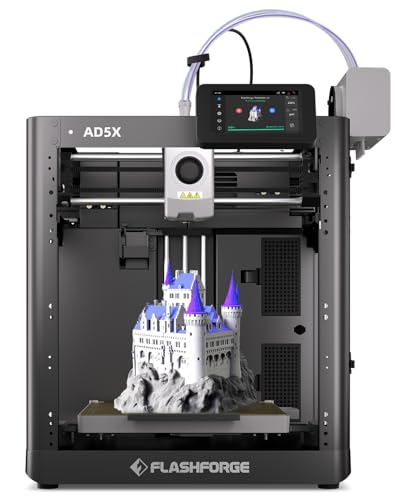
Flashforge High-Speed Multi-Color 3D Printer
Best for: fast multi-color prints in a compact size
- Printing Technology
- FDM
- Build Volume
- 220 * 220 * 220mm
- Max Print Speed
- 600mm/s
- Bed Leveling
- Fully automatic
- Printing Speed
- 600 mm/s
- Features
- Auto Leveling, Multi-Color Printing
The Flashforge AD5X is an FDM 3D printer featuring Intelligent Filament Switching for multi-color output. It reaches speeds up to 600mm/s and supports nozzles up to 300°C. The build volume measures 220 x 220 x 220mm. Fully automatic bed leveling simplifies setup. This machine suits users who want fast, vibrant prints without manual calibration.
- Multi-color printing with Intelligent Filament Switching
- High-speed printing up to 600mm/s
- Nozzle temperature reaches 300°C
- Fully automatic bed leveling system
- 220mm build volume is smaller than larger competitors
- 23.8 pounds weight adds bulk compared to lighter units
- You want multi-color prints without complex setup
- You need fast print speeds for quick projects
- You prefer automatic bed leveling for consistent results
- You require a build volume larger than 220mm
- You need a printer under 20 pounds
- You only print single-color parts
Verdict: Flashforge AD5X Multi-Color FDM Printer offers high-speed multi-color capability with a compact 220mm cube. It fits users who value speed and color variety over large format printing.

Flashforge Multi-Color Core XY 3D Printer
Best for: Compact multi-color desktop printing
- Printing Technology
- FDM
- Build Volume
- 220 * 220 * 220mm
- Max Print Speed
- 600mm/s
- Multicolor Capacity
- 4 Colors
- Bed Leveling
- Fully Auto Leveling
- Printing Speed
- 600 mm/s
The Flashforge AD5X is a Core XY FDM printer with a 220 x 220 x 220 mm build volume. It supports native 4-color printing and reaches speeds up to 600 mm/s. The unit includes fully auto leveling and an Intelligent Filament System for seamless material management. Its all-metal frame provides stability for precise output. This model suits users who need reliable multi-color results in a compact desktop footprint.
- 600 mm/s maximum print speed
- Native 4-color multi-color printing
- Fully auto leveling system
- Core XY structure for stability
- Intelligent Filament System for auto refills
- 220 mm build volume is smaller than larger competitors
- 24.3 lb weight adds bulk to the footprint
- 4-color limit restricts palette compared to 5+ color systems
- You need native multi-color printing without complex setups
- You want a stable Core XY machine for detailed models
- You prefer auto leveling to reduce manual calibration time
- You require a build volume larger than 220 mm
- You need more than 4 simultaneous colors
- You prioritize the absolute fastest acceleration speeds available
Verdict: Flashforge AD5X 220mm 4-Color FDM delivers reliable multi-color output with a stable Core XY frame. It fits users who value automated leveling and a manageable desktop size over massive build areas.

Anycubic Kobra X Multicolor 3D Printer
Best for: Compact multi-color production
- Printing Technology
- FDM
- Build Volume
- 260 x 260 x 260 mm
- Max Print Speed
- 600 mm/s
- Multicolor Capacity
- 4-color (expandable to 19-color)
- Bed Leveling
- LeviQ 3.0 (Automatic)
- Features
- Auto Leveling
The Anycubic Kobra X is an FDM 3D printer with a 260 x 260 x 260 mm build volume. It supports native 4-color printing and reaches speeds up to 600 mm/s. LeviQ 3.0 provides automatic bed leveling. The top-mount design keeps the footprint small. This unit suits users who need fast, multi-color output in a compact space.
- Native 4-color multicolor capability
- Maximum print speed of 600 mm/s
- LeviQ 3.0 automatic bed leveling
- 260 x 260 x 260 mm build volume
- 260 mm build volume is smaller than many large-format competitors
- Standard 4-color capacity limits complexity compared to 19-color expansions
- 20.9 pound weight adds bulk to desktop setups
- You need native 4-color printing for detailed models
- You require high-speed output for quick turnarounds
- You have limited desk space for a large printer
- You require a build volume larger than 260 mm
- You need more than 4 colors without adding extra hardware
- You prefer a lighter machine for easy relocation
Verdict: Anycubic Kobra X 260mm 4-Color delivers high-speed multi-color printing in a compact form. It fits users who prioritize speed and color variety over maximum build size.

Creality K2 SE 4-Color Printer
Best for: compact 4-color high-speed printing
- Printing Technology
- FDM
- Build Volume
- 220×215×245mm
- Max Print Speed
- 500mm/s
- Multicolor Capacity
- 4-color
- Bed Leveling
- Auto Leveling
- Connectivity
- USB
The Creality K2 SE 4C is an FDM printer built for speed and color. It uses a CoreXY motion system to reach 500mm/s with 20,000mm/s² acceleration. You get native 4-color printing without extra setup. The build volume is 220x215x245mm. Auto bed leveling and smart sensors help protect your prints. It fits beginners who want fast, multi-color results in a compact space.
- CoreXY system reaches 500mm/s print speed
- Native 4-color multicolor printing capability
- Intelligent auto bed leveling for active area
- Smart protection features like power loss recovery
- Compact design saves 37% space vs traditional systems
- 220x215x245mm build volume is smaller than many competitors
- USB connectivity only, lacking wireless options
- 500mm/s speed is lower than the 1000mm/s+ speeds seen in other list items
- You want native 4-color printing without complex assembly
- You need high-speed CoreXY performance for quick prototypes
- You have limited desk space for a large printer
- You require wireless connectivity like Wi-Fi or Bluetooth
- You need a build volume larger than 220mm in any dimension
- You prioritize the absolute highest print speeds available
Verdict: The Creality K2 SE 4C 500mm/s CoreXY suits users who value speed and color in a compact footprint. It is ideal for hobbyists and educators who want reliable multi-color output without managing complex extruder setups.

ANYCUBIC Kobra X Multicolor 3D Printer
Best for: Beginners wanting easy multi-color FDM printing
- Printing Technology
- FDM
- Build Volume
- 260 x 260 x 260 mm
- Max Print Speed
- 600 mm/s
- Multicolor Capacity
- 4-color (expandable to 19 colors)
- Bed Leveling
- LeviQ 3.0 (Automatic)
- Features
- Multi-Color Printing
The Anycubic Kobra X is an FDM 3D printer designed for beginners who want speed and color. It reaches 600 mm/s print speeds and includes automatic LeviQ 3.0 bed leveling for a perfect first layer. The standard 4-color system expands to 19 colors with the ACE 2 Pro. It features a 260 x 260 x 260 mm build volume and supports materials up to 300°C. This model offers a quiet operation under 48 dB and AI monitoring for peace of mind.
- 600 mm/s maximum print speed for fast output
- LeviQ 3.0 automatic 49-point bed leveling
- Native 4-color printing with 19-color expansion
- 260 x 260 x 260 mm build volume
- ≤48 dB quiet operation for home use
- 260 mm build volume is smaller than the 350 mm options available on the list
- 600 mm/s speed is lower than the 500 mm/s+ claims of some competitors
- 20.9 pound weight is heavier than lighter desktop alternatives
- You want native multi-color printing without complex setup
- You need a quiet printer for a home office
- You prefer automatic bed leveling for consistent first layers
- You require a build volume larger than 260 mm
- You need the absolute highest speed available in this guide
- You prefer a lighter, more compact desktop footprint
Verdict: The Anycubic Kobra X FDM Printer suits beginners who value color versatility and automated setup over maximum build size. It delivers reliable multi-color prints with a speed that balances quality and efficiency.

Anycubic Kobra S1 ACE 2 Pro Combo
Best for: Enclosed multicolor FDM printing
- Printing Technology
- FDM
- Max Print Speed
- 600 mm/s
- Multicolor Capacity
- 4 colors, expandable to 16
- Enclosure Type
- Fully enclosed
- Bed Leveling
- LeviQ 3.0 auto leveling
- Features
- Multi-Color Printing, Enclosure
The Anycubic Kobra S1 ACE 2 Pro Combo is a fully enclosed FDM printer using CoreXY kinematics. It supports native 4-color printing via the ACE 2 Pro system, expandable to 16 colors. You get speeds up to 600 mm/s and a 320°C hotend for broad material compatibility. The system includes smart filament management and print-while-drying capabilities. This setup suits users needing multicolor output in a secure, enclosed environment.
- CoreXY structure enables speeds up to 600 mm/s
- Fully enclosed design for safety and temperature stability
- Native 4-color printing with ACE 2 Pro expansion to 16 colors
- 320°C quick-release hotend supports PLA, PETG, ABS, and ASA
- Print-while-drying technology maintains filament quality at 65°C
- Heavier build at 39.7 pounds compared to lighter desktop options
- Larger footprint with a height of 19.3 inches
- ACE Pro and ACE 2 Pro units cannot be used simultaneously
- You want native multicolor printing without external modification
- You need an enclosed printer for ABS or ASA materials
- You value high-speed CoreXY motion for detailed parts
- You require a single-color printer to save space
- You prefer a lighter, more compact desktop footprint
- You do not need multi-material capabilities
Verdict: The Anycubic Kobra S1 ACE 2 Pro Combo fits users who need reliable, high-speed multicolor printing in a fully enclosed space. It is ideal for those prioritizing material versatility and automated filament management over minimal physical footprint.

Original Prusa CORE One+ Enclosed CoreXY
Best for: Engineering materials and reliable enclosed printing
- Printing Technology
- FDM
- Build Volume
- 9.8 × 8.6 × 10.6 in (250 × 220 × 270 mm)
- Enclosure Type
- Fully enclosed, active-heated
- Bed Leveling
- Automatic calibration
- Features
- Enclosure, CoreXY Structure
- Dimensions
- 16.3 × 17.5 × 28.1 inches
The Original Prusa CORE One+ is a fully enclosed FDM printer with a CoreXY motion system. It features a 250 × 220 × 270 mm build volume and an active-heated chamber for stable material handling. This model supports high-speed printing and includes automatic bed leveling. You get a ready-to-print machine with lifetime technical assistance. It suits users needing reliable, enclosed printing for engineering materials.
- CoreXY motion system for fast, precise printing
- Fully enclosed design with active-heated chamber
- 250 × 220 × 270 mm build volume
- Automatic bed leveling for easy setup
- Lifetime technical assistance included
- Build volume is smaller than the 350 mm options on this list
- Weighs 56.9 pounds, making it heavier than many desktop units
- Standard 250 mm width is narrower than the 350 mm models available
- You need an enclosed chamber for printing ASA or Nylon
- You want a fully assembled machine with lifetime support
- You prefer CoreXY speed and precision for prototyping
- You require a build volume larger than 250 mm
- You are looking for a multi-color printing system
- You need a lightweight unit for easy transport
Verdict: Prusa CORE One+ Enclosed CoreXY Printer delivers professional-grade reliability and enclosed printing capabilities. It fits users who prioritize material stability and long-term support over maximum build size.

Anycubic Kobra S1 Max Combo 3D Printer
Best for: Large multi-color engineering prints
- Printing Technology
- FDM
- Build Volume
- 350x350x350mm³
- Max Print Speed
- 600mm/s
- Multicolor Capacity
- 4-color to 16-color
- Enclosure Type
- Fully enclosed, 65°C heated chamber
- Bed Leveling
- LeviQ 3.0 auto-leveling
The Anycubic Kobra S1 Max Combo is a large-format FDM printer with a 350x350x350mm³ build volume. It uses a fully enclosed CoreXY structure and reaches speeds up to 600 mm/s. The ACE 2 Pro system supports native 4-color printing, expandable to 16 colors. The 65°C heated chamber and 350°C hotend handle engineering materials like ABS and ASA. This machine suits makers who need big prints and multi-color detail.
- 350x350x350mm³ build volume for large single-piece models
- CoreXY structure with 600 mm/s max print speed
- Fully enclosed design with 65°C heated chamber
- Native 4-color printing with ACE 2 Pro
- 600 mm/s speed is slower than the 500 mm/s+ speeds on some competitors like the Creality K2 SE 4C
- 350x350x350mm³ build volume is smaller than the 350x350x350mm³ volume found on the FLASHFORGE Creator 5
- You need to print large objects in one piece without slicing them
- You require multi-color prints for complex or vibrant models
- You print with engineering filaments like ABS or ASA that benefit from a heated chamber
- You only print small parts and do not need a large build volume
- You prefer a more compact footprint for limited workspace
- You do not need multi-color capabilities
Verdict: The Anycubic Kobra S1 Max Combo fits makers who need a large, enclosed machine for engineering materials and multi-color projects. Its CoreXY speed and expandable color system make it a strong option for detailed, large-scale work.

Original Prusa MK4S 3D Printer
Best for: Reliable desktop production and prototyping
- Printing Technology
- FDM
- Build Volume
- 9.84 x 8.3 x 8.6 in
- Dimensions
- 19.6 × 15.7 × 21.6 inches
- Weight
- 15.4 pounds
The Original Prusa MK4S is a fully assembled FDM desktop printer with a 9.84 x 8.3 x 8.6 inch build volume. It uses input shaping to reduce ringing and improve surface quality at higher speeds. The system is open-source and upgradeable, supporting long-term firmware updates. It includes a 1 kg PLA spool and offers lifetime technical assistance. This machine suits workshops needing reliable, professional-grade output for functional parts.
- Fully assembled for immediate use
- Input shaping reduces ringing and vibrations
- Open-source and upgradeable ecosystem
- Includes 1 kg Prusament PLA spool
- Smaller build volume than many competitors
- Heavier and bulkier physical footprint
- Single-color native printing capability
- You need a reliable desktop printer for workshops
- You want an open-source upgradeable system
- You value lifetime technical assistance
- You require multi-color printing
- You need a large format build volume
- You prefer a compact footprint
Verdict: Prusa MK4S High-Speed FDM Printer delivers consistent professional output for functional parts and detailed prototypes. It fits users who prioritize reliability and open-source support over large build volumes or multi-color capabilities.

Anycubic Kobra S1 Multicolor FDM Printer
Best for: Compact multicolor printing with material protection
- Printing Technology
- FDM
- Build Volume
- 250×250×250 mm³
- Max Print Speed
- 600mm/s
- Multicolor Capacity
- 4 colors, expandable to 16
- Enclosure Type
- Fully enclosed
- Features
- Multi-Color Printing, Enclosure, CoreXY Structure
This enclosed CoreXY FDM printer offers a 250x250x250 mm build volume and speeds up to 600 mm/s. It includes an ACE 2 Pro system for 4-color printing, expandable to 16 colors. The unit features a fully enclosed design with integrated 65°C dehumidification. It targets beginners who want multicolor capability in a quiet, 44dB environment without complex setup.
- CoreXY structure for high-speed printing at 600 mm/s
- Fully enclosed design with 65°C active drying
- Native 4-color printing with expansion to 16 colors
- Quiet operation at 44 dB using brushless motors
- 250 mm build volume is smaller than the 350 mm options on this list
- 39.7 lb weight makes it bulkier than many desktop alternatives
- Maximum print speed of 600 mm/s trails the 500 mm/s+ claims of some competitors
- You want native multicolor printing without complex assembly
- You need a fully enclosed printer for ABS or ASA materials
- You prefer quiet operation in a home or office setting
- You require a build volume larger than 250 mm
- You need a printer that is lighter than 30 lbs
- You are looking for the absolute highest print speeds available
Verdict: Anycubic Kobra S1 ACE 2 Pro delivers reliable multicolor printing in a compact, quiet enclosure. It suits beginners who prioritize material protection and color variety over maximum build size.
Specifications side by side
| Spec | Bambu Lab P1S Enclosed 3D Printer | Bambu Lab P2S High-Speed FDM Printer | Bambu Lab A1 FDM 3D Printer | Anycubic Kobra X Multicolor 3D Printer | Flashforge Creator 5 4-Toolhead 3D Printer | Flashforge High-Speed Multi-Color 3D Printer | Flashforge Multi-Color Core XY 3D Printer | Anycubic Kobra X Multicolor 3D Printer | Creality K2 SE 4-Color Printer | ANYCUBIC Kobra X Multicolor 3D Printer | Anycubic Kobra S1 ACE 2 Pro Combo | Original Prusa CORE One+ Enclosed CoreXY | Anycubic Kobra S1 Max Combo 3D Printer | Original Prusa MK4S 3D Printer | Anycubic Kobra S1 Multicolor FDM Printer |
|---|---|---|---|---|---|---|---|---|---|---|---|---|---|---|---|
| Build Volume | – | – | – | 260 x 260 x 260 mm | – | 220 * 220 * 220mm | 220 * 220 * 220mm | 260 x 260 x 260 mm | 220×215×245mm | 260 x 260 x 260 mm | – | 9.8 × 8.6 × 10.6 in (250 × 220 × 270 mm) | 350x350x350mm³ | 9.84 x 8.3 x 8.6 in | 250×250×250 mm³ |
| Max Print Speed | 500mm/s | 600 mm/s | – | 600 mm/s | 600mm/s | 600mm/s | 600mm/s | 600 mm/s | 500mm/s | 600 mm/s | 600 mm/s | – | 600mm/s | – | 600mm/s |
| Printing Technology | FDM, CoreXY | FDM, CoreXY | FDM | FDM | FDM, CoreXY | FDM | FDM, Core XY | FDM | CoreXY, FDM | FDM | FDM, CoreXY | CoreXY, FDM | FDM, CoreXY | FDM | FDM, CoreXY |
| Multicolor Capacity | Up to 16 colors | – | – | 4-color (expandable to 19 colors) | 4 independent toolheads | – | 4 Colors | 4-color (expandable to 19-color) | 4-color | 4-color (expandable to 19 colors) | 4 colors, expandable to 16 | – | 4-color to 16-color | – | 4 colors, expandable to 16 |
| Enclosure Type | Fully enclosed | – | – | – | – | – | – | – | – | – | Fully enclosed | Fully enclosed, active-heated | Fully enclosed, 65°C heated chamber | – | Fully enclosed |
| Bed Leveling | Automatic | Automatic calibration | Automatic | LeviQ 3.0 (Automatic) | – | Fully automatic | Fully Auto Leveling | LeviQ 3.0 (Automatic) | Auto Leveling | LeviQ 3.0 (Automatic) | LeviQ 3.0 auto leveling | Automatic calibration | LeviQ 3.0 auto-leveling | – | – |
| Connectivity | – | – | – | Dual-band Wi-Fi (2.4G/5G), LAN | – | – | – | – | USB | – | – | – | – | – | – |
| Printing Speed | – | 600 mm/s | – | 600 mm/s | 600 mm/s | 600 mm/s | 600 mm/s | 600 mm/s | 500 mm/s | 600 mm/s | – | – | 600 mm/s | – | – |
| Features | Enclosure, CoreXY Structure | CoreXY Structure | – | Camera, Multi-Color Printing, AI Camera | Multi-Color Printing, CoreXY Structure | Auto Leveling, Multi-Color Printing | Auto Leveling, Multi-Color Printing | Auto Leveling | Auto Leveling, Multi-Color Printing | Multi-Color Printing | Multi-Color Printing, Enclosure | Enclosure, CoreXY Structure | Enclosure, CoreXY Structure | – | Multi-Color Printing, Enclosure, CoreXY Structure |
| Target Audience | Beginners | Beginners | Beginners, Kids | Beginners | – | – | – | – | Beginners, Kids | Beginners | Beginners, Kids | – | – | – | Beginners |
| Structure | Enclosed | – | – | – | – | – | – | – | – | – | Enclosed | Enclosed | Enclosed | – | Enclosed |
| Dimensions | 15.3 × 18 × 15.3 inches | 18 × 21 × 18 inches | 21.8 × 20.8 × 12.9 inches | 23 × 13 × 22 inches | 16 × 14 × 18 inches | 14.3 × 14.8 × 16.3 inches | 14.3 × 16.3 × 14.8 inches | 17.9 × 17.5 × 18.2 inches | 14.5 × 14.5 × 19 inches | 17.9 × 17.5 × 18.2 inches | 15.8 × 16.1 × 19.3 inches | 16.3 × 17.5 × 28.1 inches | 21 × 23 × 19 inches | 19.6 × 15.7 × 21.6 inches | 15.8 × 16.1 × 19.3 inches |
| Weight | 39 pounds | – | 22 pounds | 20.9 pounds | 30.8 pounds | 23.8 pounds | 24.3 pounds | 20.9 pounds | – | 20.9 pounds | 39.7 pounds | 54 pounds | – | 15.4 pounds | 39.7 pounds |
| Size | P1S (Without AMS) | P2S | A1 | – | – | – | – | – | – | – | ANYCUBIC Kobra S1 ACE 2 Pro Combo 3D Printer | – | – | – | – |
| Color | Black | Grey | Grey | Grey | – | black | black | Grey | Black | Grey | Black | Orange | – | Black Orange | Black |
| Model | P1S | PF004-U-AU | PF002-A | – | Creator 5 | AD5X | AD5X | – | – | – | – | Original Prusa CORE One+ | – | MK4S-COM-PEI | – |
You can compare build volume and extrusion temperature specs across the ranked list of best FDM 3d printers.
How We Selected These FDM Printers
We identified FDM printers by checking Amazon listings for the printing technology in the title or feature list. We only included one size or variant from each product family to keep the list clear. All details come from the published specifications and feature lists. We did not handle or test any of these machines physically. You can trust that every spec here matches the official listing data. We ordered the products by availability first. Then we used the listing's overall rating weighted by count. Finally, we ranked them by how many of our criteria the specs meet.
How to Choose Your FDM Printer
Check for an Enclosure
You must verify if the printer has an enclosed frame if you plan to use engineering plastics like ABS or ASA. These materials require stable, elevated temperatures to prevent warping and to contain fumes safely. The Bambu Lab P1S Enclosed 3D Printer features this protective structure, making it suitable for beginners handling these specific filaments. Open-frame models lack this thermal consistency and safety barrier, so you should only choose them if you stick to standard PLA or PETG materials that do not need such controlled environments.
Evaluate Printing Speed
Look at the maximum travel speed listed in the specifications to understand how quickly the printer can produce parts. Many modern CoreXY models, such as the Bambu Lab P2S, reach 600 mm/s. This high speed significantly reduces print times for functional prototypes or simple objects without necessarily sacrificing layer adhesion. If you prioritize rapid production over raw size, a high-speed machine like the P2S offers better efficiency. However, you should ensure your material and cooling settings can keep up with these faster movements to maintain consistent quality.
Consider Multi-Color Systems
Determine if you need single-color precision or multi-color versatility. Several models on this list support multi-color printing, such as the Anycubic Kobra X and the Flashforge Creator 5. These systems allow you to print complex objects with multiple materials or colors in a single job. The Flashforge Creator 5 uses a four-toolhead design to minimize waste. If you only need one color, a single-extruder model like the Prusa MK4S is often simpler and more reliable for standard production tasks.
Assess Build Volume
Compare the physical dimensions of the printer to ensure it fits your workspace and can handle your desired object sizes. The Bambu Lab P1S measures 18 inches in width, providing a substantial build area for medium-sized projects. In contrast, the Anycubic Kobra S1 ACE 2 Pro Combo is more compact at 16.1 inches wide. You should measure your available desk space carefully before purchasing. Larger frames require more room and often weigh more, while smaller units like the Prusa MK4S offer a lighter footprint for tight spaces.
Review Target Audience
Check the manufacturer's stated target audience to gauge the expected learning curve and setup complexity. Many models, including the Bambu Lab A1 and the Creality K2 SE, are explicitly designed for beginners and kids. These printers often include automated calibration features that reduce the need for manual adjustments. If you are new to 3D printing, selecting a machine labeled for beginners ensures you get a device with user-friendly setup processes. This focus on ease of use helps you achieve successful prints sooner without extensive technical troubleshooting.
Frequently asked questions
Which FDM printer is best for beginners printing ABS?
The Bambu Lab P1S Enclosed 3D Printer is the top choice for beginners who need to print ABS or ASA safely. Its enclosed structure contains fumes and maintains stable temperatures. This setup allows new users to handle engineering materials without the risks associated with open-frame machines.
How fast can these FDM printers print?
Many high-speed models in this list reach 600 mm/s. The Bambu Lab P2S, Anycubic Kobra X, and Flashforge Creator 5 all offer this speed. This CoreXY structure allows for rapid movement while maintaining precision, which helps you complete projects faster without sacrificing detail.
Do I need an enclosure for engineering materials?
Yes, an enclosed frame is essential for printing ABS or ASA. The Bambu Lab P1S and Anycubic Kobra S1 ACE 2 Pro Combo both feature full enclosures. These structures trap heat to prevent warping and protect you from potentially harmful fumes during the printing process.
Which printer offers the best multi-color capability?
The Flashforge Creator 5 is ideal for multi-color printing with minimal waste. It uses a 4-toolhead system to eliminate purging waste while keeping color separation precise. The Anycubic Kobra X also delivers high-speed multi-color output, making it a strong option for vibrant, complex projects.
What is the smallest budget FDM printer?
The Bambu Lab A1 is the best budget option for small, precise prints. It weighs just 22 pounds and features automated calibration. This compact size makes it easy to place on a desk, while its reliability suits beginners who value ease of use over large build capacity.
Can I use these printers for educational purposes?
Several models are explicitly targeted at beginners and kids. The Bambu Lab A1 and Creality K2 SE 4-Color Printer both list these audiences. Their automated features and reliable output make them suitable for classrooms, allowing educators to manage multi-color projects without complex extruder setups.
Which printer has the largest build volume?
The Anycubic Kobra S1 Max Combo offers a large build area for engineering prints. It features a CoreXY speed system and an expandable color system. This machine is designed for detailed, large-scale work, making it a strong option when you need more space than standard desktop printers provide.