Best 5W Laser Engravers: 15 Spec-Based Picks
As Amazon Associates, we earn from qualifying purchases. This means we may receive a small commission at no extra cost to you if you click through and make a purchase.
As an Amazon Associate we earn from qualifying purchases. Links on this page are affiliate links.
Finding the best 5W laser engravers requires looking past marketing claims and focusing on hard data. We compared 15 models based strictly on the specifications published on their listings. The xTool F2 15W Diode & 5W IR Laser Engraver leads this list because it features both diode and infrared lasers for metal marking. This dual-laser setup allows you to process items like coasters efficiently while ensuring safety in an enclosed workspace. You need to decide if you prioritize a large 400 x 400mm bed, a compact footprint for home use, or specialized UV precision for glass. Use these spec-based picks to choose the right machine for your specific material needs and workspace constraints.
Match laser type to your materials
You must select the correct laser source for your target materials. Diode and infrared lasers handle wood, leather, and metal marking. UV lasers are required for clean, char-free engraving on glass and acrylic. Check the Laser Type and Compatible Material fields in the specifications to ensure the machine works with your specific projects before buying.
| # | Product | Best for | Price |
|---|---|---|---|
| 1 | xTool F2 15W Diode & 5W IR Laser Engraver Best overall | fast commercial metal marking and batch processing | |
| 2 | Carverall A1 Pro 5W Enclosed Laser Engraver Best paper | small, precise home crafting projects | |
| 3 | AlgoLaser Pixi 5W with Touchscreen Best budget | beginners needing standalone, safe engraving | |
| 4 | Woxcker Enclosed 5.5W Laser Engraver Also great | safety-focused users needing speed | |
| 5 | Longer Ray5 5W with Rotary and Air Assist Also great | Large projects and cylindrical engraving | |
| 6 | xTool F2 Ultra 5W UV Laser Engraver Best premium | precision glass and acrylic engraving | |
| 7 | Woxcker 300x300mm 5.5W Enclosed Laser Engraver Also great | Beginners seeking safety and precision | |
| 8 | Creality Falcon A1C 5W Enclosed Engraver Also great | small detailed engravings and safe indoor use | |
| 9 | Longer Ray5 5W Laser Engraver Bundle Best air assist | large format engraving with air assist | |
| 10 | ATOMSTACK P1 Dual 5W Diode & IR Also great | Small metal marking and safe desktop use | |
| 11 | SCULPFUN S9 5.5W Diode Laser Engraver Best jewelry | detailed jewelry and wood engraving | |
| 12 | Creality Falcon T1 5W UV Also great | Fine glass and acrylic engraving | |
| 13 | Creality Falcon A1C 5W Enclosed Engraver Best fabric | safe fabric and wood engraving | |
| 14 | Creality Falcon T1 5W UV Modular Engraver Also great | fine engraving on glass and acrylic | |
| 15 | BlazeX 5W Enclosed Laser Engraver Also great | Beginners needing a safe, enclosed starter kit |
The best fit for you
- You need fast commercial metal marking – xTool F2 15W Diode & 5W IR Laser Engraver – It uses a 5W IR laser to mark metal efficiently.
- You want the most compact model – AlgoLaser Pixi 5W with Touchscreen – It weighs only 4.41 pounds and fits small desks.
- You require a large 400mm workspace – Longer Ray5 5W with Rotary and Air Assist – It offers a 400x400mm area for big projects.
- You prioritize safety for beginners – Carverall A1 Pro 5W Enclosed Laser Engraver – It is an enclosed unit with camera control.

xTool F2 15W Diode & 5W IR Laser Engraver
Best for: fast commercial metal marking and batch processing
- Laser Power
- 5W
- Laser Type
- Diode, IR
- Engraving Speed
- 6000mm/s
- Safety Class
- Class 4
- Features
- Camera
- Compatible Material
- Metal
The xTool F2 combines a 15W diode laser and a 5W infrared laser for versatile marking on over 300 materials. It reaches speeds up to 6000mm/s and includes a built-in 50MP camera for precise alignment. This Class 4 machine weighs 10 pounds and features a fully enclosed design with a built-in fan. It suits users needing fast batch processing and color marking on metal.
- Dual 15W diode and 5W IR laser modules
- Built-in 50MP camera for 0.1 mm alignment
- Engraving speed up to 6000mm/s
- Fully enclosed and leak-proof design
- Class 4 safety rating requires strict precautions
- Heavier 10-pound build than some competitors
- Limited to basic size option in data
- You need color marking on metal surfaces
- You require high-speed batch processing
- You want a fully enclosed machine for indoor use
- You need a Class 1 enclosed system
- You prefer a lighter portable unit
- You only engrave wood and leather
Verdict: The xTool F2 Dual Laser Engraver delivers unmatched speed and material versatility for commercial customization. It fits users who need to mark metal and process items like coasters efficiently in a safe, enclosed workspace.

Carverall A1 Pro 5W Enclosed Laser Engraver
Best for: small, precise home crafting projects
- Laser Power
- 5W
- Work Area
- 3.94×3.94-inch
- Engraving Speed
- 12,000mm/min
- Safety Class
- Class 1
- Software Compatibility
- CutLabX, LightBurn, LaserGRBL
- Features
- Camera
The Carverall A1 Pro is a Class 1 enclosed laser engraver with a 3.94×3.94-inch work area. It delivers 5W of power and engraves at 12,000mm/min. An HD camera helps you align designs precisely. It supports CutLabX, LightBurn, and LaserGRBL. This machine suits users who need a safe, compact tool for small items like pet tags. The enclosed design protects against laser exposure.
- Class 1 safety enclosure stops laser when open
- HD camera enables precise drag-and-drop alignment
- Engraving speed reaches 12,000mm/min
- Compatible with LightBurn and LaserGRBL software
- 3.94×3.94-inch work area is smaller than most competitors
- 12,000mm/min speed is lower than faster models on the list
- You need a safe, enclosed machine for home use
- You primarily engrave small items like jewelry or tags
- You want precise alignment via a built-in camera
- You require a large work area for bigger projects
- You need maximum speed for high-volume production
- You prefer a machine with a larger build footprint
Verdict: The Carverall A1 Pro 5W Compact Engraver fits users who prioritize safety and precision for small, detailed work. Its compact size and camera make it ideal for home crafters. It is not suitable for large-scale production.

AlgoLaser Pixi 5W with Touchscreen
Best for: beginners needing standalone, safe engraving
- Laser Power
- 5W
- Safety Class
- Class 1
- Features
- Touchscreen
- Compatible Material
- Wood, Leather
- Connectivity
- Wireless
- Dimensions
- 10.5 × 8.5 × 7.7 inches
The AlgoLaser Pixi is a portable 5W laser engraver designed for standalone use. It features a 3.5-inch touchscreen and runs the AlgoOS system, allowing you to engrave without a computer. The unit measures 8.5 by 10.5 by 7.7 inches and weighs 4.41 pounds. It includes a Class 1 safety rating and auto-pause door. This machine suits beginners who want a simple, plug-and-play workflow for wood and leather projects.
- 5W laser output for standard engraving tasks
- 3.5-inch touchscreen with AlgoOS system for standalone operation
- Class 1 safety rating with auto-pause door
- Compact dimensions of 8.5 x 10.5 x 7.7 inches
- 4.41-pound weight is heavier than many desktop competitors
- 8.5-inch width limits the maximum material size compared to larger beds
- Single 5W diode laser lacks IR or UV capabilities
- You want a standalone engraver without needing a computer
- You prioritize safety features like a Class 1 rating and auto-pause door
- You are engraving small items on wood or leather
- You need to engrave large materials wider than 8.5 inches
- You require IR or UV laser modules for metal or glass
- You prefer a larger working area for bigger projects
Verdict: The AlgoLaser Pixi 5W Smart Engraver is a compact, standalone tool for beginners who value safety and simplicity over large work areas or multi-laser versatility.

Woxcker Enclosed 5.5W Laser Engraver
Best for: safety-focused users needing speed
- Laser Power
- 5W
- Laser Type
- Semiconductor
- Work Area
- 300 × 300 mm
- Engraving Speed
- 20,000mm/min
- Spot Size
- 0.01mm square
- Safety Class
- Class 1
The Woxcker L2 MAX offers a 300x300mm work area with a 5.5W semiconductor laser. It reaches speeds of 20,000mm/min for faster processing. The fully enclosed Class 1 design includes safety features like flame detection and automatic stops. It supports LightBurn and connects via Wi-Fi or USB. This unit suits users needing high precision and a contained workspace.
- 5.5W laser power exceeds standard 5W options
- 0.01mm ultra-fine focus for high precision
- 20,000mm/min engraving speed
- Class 1 enclosed safety design
- 300x300mm large work area
- Heavier build at 13.8 pounds
- Larger footprint than desktop units
- Fixed focus system limits flexibility
- You need a fully enclosed Class 1 machine
- You require a 300x300mm work area
- You want a 5.5W laser output
- You need interchangeable laser platforms
- You prefer a lightweight portable unit
- You require UV or IR laser types
Verdict: The Woxcker L2 MAX 5.5W Enclosed Engraver fits users who prioritize safety and speed in a fixed workspace. It is ideal for hobbyists needing a contained environment for wood or leather.

Longer Ray5 5W with Rotary and Air Assist
Best for: Large projects and cylindrical engraving
- Laser Power
- 5W
- Work Area
- 400 x 400mm
- Engraving Speed
- 24,000mm/min
- Spot Size
- 0.08 x 0.08mm
- Software Compatibility
- LaserGRBL, LightBurn
- Dimensions
- 24.4 × 11.8 × 10.1 inches
The Longer RAY5 is a 5W laser engraver with a 400 x 400mm work area and a 32-bit main control chip. It reaches engraving speeds up to 24,000mm/min with a 0.08 x 0.08mm spot size. You get a 3.5-inch color touchscreen and support for LightBurn and LaserGRBL. The unit includes an air assist kit and a 4-in-1 rotary attachment for cylindrical items. It fits hobbyists and small businesses needing a large workspace.
- 400 x 400mm work area
- 24,000mm/min engraving speed
- 0.08 x 0.08mm laser spot size
- Includes 4-in-1 rotary attachment
- 3.5-inch color touchscreen
- 5W laser power is lower than 5.5W options on this list
- 0.08mm spot size is larger than 0.01mm precision models
- No enclosure listed in specifications
- You need a large 400 x 400mm workspace
- You want to engrave cylindrical objects with the included rotary
- You prefer a built-in touchscreen for settings
- You require a Class 1 enclosed safety system
- You need ultra-fine 0.01mm engraving precision
- You want a laser power higher than 5W
Verdict: The Longer RAY5 5W 400x400mm Engraver suits users who prioritize a large 400 x 400mm workspace and rotary capabilities over maximum laser power or enclosed safety.

xTool F2 Ultra 5W UV Laser Engraver
Best for: precision glass and acrylic engraving
- Laser Power
- 5W
- Engraving Speed
- 15,000 mm/s
- Spot Size
- <10μm
- Safety Class
- Class 4
- Laser Type
- UV Laser
- Compatible Material
- Acrylic, Glass, Plastic
The xTool F2 Ultra UV is a 5W UV laser engraver designed for precise work on glass and acrylic. It features a spot size under 10μm for micron-level accuracy and reaches speeds of 15,000 mm/s. Dual 48MP cameras assist with auto-focus and alignment. This fully enclosed unit weighs 49.6 pounds and measures 16.9 by 11.6 by 20.5 inches. It suits users needing clean edges without charring on heat-sensitive materials.
- 5W UV laser source for transparent and fragile materials
- Spot size smaller than 10μm for high precision
- Engraving speed up to 15,000 mm/s
- Dual 48MP cameras for auto-focus and alignment
- Fully enclosed Class 4 design for safety
- Class 4 safety rating requires strict precautions
- Weighs 49.6 pounds, making it less portable
- Dimensions of 16.9 by 11.6 by 20.5 inches take up desk space
- You need to engrave glass, crystal, or acrylic without charring
- You require micron-level precision for fine details
- You want fast processing speeds for batch production
- You need a Class 1 enclosed system for unattended operation
- You prefer a lightweight unit for frequent travel
- You only engrave wood or leather with diode lasers
Verdict: The xTool F2 Ultra UV 5W Laser Engraver delivers exceptional precision for glass and acrylic work. It fits professionals who need clean, char-free edges and high-speed output for fragile materials.
Woxcker 300x300mm 5.5W Enclosed Laser Engraver
Best for: Beginners seeking safety and precision
- Laser Power
- 5W
- Laser Type
- Semiconductor
- Work Area
- 300 x 300mm
- Engraving Speed
- 20,000mm/min
- Spot Size
- 0.01mm
- Safety Class
- Class 1
The Woxcker 5.5W laser engraver offers a 300x300mm work area and a 0.01mm spot size for high-precision results. It operates at speeds up to 20,000mm/min and features a fully enclosed Class 1 design. This unit includes safety enhancements like a flame sensor and auto-stop. It suits beginners who want a safe, easy-to-assemble machine for wood, leather, and metal projects.
- Class 1 safety rating with full enclosure
- 0.01mm ultra-fine spot size
- 20,000mm/min engraving speed
- Modular assembly for quick setup
- 5.5W output is slightly higher than the standard 5W limit
- 5.5-pound weight adds bulk for portability
- 300x300mm area is smaller than some larger beds
- You want a fully enclosed Class 1 machine
- You value quick modular assembly
- You need high precision for intricate details
- You require a larger work area
- You prefer an open-frame design
- You need industrial-grade speed
Verdict: The Woxcker 5.5W Enclosed 300x300mm Laser is a safe, precise option for beginners who prioritize safety features and ease of use over maximum power or size.

Creality Falcon A1C 5W Enclosed Engraver
Best for: small detailed engravings and safe indoor use
- Laser Power
- 5W
- Work Area
- 150 × 150 × 148 mm
- Engraving Speed
- 15,000 mm/min
- Safety Class
- Class 1
- Features
- Camera, AI Camera, Auto Focus
- Compatible Material
- Wood, Leather
The Creality Falcon A1C is a Class 1 enclosed laser engraver with 5W power. It features a 150 × 150 mm work area and engraving speeds up to 15,000 mm/min. An AI camera with auto focus simplifies setup. The interchangeable laser platform allows module upgrades. This compact desktop unit suits users seeking safety and precision for small projects.
- Class 1 enclosed safety design
- 15,000 mm/min engraving speed
- AI camera with auto focus
- Interchangeable laser platform support
- 150 × 150 mm work area is smaller than many competitors
- 5W laser power limits depth compared to higher wattage models
- You need a Class 1 safe machine for indoor use
- You want fast engraving speeds for small items
- You value AI-assisted workflow features
- You require a large work area over 150 mm
- You need high-power laser for deep cutting
- You prefer open-frame desktop engravers
Verdict: The Creality Falcon A1C 5W Laser Engraver fits beginners and pros who prioritize safety and speed for small, detailed projects. Its compact size and AI features make it ideal for desktop use.

Longer Ray5 5W Laser Engraver Bundle
Best for: large format engraving with air assist
- Laser Power
- 5W
- Work Area
- 400 x 400 mm
- Software Compatibility
- LaserGRBL, LightBurn
- Features
- Air Assist
- Compatible Material
- Wood, Acrylic, Leather
- Application
- DIY Projects
The Longer RAY5 is a 5W laser engraver with a 400 x 400 mm working area. It features an integrated air assist pump that reduces smoke and dust for cleaner cuts. The machine includes a 3.5-inch touchscreen and supports offline operation via USB or TF card. You can control it with LaserGRBL or LightBurn software. This bundle includes safety goggles and a protective cover.
- 400 x 400 mm large working area
- Built-in air assist with adjustable airflow
- 3.5-inch color touchscreen for offline control
- Supports LaserGRBL and LightBurn software
- 5W laser power is lower than 5.5W options on the list
- 60dB noise level is higher than quiet office environments
- 400 x 400 mm area is smaller than 300 x 300 mm or larger enclosures
- You need a large 400 x 400 mm engraving area
- You want built-in air assist for cleaner cuts
- You prefer offline control via a touchscreen
- You require laser power above 5W
- You need a Class 1 enclosed safety rating
- You want a smaller footprint than 400 x 400 mm
Verdict: The Longer RAY5 5W Laser Engraver offers a spacious 400 x 400 mm area and useful air assist for users prioritizing size and cut quality over higher power.
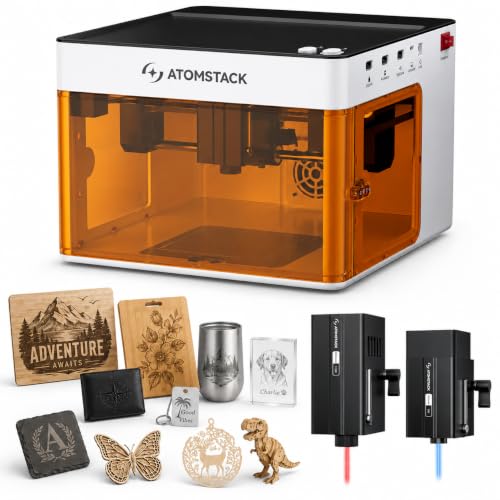
ATOMSTACK P1 Dual 5W Diode & IR
Best for: Small metal marking and safe desktop use
- Laser Power
- 5W
- Laser Type
- Diode, Infrared
- Work Area
- 110 × 110mm
- Engraving Speed
- 10000mm/min
- Safety Class
- Class 1
- Software Compatibility
- AtomStack Studio, LightBurn, LaserGRBL
The ATOMSTACK P1 Dual combines a 5000mW diode laser and a 1200mW infrared laser for versatile material handling. It offers a 110 x 110mm work area and engraving speeds up to 10000mm/min. This Class 1 enclosed unit weighs 11 pounds and includes safety features like cover detection. It suits beginners needing precise marking on metals and wood.
- Dual 5000mW diode and 1200mW infrared laser modules
- Class 1 enclosed safety design with interlock
- Supports LightBurn and AtomStack software
- Engraving speeds up to 10000mm/min
- 110 x 110mm work area is smaller than competitors
- 11-pound weight is heavier than many desktop units
- 5000mW diode power is lower than 5500mW options
- You need infrared marking on coated metals
- You want a Class 1 enclosed safety design
- You prefer LightBurn software compatibility
- You require a large work area over 300mm
- You need cutting power above 5000mW
- You prefer a lightweight portable unit under 7 pounds
Verdict: The ATOMSTACK P1 Dual 5W Laser Engraver fits hobbyists who need infrared metal marking in a compact, safe enclosure. It is ideal for small projects where precision matters more than speed or size.

SCULPFUN S9 5.5W Diode Laser Engraver
Best for: detailed jewelry and wood engraving
- Laser Power
- 5W
- Laser Type
- Diode
- Work Area
- 16.14×16.34"
- Spot Size
- 0.06mm
- Safety Class
- Class 4
- Software Compatibility
- LaserGRBL, LightBurn
The SCULPFUN S9 is a 5.5W diode laser engraver with a 0.06mm spot size. It features a 16.14×16.34-inch work area and a solid metal frame. This machine suits you if you need high precision for detailed tasks. It handles wood and acrylic well. The open frame allows for easy upgrades. You get a practical tool for intricate projects.
- 5500mW laser output for strong cutting power
- 0.06mm ultra-fine spot size for high precision
- 16.14×16.34-inch large work area
- Compatible with LightBurn and LaserGRBL software
- Class 4 safety rating requires strict precautions
- 9.7-pound weight adds portability challenges
- Open frame design offers less enclosure safety
- You need a 0.06mm spot size for fine details
- You want a large 16.14×16.34-inch work area
- You prefer a solid metal frame structure
- You require a Class 1 enclosed safety system
- You need a smaller footprint for tight spaces
- You want a lighter unit under 5 pounds
Verdict: The SCULPFUN S9 5.5W Diode Engraver fits you if you prioritize a 0.06mm spot size and a large 16.14×16.34-inch work area for detailed jewelry or wood projects.
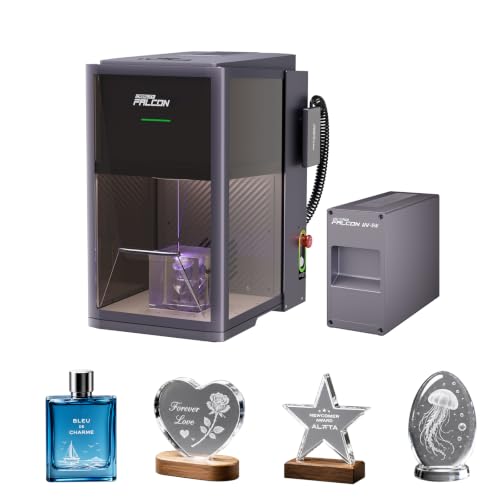
Creality Falcon T1 5W UV
Best for: Fine glass and acrylic engraving
- Laser Power
- 5W
- Engraving Speed
- 10,000mm/s
- Safety Class
- Class 1
- Software Compatibility
- Falcon Design Space, LightBurn
- Laser Type
- UV Laser
- Compatible Material
- Acrylic, Glass
The Creality Falcon T1 5W UV Laser Engraver uses a 5W UV laser module for precision work on glass and acrylic. It reaches engraving speeds up to 10,000mm/s with 0.001mm repeat accuracy. The unit is fully enclosed in a Class 1 safety system. It supports Falcon Design Space and LightBurn software. This machine suits users needing fine detail on sensitive materials.
- 5W UV laser module for glass and acrylic
- Engraving speeds up to 10,000mm/s
- 0.001mm repeat accuracy
- Class 1 enclosed safety system
- Compatible with LightBurn software
- 5W power output is lower than 5.5W diode options on the list
- UV laser limits material compatibility compared to multi-module platforms
- Physical footprint of 27.2 inches is bulkier than compact desktop units
- You need precise engraving on glass or crystal
- You require a Class 1 enclosed safety system
- You want high-speed galvo technology for production
- You need to cut thick wood or acrylic
- You want to engrave metals without a fiber module
- You prefer a smaller desktop footprint
Verdict: The Creality Falcon T1 5W UV Laser is a specialized tool for users who need fine detail on glass and acrylic. It fits those who prioritize safety and speed over raw cutting power.
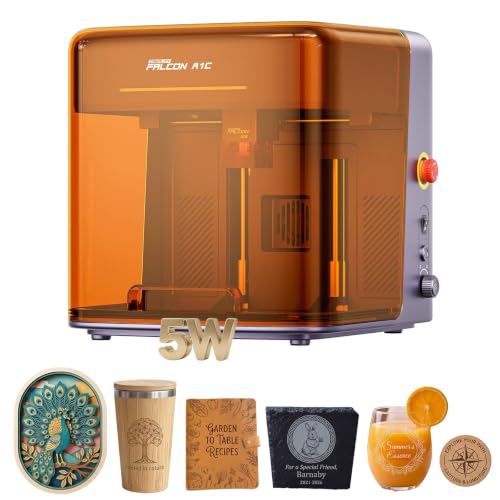
Creality Falcon A1C 5W Enclosed Engraver
Best for: safe fabric and wood engraving
- Laser Power
- 5W
- Engraving Speed
- 15,000 mm/min
- Safety Class
- Class 1
- Features
- Camera, Enclosure, AI Camera, Auto Focus
- Target Audience
- Beginners
- Compatible Material
- Wood, Leather, Fabric
The Creality Falcon A1C 5W is an enclosed laser engraver with a Class 1 safety rating. It offers a 5000mW laser power output and reaches speeds of 15,000 mm/min. The machine includes a built-in AI camera for auto recognition and an adjustable lift table for thick items. It is designed for beginners working with wood, leather, and fabric.
- Class 1 enclosed housing with flame detection
- 15,000 mm/min engraving speed
- Built-in AI camera for auto recognition
- Adjustable lift table for thick materials
- 5000mW laser power is lower than the 5500mW options on the list
- 13.2 x 13.4 inch footprint is smaller than the 300x300mm beds on other picks
- You need a Class 1 safe machine for home use
- You engrave fabric, wood, or leather
- You want fast 15,000 mm/min output
- You require more than 5000mW of power
- You need a large 300x300mm working area
- You want to engrave metal without buying an IR module
Verdict: The Creality Falcon A1C 5W suits beginners who prioritize safety and speed for small fabric or wood projects. It is less ideal if you need higher power or a larger bed.

Creality Falcon T1 5W UV Modular Engraver
Best for: fine engraving on glass and acrylic
- Laser Power
- 5W
- Engraving Speed
- 10,000mm/s
- Safety Class
- Class 1
- Features
- Enclosure
- Laser Type
- UV Laser
- Compatible Material
- Acrylic, Glass
The Creality Falcon T1 is a Class 1 enclosed laser engraver featuring a 5W UV laser module. It delivers precise engraving on materials like glass and acrylic with minimal heat impact. The unit supports interchangeable modules, including diode and fiber options, allowing you to expand capabilities. It reaches engraving speeds of up to 10,000mm/s and includes AI visual auto-focus for efficient production workflows.
- 5W UV laser module for ultra-fine engraving
- Class 1 safety rating with enclosed design
- 10,000mm/s galvo scanning speed
- Quick-swap modular design for other laser types
- Heavier build at 44.1 pounds
- Limited to one module at a time
- UV lens sold separately for red or blue lasers
- You need precise engraving on glass or acrylic
- You want to upgrade to diode or fiber modules later
- You require a Class 1 enclosed safety system
- You need to use multiple laser types simultaneously
- You prefer a lighter, more portable machine
- You want all necessary lenses included in the base price
Verdict: The Creality Falcon T1 5W UV Engraver suits users who need high-precision work on sensitive materials and plan to expand their laser capabilities over time. It is ideal for small businesses requiring a safe, enclosed environment for detailed marking tasks.

BlazeX 5W Enclosed Laser Engraver
Best for: Beginners needing a safe, enclosed starter kit
- Laser Power
- 5W
- Safety Class
- Class 1
- Software Compatibility
- LightBurn, LaserGRBL, CutLabX
- Features
- Enclosure
- Compatible Material
- Wood, Metal, Leather, Glass
- Structure
- Enclosed
The BlazeX M3 is a 5W enclosed laser engraver designed for beginners who need a safe, all-in-one setup. It features a Class 1 safety rating and includes a honeycomb bed to protect delicate materials. You get a starter kit with 13 engraving materials and a tool kit. It supports LightBurn and LaserGRBL software, making it a practical choice for desktop DIY projects and small-batch production on wood, leather, and coated metal.
- Class 1 safety rating with automatic stop sensors
- Includes honeycomb laser bed for heat absorption
- Compatible with LightBurn, LaserGRBL, and CutLabX
- Comes with 13 engraving materials and enclosure
- 5W power is lower than the 5.5W or 15W options on this list
- Smaller build dimensions compared to larger desktop units
- You want a Class 1 enclosed machine for home use
- You are a beginner needing a complete starter kit
- You engrave delicate materials like paper or fabric
- You need high-speed cutting through thick materials
- You require interchangeable laser platforms for UV or IR
- You want a built-in camera for AI tracking
Verdict: The BlazeX M3 5W Enclosed Laser Engraver is a safe, beginner-friendly option for users who prioritize safety ratings and included accessories over raw cutting power. It fits creators who want a quiet, enclosed workspace for detailed work on wood and leather without managing complex safety setups.
Specifications side by side
| Spec | xTool F2 15W Diode & 5W IR Laser Engraver | Carverall A1 Pro 5W Enclosed Laser Engraver | AlgoLaser Pixi 5W with Touchscreen | Woxcker Enclosed 5.5W Laser Engraver | Longer Ray5 5W with Rotary and Air Assist | xTool F2 Ultra 5W UV Laser Engraver | Woxcker 300x300mm 5.5W Enclosed Laser Engraver | Creality Falcon A1C 5W Enclosed Engraver | Longer Ray5 5W Laser Engraver Bundle | ATOMSTACK P1 Dual 5W Diode & IR | SCULPFUN S9 5.5W Diode Laser Engraver | Creality Falcon T1 5W UV | Creality Falcon A1C 5W Enclosed Engraver | Creality Falcon T1 5W UV Modular Engraver | BlazeX 5W Enclosed Laser Engraver |
|---|---|---|---|---|---|---|---|---|---|---|---|---|---|---|---|
| Laser Power | 15W, 5W | 5W | 5W | 5.5W | 5W | 5W | 5.5W (5500mW) | 5W | 5W | 5000mW, 1200mW | 5500mW | 5W | 5000mW | 5W | 5W |
| Laser Type | Diode, IR | – | – | Semiconductor | – | – | Semiconductor | – | – | Diode, Infrared | Diode | – | – | – | – |
| Work Area | – | 3.94×3.94-inch | – | 300 × 300 mm | 400 x 400mm | – | 300 x 300mm | 150 × 150 × 148 mm | 400 x 400 mm | 110 × 110mm | 16.14×16.34" | – | – | – | – |
| Engraving Speed | 6000mm/s | 12,000mm/min | – | 20,000mm/min | 24,000mm/min | 15,000 mm/s | 20,000mm/min | 15,000 mm/min | – | 10000mm/min | – | 10,000mm/s | 15,000 mm/min | 10,000mm/s | – |
| Spot Size | – | – | – | 0.01mm square | 0.08 x 0.08mm | <10μm | 0.01mm | – | – | – | 0.06mm | – | – | – | – |
| Safety Class | Class 4 | Class 1 | Class 1 | Class 1 | – | Class 4 | Class 1 | Class 1 | – | Class 1 | Class 4 | Class 1 | Class 1 | Class 1 | Class 1 |
| Software Compatibility | – | CutLabX, LightBurn, LaserGRBL | – | LightBurn, LaserGRBL, Cutlabx | LaserGRBL, LightBurn | – | LightBurn, LaserGRBL, Cutlabx | – | LaserGRBL, LightBurn | AtomStack Studio, LightBurn, LaserGRBL | LaserGRBL, LightBurn | Falcon Design Space, LightBurn | – | – | LightBurn, LaserGRBL, CutLabX |
| Features | Camera | Camera | Touchscreen | Enclosure | – | – | Enclosure | Camera, AI Camera, Auto Focus | Air Assist | – | – | – | Camera, Enclosure, AI Camera, Auto Focus | Enclosure | Enclosure |
| Target Audience | – | – | – | – | – | – | Beginners | – | – | – | – | – | Beginners | – | – |
| Compatible Material | Metal | Wood, Metal, Leather, Glass, Paper | Wood, Leather | Wood, Acrylic, Leather, Glass | – | Acrylic, Glass, Plastic | Wood, Metal, Leather, Glass | Wood, Leather | Wood, Acrylic, Leather | – | Wood | Acrylic, Glass | Wood, Leather, Fabric | Acrylic, Glass | Wood, Metal, Leather, Glass |
| Application | – | – | – | – | – | – | – | DIY Projects | DIY Projects | – | DIY Projects, Jewelry | – | DIY Projects | – | – |
| Structure | – | – | – | Enclosed | – | – | Enclosed | – | – | – | – | – | Enclosed | Enclosed | Enclosed |
| Control Interface | – | App Control | – | – | – | – | – | – | – | – | – | – | – | – | – |
| Connectivity | – | – | Wireless | – | – | – | – | – | – | – | – | – | – | – | – |
| Dimensions | 6.89 × 9.33 × 0.1 inches | 12.8 × 11 × 10.9 inches | 10.5 × 8.5 × 7.7 inches | 18.8 × 21.6 × 8.4 inches | 24.4 × 11.8 × 10.1 inches | 11.6 × 16.9 × 20.5 inches | 18.8 × 21.6 × 8.4 inches | 18.5 × 16.5 × 15.7 inches | – | 10.4 × 11.9 × 7.28 inches | – | 27.2 × 25.2 × 27.2 inches | 13.4 × 13.2 × 14.9 inches | 12.3 × 19.8 × 18.3 inches | 4.3 × 1.2 × 4.7 inches |
| Weight | 10 pounds | – | 4.41 pounds | 13.8 pounds | – | 49.6 pounds | 5.5 pounds | – | – | 11 pounds | 9.7 pounds | – | – | 44.1 pounds | – |
| Size | xTool F2 Basic | – | 5W | 300×300mm L2 Max 5W | 400 * 400mm | xTool F2 Ultra UV | 300x300mm Max 5W | – | 400 * 400mm | – | – | – | – | – | 5W |
| Color | Orange | 5w | Power Black | Black | Black-5W | – | Orange | Purple Gray | Black bundle | P1 Dual | Blue | T1 UV 5W | 5w Laser | UV 5W | 5W Standard |
| Model | MXF-K005-002 | A1 PRO 5W | Pixi-Black-5W | L2 MAX 5W | – | MXF-K007-002 | 5.5W | Falcon A1C | RAY5 | P1 | S9 | Falcon T1 | Creality Falcon A1C 5W | T1 UV | M3 |
You can compare standard specifications for the best 5W laser engravers side by side to evaluate their working areas.
Key Specs for Choosing a 5W Engraver
Check the laser type
The laser type determines which materials you can process effectively. Diode and infrared lasers are standard for wood, leather, and metal marking. If you need to engrave glass or acrylic without charring, look for a UV laser source. The xTool F2 includes both diode and infrared options, making it versatile for commercial metal marking. In contrast, the xTool F2 Ultra UV uses a dedicated UV laser for precision work on fragile materials. Verify the Laser Type in the attributes to ensure it matches your primary materials before purchasing.
Evaluate the workspace size
The build area dictates the maximum size of your projects. Larger workspaces allow for bigger items but often require more desk space. The Longer Ray5 offers a spacious 400 x 400mm area, which is ideal for large format engraving. The SCULPFUN S9 provides a similarly large 16.14 x 16.34-inch area for detailed jewelry or wood projects. Smaller models like the AlgoLaser Pixi are compact and fit on smaller desks. Always check the length and width dimensions in the specs to ensure the machine fits your workspace.
Look for safety enclosures
An enclosed structure keeps laser light contained and protects you from fumes. This feature is crucial for beginners or home users who prioritize safety. The Woxcker L2 MAX and the Creality Falcon A1C both feature enclosed structures that provide a safe environment for wood and leather work. The BlazeX M3 is also an enclosed starter kit designed for quiet, safe operation. If you do not see an enclosure listed, you may need to buy one separately. Check the Structure attribute to confirm if the unit is fully enclosed.
Consider smart features
Features like cameras and touchscreens simplify the setup and alignment process. A built-in camera helps you position your design accurately on the material. The Carverall A1 Pro and the Creality Falcon A1C include cameras for precise alignment. Some models, like the AlgoLaser Pixi, offer a touchscreen for standalone operation without needing a computer. The Woxcker models may also include advanced controls. These features reduce setup time and improve accuracy, especially for detailed or small projects.
Review connectivity options
Connectivity determines how you send files to the engraver. Wireless connectivity allows you to operate the machine without cables. The AlgoLaser Pixi supports wireless connections, making it convenient for quick jobs. Other models may rely on wired connections, which can be more stable for large files. Check the Connectivity attribute to see if the machine supports wireless transfer. This is particularly useful if you plan to move the engraver frequently or have a limited desk space for cables.
Frequently asked questions
Can 5W laser engravers cut metal?
No, 5W diode lasers cannot cut metal. They can only mark or engrave surface coatings. For metal marking, you need a 5W infrared laser module. The xTool F2 and ATOMSTACK P1 include infrared lasers for this purpose. UV lasers also mark metal but are better for glass. Always check the laser type in the specs.
What is the largest 5W laser engraver bed?
The largest workspace is 400 x 400 mm. The Longer Ray5 and its bundle offer this expansive area. This size suits large projects that exceed standard 300 mm beds. The SCULPFUN S9 provides a slightly smaller 16.14 x 16.34-inch area. Larger beds allow you to engrave bigger items without resizing designs.
Which 5W engraver is best for glass?
UV lasers are best for glass and acrylic. They provide clean, char-free edges. The xTool F2 Ultra and Creality Falcon T1 use 5W UV lasers. These models handle fragile materials with high precision. Diode lasers will likely crack or char glass. Select a UV-equipped machine for safe glass engraving.
Do I need an enclosure for a 5W laser?
Enclosures are vital for safety and fume containment. Models like the Carverall A1 Pro and Woxcker L2 MAX are fully enclosed. They protect you from laser radiation and smoke. Open-frame machines like the Longer Ray5 require external safety gear. Choose an enclosed unit if you prioritize a safe desktop environment.
Can I engrave cylindrical objects with a 5W laser?
Yes, if the machine includes a rotary attachment. The Longer Ray5 bundle supports cylindrical engraving. This feature allows you to mark tumblers, pens, or bottles. Not all 5W models include this accessory. Check the attributes for rotary support before purchasing if you plan to work on round objects.
Is a camera feature necessary on a 5W engraver?
A camera helps with positioning and auto-focus. The xTool F2 and Creality Falcon A1C include cameras. They allow you to align designs precisely on materials. The AlgoLaser Pixi uses a touchscreen instead. Cameras are useful for detailed work but not strictly required for all projects.
What is the lightest 5W laser engraver?
The AlgoLaser Pixi 5W is the lightest at 4.41 pounds. It is compact and easy to move. The xTool F2 Basic weighs 10 pounds. Heavier models like the xTool F2 Ultra weigh 49.6 pounds due to UV components. Choose a lighter unit for portable or small desk setups.
Which 5W engraver works with fabric?
The Creality Falcon A1C is ideal for fabric. It is enclosed and safe for textile engraving. It handles wood and leather as well. Other models like the Woxcker L2 MAX also support leather. Ensure the machine has an enclosure when working with fabrics to contain smoke and protect your eyes.