Best 3d Printers for Kids: 15 Spec-Based Picks
As Amazon Associates, we earn from qualifying purchases. This means we may receive a small commission at no extra cost to you if you click through and make a purchase.
As an Amazon Associate we earn from qualifying purchases. Links on this page are affiliate links.
Finding the best 3d printers for kids requires looking at safety, ease of use, and print quality. We compared 15 models based strictly on the specifications published on their listings. The Bambu Lab A1 FDM 3D Printer leads this list because it offers automated calibration and quiet operation. These specs help beginners start printing without complex setup steps. Our picks focus on features like enclosed designs and app control to suit young creators. This guide helps you decide which machine fits your child’s skill level and your home space.
Choose enclosed or open based on safety
Kids need safe printing environments. Many options like the AOSEED and Magic Jimmy feature fully enclosed structures to contain heat and moving parts. Others, such as the Bambu Lab A1, use open frames with automated calibration. Select an enclosed model for younger children requiring physical barriers. Choose open-frame units with auto-leveling for older kids who prioritize speed and larger build volumes over complete enclosure.
| # | Product | Best for | Price |
|---|---|---|---|
| 1 | Bambu Lab A1 FDM 3D Printer Best overall | Beginners seeking automated calibration and quiet operation | |
| 2 | AOSEED Enclosed Kids 3D Printer Also great | Safe, enclosed printing for children | |
| 3 | Entina Tina2C Mini 3D Printer Also great | small home projects and educational STEM activities | |
| 4 | ANYCUBIC Kobra X Combo Multi-Color 3D Printer Best premium | multi-color home printing for kids | |
| 5 | Magic Jimmy Enclosed Kids 3D Printer Also great | Safe, enclosed printing for young children | |
| 6 | HEPHI3D Tina2C Compact 3D Printer Best budget | small spaces and quick beginner setups | |
| 7 | Entina Tina2C Mini 3D Printer Also great | small space home or classroom use | |
| 8 | UGEE Funbox Enclosed Kids 3D Printer Also great | Safe, fast, single-color printing for kids | |
| 9 | Creality K2 SE 4-Color Printer Also great | Kids wanting fast, colorful prints in small spaces | |
| 10 | Anycubic Kobra S1 ACE 2 Pro Combo Also great | safe multi-color printing for kids | |
| 11 | Flashforge Adventurer Direct Drive 3D Printer Also great | Beginners seeking fast, reliable prints | |
| 12 | TKID Kids 3D Printer with Enclosure Also great | Safe, enclosed printing for kids and beginners | |
| 13 | Flashforge Adventurer 5M CoreXY 3D Printer Best corexy structure | Fast Core XY printing for kids | |
| 14 | SainSmart PrintyGo 600mm/s Kids Printer Best touchscreen | young creators needing a safe, enclosed machine | |
| 15 | Toybox PR_alpha20_sams 3D Printer Also great | small family projects and licensed designs |
The best fit for you
- You want the best overall printer for beginners – Bambu Lab A1 FDM 3D Printer – The Bambu Lab A1 offers automated calibration and quiet operation for new users.
- You need a safe enclosed printer for young kids – AOSEED Enclosed Kids 3D Printer – The AOSEED printer features a fully enclosed structure and app control for safety.
- You want multi-color printing for family projects – ANYCUBIC Kobra X Combo Multi-Color 3D Printer – The Anycubic Kobra X Combo supports multi-color printing with auto leveling features.
- You need the most compact printer for small spaces – HEPHI3D Tina2C Compact 3D Printer – The Hephi3d Tina2C Compact fits in small areas with a 6.7-inch width.
- You want fast printing with a touchscreen interface – SainSmart PrintyGo 600mm/s Kids Printer – The SainSmart PrintyGo provides 600 mm/s speed and a touchscreen for easy use.
Is a Kids 3D Printer Worth It?
Targeting kids changes the spec focus. Enclosed structures appear often, like on the AOSEED and Magic Jimmy models, to contain heat and moving parts. Automated calibration, found in the Bambu Lab A1, reduces setup friction. App control simplifies operation for younger users. Compact dimensions, such as the 8.6-inch width on the Entina Tina2C, fit small desks. These features prioritize safety and ease over raw speed or massive build volumes.
Worth it if
- You want a safe, enclosed environment for young children
- You need automated calibration to simplify setup
- You have limited desk space for a compact printer
Skip it if
- You require large build volumes for big projects
- You prefer manual control over app-based operation
- You need maximum print speed for professional results

Bambu Lab A1 FDM 3D Printer
Best for: Beginners seeking automated calibration and quiet operation
- Target Audience
- Beginners, Kids
- Printing Technology
- FDM
- Bed Leveling
- Automatic
- Dimensions
- 21.8 × 20.8 × 12.9 inches
- Weight
- 22 pounds
The Bambu Lab A1 is a beginner-friendly FDM 3D printer designed for kids and new users. It features automatic bed leveling and active flow rate compensation to ensure consistent quality. With 10,000 mm/s² acceleration, it prints quickly while maintaining precision. The unit supports multi-color printing when paired with the optional AMS lite. Its compact design and quiet operation make it suitable for home or classroom environments.
- 10,000 mm/s² acceleration for fast printing speeds
- Automatic bed leveling and full-auto calibration
- Active flow rate compensation for smooth prints
- FDM printing technology suitable for beginners
- 22 pounds weight is heavier than many compact kids' printers
- Multi-color capability requires purchasing the separate AMS lite accessory
- 20.8 x 21.8 x 12.9 inches build volume is smaller than high-speed models
- You want a printer with automatic calibration to simplify setup
- You are looking for a quiet device for indoor use
- You plan to add multi-color printing with the AMS lite
- You need a fully enclosed unit for safety
- You want multi-color printing included in the base price
- You prefer a lighter, more portable machine for travel
Verdict: The Bambu Lab A1 3D Printer offers reliable automated calibration and high acceleration for kids starting with FDM printing. It is ideal for users who value ease of use and quiet operation over a compact footprint.

AOSEED Enclosed Kids 3D Printer
Best for: Safe, enclosed printing for children
- Target Audience
- Kids
- Max Print Speed
- 400mm/s
- Multicolor Capacity
- single-color
- Enclosure Type
- Enclosed
- Bed Leveling
- Leveling-Free
- Features
- Enclosure, Wi-Fi
The AOSEED AI 3D Printer for Kids is an enclosed, single-color FDM printer designed for young users. It features a leveling-free platform and app control via Wi-Fi. With peak speeds of 400 mm/s and 0.05 mm precision, it handles small projects quickly. The included 12,000+ models and AI tools simplify creation. Its enclosed, pinch-resistant design and quiet operation make it a safe, practical option for home use.
- Enclosed, pinch-resistant design for safety
- Leveling-free build plate for easy setup
- Peak print speed of 400 mm/s
- 0.05 mm precision for detailed prints
- 12,000+ pre-loaded models and AI tools
- Supports single-color printing only
- Print speed peaks at 400 mm/s, lower than some competitors
- Build volume is smaller than larger models
- You want a safe, enclosed printer for children
- You prefer simple, leveling-free setup
- You value AI-assisted design features
- You need native multi-color printing
- You require a larger build volume
- You prefer manual bed leveling control
Verdict: The AOSEED AI 3D Printer for Kids fits families seeking a safe, enclosed machine with simple app control and AI features. It suits beginners who prioritize ease of use and safety over multi-color capabilities or large build sizes.

Entina Tina2C Mini 3D Printer
Best for: small home projects and educational STEM activities
- Target Audience
- Beginners, Kids
- Build Volume
- 3.9" x 3.9" x 3.9"
- Bed Leveling
- Auto Leveling
- Connectivity
- WiFi
- Features
- Auto Leveling, Wi-Fi
- Application
- DIY Projects
The Entina Tina2C Mini is a fully assembled FDM printer designed for kids and beginners. It features auto leveling and WiFi connectivity for easy setup via the Poloprint app. The compact build volume measures 3.9 x 3.9 x 3.9 inches. It includes four PLA filament colors to start printing immediately. This bundle suits small workspaces and home desks.
- Fully assembled for immediate use
- Auto leveling reduces manual setup
- Includes four PLA filament colors
- Compact 3.9-inch build volume
- Small 3.9 x 3.9 x 3.9 inch build volume
- Limited to single-color printing
- You need a printer for small prototypes
- You want a fully assembled unit for kids
- You have limited desk space
- You require large print sizes
- You need multi-color printing capability
- You prefer a larger build volume
Verdict: The Entina Tina2C Mini 3D Printer fits beginners who prioritize ease of use and compact size over large print capacity. It is ideal for small home projects and educational STEM activities.

ANYCUBIC Kobra X Combo Multi-Color 3D Printer
Best for: multi-color home printing for kids
- Target Audience
- Kids
- Build Volume
- 260*260*260mm³
- Multicolor Capacity
- 7-color, up to 19-color
- Bed Leveling
- LeviQ 3.0 auto-leveling
- Application
- DIY Projects
- Dimensions
- 18.1 × 17.7 × 18.1 inches
The Anycubic Kobra X Combo is a multi-color 3D printer designed for kids and beginners. It features a 260x260x260mm build volume and native 7-color printing capability, expandable to 19 colors. The device includes LeviQ 3.0 auto-leveling and an AI camera for error detection. It operates quietly at under 48dB, making it suitable for home environments where noise is a concern.
- Native 7-color printing with expansion to 19 colors
- 260x260x260mm build volume for larger projects
- LeviQ 3.0 auto-leveling system
- Operates at under 48dB noise level
- Heavier at 29.1 pounds compared to lighter competitors
- Larger physical footprint with 18.1-inch width and height
- You want vibrant multi-color prints for children's toys
- You need a larger build volume for school projects
- You prefer a quiet printer for home use
- You need the absolute fastest print speeds available
- You require a compact printer for small desks
- You want a lighter device for easy relocation
Verdict: The Anycubic Kobra X Combo suits families prioritizing color variety and quiet operation over speed and compactness. It is ideal for parents who want safe, multi-color printing without constant supervision.

Magic Jimmy Enclosed Kids 3D Printer
Best for: Safe, enclosed printing for young children
- Target Audience
- Kids
- Max Print Speed
- up to 400mm/s
- Enclosure Type
- Fully enclosed
- Connectivity
- WiFi
- Features
- Camera, Enclosure
- Dimensions
- 13.7 × 13.2 × 15.5 inches
The Magic Jimmy is a fully enclosed 3D printer designed for kids. It features a safe, cool-touch exterior and includes AI-powered design tools. The unit prints at speeds up to 400mm/s and comes fully assembled. You get access to over 12,000 models via an app. This device suits young users who need a secure environment for learning STEM concepts without handling hot components.
- Fully enclosed design keeps hot parts away from children
- Prints at speeds up to 400mm/s for faster results
- Comes fully assembled with no tools required
- Includes AI tools to turn sketches into 3D models
- Max print speed of 400mm/s is slower than some competitors reaching 600mm/s
- Heavier build at 8.8 pounds compared to lighter mini options
- Uses only non-toxic PLA filament, limiting material choices
- You want a safe, enclosed printer for young children
- You prefer a device that is fully assembled and ready to use
- You are interested in AI-powered design tools for kids
- You need high-speed printing over 400mm/s
- You want to use advanced materials beyond standard PLA
- You prefer a lighter, more portable unit under 8 pounds
Verdict: Magic Jimmy 3D Printer for Kids is a secure, ready-to-use option for children who need a fully enclosed environment. It fits families prioritizing safety and AI-assisted creativity over maximum print speed.

HEPHI3D Tina2C Compact 3D Printer
Best for: small spaces and quick beginner setups
- Target Audience
- Beginners, Kids
- Printing Technology
- FDM
- Bed Leveling
- Auto leveling
- Connectivity
- Wi-Fi, TF card, USB-type C
- Dimensions
- 8.27 × 6.7 × 9.84 inches
- Weight
- 8.27 pounds
The Hephi3d TINA2C is a fully assembled FDM printer designed for kids and beginners. It features auto leveling and supports WiFi, TF card, and USB-C connectivity. The unit measures 6.7 by 8.27 by 9.84 inches and weighs 8.27 pounds. It includes a four-color PLA filament starter kit. This compact size makes it suitable for small spaces. You can start printing in five minutes with the factory presets.
- Fully assembled and ready to print in five minutes
- Auto leveling bed reduces setup complexity
- Supports WiFi, TF card, and USB-C connectivity
- Includes a four-color PLA filament starter kit
- Compact dimensions of 6.7 by 8.27 by 9.84 inches
- Heavier build at 8.27 pounds compared to lighter competitors
- Smaller build volume than the 220x220x220mm or larger options on the list
- Lower model library count of 3,000+ compared to 12,000+ or 20,000+ alternatives
- You need a compact printer that fits on a small desk
- You want a fully assembled unit with auto leveling for easy setup
- You prefer a starter kit that includes four-color PLA filament
- You require a larger build volume for bigger projects
- You want access to a massive library of over 12,000 models
- You prefer a lighter device under 8 pounds for portability
Verdict: Hephi3d TINA2C Compact FDM Printer fits beginners who value a small footprint and quick setup. It suits families wanting a simple entry into multi-color printing with included filament.

Entina Tina2C Mini 3D Printer
Best for: small space home or classroom use
- Target Audience
- Beginners, Kids
- Build Volume
- 3.9" x 3.9" x 3.9"
- Bed Leveling
- Auto Leveling
- Connectivity
- 2.4GHz WiFi, TF card
- Features
- Auto Leveling, Wi-Fi
- Application
- DIY Projects
The Entina Tina2C Mini is a compact FDM printer designed for kids and beginners. It features a 3.9 x 3.9 x 3.9-inch build volume and auto leveling for easy setup. The unit comes fully assembled with a 1kg PLA starter bundle. You can use the Poloprint Cloud app or a TF card for printing. It includes over 3500 models and supports offline operation for flexible use.
- Fully assembled for ready use in 5 minutes
- Includes 1kg of 4-color PLA filament
- Auto leveling reduces manual adjustment
- Compact 3.9-inch cubic build volume
- Supports 2.4GHz WiFi and TF card printing
- 3.9-inch build volume is smaller than most competitors
- 2.4GHz WiFi only limits network options
- 3500 models is fewer than the 12000+ or 20000+ options in other picks
- You want a printer that requires no assembly
- You need a compact unit for small spaces
- You prefer guided app setup over manual configuration
- You need a large build volume for bigger projects
- You require 5GHz WiFi connectivity
- You want access to thousands more pre-loaded models
Verdict: Entina Tina2C Mini 3D Printer is a practical starter choice for families who value convenience and compact size over large print areas or extensive model libraries.

UGEE Funbox Enclosed Kids 3D Printer
Best for: Safe, fast, single-color printing for kids
- Target Audience
- Kids
- Max Print Speed
- 500 mm/s
- Multicolor Capacity
- Single-color
- Enclosure Type
- Fully enclosed
- Bed Leveling
- Leveling-free
- Connectivity
- WiFi 6
The UGEE Funbox is a fully enclosed 3D printer designed for kids aged 8 and up. It features a 500 mm/s print speed and leveling-free technology for quick setup. The unit includes a built-in camera and WiFi 6 connectivity. It supports single-color PLA printing with AI-powered model generation. This device offers a safe, quiet environment for creative STEM learning.
- Fully enclosed structure with anti-pinch door
- Print speed up to 500 mm/s
- Leveling-free automatic bed setup
- Built-in HD camera for live streaming
- Quiet operation below 46dB
- Single-color printing limits multi-color projects
- Heavier build at 8.91 pounds
- Smaller build volume compared to larger models
- You want a safe, enclosed printer for a child's room
- You need fast setup with zero manual leveling
- You prefer quiet operation for bedroom use
- You require native multi-color printing
- You need a larger build volume for big models
- You want a lighter, more portable unit
Verdict: UGEE Funbox 500mm/s Kids Printer suits families prioritizing safety and speed in a compact, enclosed design. It is ideal for parents who want a quiet, easy-to-use machine for kids aged 8 and up.

Creality K2 SE 4-Color Printer
Best for: Kids wanting fast, colorful prints in small spaces
- Target Audience
- Beginners, Kids
- Build Volume
- 220×215×245mm
- Max Print Speed
- 500mm/s
- Printing Technology
- CoreXY, FDM
- Multicolor Capacity
- 4-color
- Bed Leveling
- Auto Leveling
The Creality K2 SE 4C is a CoreXY FDM printer designed for kids and beginners. It supports 4-color multicolor printing and reaches speeds up to 500mm/s with 20,000mm/s² acceleration. The build volume is 220×215×245mm. Auto bed leveling and smart sensors help ensure reliable first layers and protect prints. Its compact frame fits well in classrooms or home offices.
- 4-color multicolor printing capability
- 500mm/s max print speed
- Auto bed leveling
- CoreXY motion system
- Smart print protection sensors
- 220×215×245mm build volume is smaller than some competitors
- USB connectivity only
- You want multicolor prints without complex setup
- You need fast printing for educational projects
- You have limited desk space
- You require native Wi-Fi or Ethernet
- You need a build volume larger than 220mm
- You prefer manual bed leveling
Verdict: Creality K2 SE 4C Compact 3D Printer is a solid pick for kids who want colorful results quickly. It fits well in spaces where a large footprint is not an option.

Anycubic Kobra S1 ACE 2 Pro Combo
Best for: safe multi-color printing for kids
- Target Audience
- Beginners, Kids
- Max Print Speed
- 600 mm/s
- Printing Technology
- FDM, CoreXY
- Multicolor Capacity
- 4 colors, expandable to 16
- Enclosure Type
- Fully enclosed
- Bed Leveling
- LeviQ 3.0 auto leveling
The Anycubic Kobra S1 ACE 2 Pro Combo is a fully enclosed FDM printer designed for beginners and kids. It features a CoreXY structure with a max print speed of 600 mm/s. The included ACE 2 Pro system supports native 4-color printing, expandable to 16 colors. It includes smart filament management and Print While Drying technology. The unit weighs 39.7 pounds and measures 16.1 by 15.8 by 19.3 inches.
- Native 4-color printing with ACE 2 Pro
- CoreXY structure for speeds up to 600 mm/s
- Fully enclosed design for safety
- Print While Drying technology at 65°C
- Weighs 39.7 pounds, which is heavier than many compact kid printers
- Standard 4-color capacity, fewer than the 7-color option on the Anycubic Kobra X Combo
- Requires multiple units to unlock 16-color printing
- You want native multi-color printing without complex setup
- You need a fully enclosed machine for safer operation
- You value high-speed CoreXY motion for detailed prints
- You need a lighter, more portable unit for small spaces
- You only want a single-color printer
- You prefer a printer with more than 4 colors out of the box
Verdict: The Anycubic Kobra S1 ACE 2 Pro Combo fits kids and beginners who want reliable multi-color results in a safe, enclosed environment. It suits users who prioritize speed and color variety over a lightweight footprint.
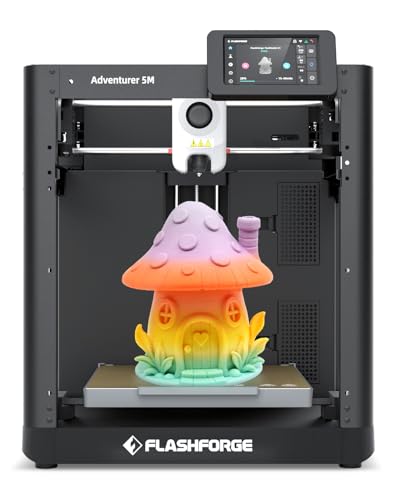
Flashforge Adventurer Direct Drive 3D Printer
Best for: Beginners seeking fast, reliable prints
- Target Audience
- Beginners, Kids
- Build Volume
- 220×220×220mm
- Max Print Speed
- 600 mm/s
- Printing Technology
- CoreXY
- Bed Leveling
- Auto Leveling
- Features
- Auto Leveling, Direct Drive Extruder
The FLASHFORGE Adventurer 5M is a CoreXY 3D printer designed for beginners and kids. It features a 220x220x220mm build volume and reaches speeds up to 600mm/s. Auto bed leveling and a 4.3-inch touchscreen simplify setup. The direct drive extruder supports reliable printing. This model suits users seeking fast output and straightforward operation without complex calibration.
- CoreXY frame with 600mm/s max speed
- 220x220x220mm build volume
- Auto bed leveling system
- 4.3-inch touchscreen interface
- Direct drive extruder
- 220mm build height is smaller than some competitors
- 20-pound weight adds bulk for portability
- Requires optional DIY kit for high-temp materials
- You want fast printing speeds for quick projects
- You prefer auto-leveling to simplify setup
- You need a moderate build volume for family use
- You require native high-temperature material support
- You need a build volume larger than 220mm
- You prefer a lighter, more portable unit
Verdict: FLASHFORGE Adventurer 5M 220mm 3D Printer delivers high speed and ease of use for beginners. It fits families wanting reliable, fast prints without manual calibration steps.

TKID Kids 3D Printer with Enclosure
Best for: Safe, enclosed printing for kids and beginners
- Target Audience
- Kids
- Max Print Speed
- Up to 400mm/s
- Enclosure Type
- Enclosed
- Bed Leveling
- Leveling-free
- Features
- Camera, Enclosure
- Application
- DIY Projects
The TKID TCH1.0 is an enclosed 3D printer designed for kids and beginners. It features leveling-free setup and app-guided filament loading to simplify the process. Max print speeds reach 400mm/s, while standard speeds run between 220–250mm/s. The device includes a live camera for remote monitoring and offers 20,000+ models via the XMAKER app. It is a compact unit measuring 10.4 x 11.4 x 12.2 inches.
- Leveling-free setup reduces initial friction for new users
- Enclosed design keeps the active printing area contained
- Max print speed up to 400mm/s for faster output
- Live camera allows remote progress viewing and control
- Standard print speed of 220–250mm/s is slower than 500mm/s or 600mm/s competitors
- Heavier build at 13 pounds compared to lighter mini printers
- Smaller build volume implied by compact dimensions versus larger beds
- You want a safe, enclosed printer for home use
- You prefer leveling-free setup for easier first prints
- You value remote monitoring via live camera
- You need high-speed printing above 400mm/s
- You require a large build volume for big projects
- You want a lightweight, portable printer under 10 pounds
Verdict: The TKID TCH1.0 Kids 3D Printer suits families seeking a safe, enclosed machine with simple setup. It fits users who value remote monitoring and moderate speeds over maximum velocity.

Flashforge Adventurer 5M CoreXY 3D Printer
Best for: Fast Core XY printing for kids
- Target Audience
- Beginners, Kids
- Build Volume
- 220 x 220 x 220 mm
- Max Print Speed
- 600 mm/s
- Bed Leveling
- Automatic
- Features
- Auto Leveling, CoreXY Structure, Direct Drive Extruder, Quick-Swap Nozzle
- Dimensions
- 14.3 × 14.8 × 16.3 inches
The Voxelab Adventurer 5M is a Core XY 3D printer built for kids and beginners. It offers a 220 x 220 x 220 mm build volume and reaches speeds up to 600 mm/s. Automatic bed leveling ensures reliable first layers. The direct drive extruder and quick-swap nozzle support various filaments. Vibration compensation helps maintain print quality at high speeds.
- Core XY structure for high-speed stability
- 600 mm/s max print speed
- Automatic bed leveling
- 220 x 220 x 220 mm build volume
- Quick-swap nozzle system
- 23.8 pounds weight is heavier than many compact kid printers
- 220 x 220 x 220 mm build volume is smaller than larger beginner models
- You want a fast printer with a Core XY frame
- You need automatic bed leveling for easy setup
- You prefer a compact footprint for a desk
- You require a build volume larger than 220 mm
- You need a significantly lighter machine for portability
- You want native multi-color printing without extra kits
Verdict: Voxelab Adventurer 5M Core XY suits kids who need fast, stable prints in a small space. It fits beginners who value automatic leveling and quick setup.

SainSmart PrintyGo 600mm/s Kids Printer
Best for: young creators needing a safe, enclosed machine
- Target Audience
- Kids
- Max Print Speed
- 600mm/s
- Enclosure Type
- Fully enclosed
- Bed Leveling
- Auto Leveling
- Connectivity
- WiFi
- Printing Speed
- 600 mm/s
The SainSmart PrintyGo Mini is a fully enclosed 3D printer designed for kids aged 8 and up. It features a 5-inch touchscreen and auto leveling for straightforward operation. With a max print speed of 600mm/s, it produces prints quickly. The unit includes a 4-color PLA starter bundle and over 1,500 pre-loaded models. You get a safe, child-safe environment with a lock system that pauses printing when the door opens.
- Fully enclosed design with child lock safety system
- 5-inch interactive touchscreen for easy control
- Auto leveling simplifies setup
- Max print speed of 600mm/s
- Includes 4-color PLA filament bundle
- Heavier build at 11.8 pounds
- Smaller library of 1,500 models compared to competitors offering 12,000 or 20,000+
- Limited to 4-color printing while others support 7-color
- You want a safe, enclosed printer for children aged 8+
- You prefer a responsive touchscreen over app-only control
- You need auto leveling to simplify initial setup
- You require multi-color printing with more than four colors
- You need access to a large library of 20,000+ models
- You prefer a lighter, more portable unit under 10 pounds
Verdict: SainSmart PrintyGo Mini 3D Printer fits families seeking a safe, enclosed machine with a large touchscreen for young creators who value speed and simplicity over extensive color options or massive model libraries.

Toybox PR_alpha20_sams 3D Printer
Best for: small family projects and licensed designs
- Target Audience
- Beginners, Kids
- Dimensions
- 11 × 11 × 8.27 inches
The Toybox PR_alpha20_sams is a compact 3D printer designed for beginners and kids. It measures 11 x 11 x 8.27 inches, making it a small footprint device. The system supports one-touch printing and tool-free calibration for easy setup. You get access to 15,000+ digital designs via the app. It uses non-toxic PLA filament and includes a 1-month Pro trial. This model focuses on safety and simplicity for family use.
- Compact 11 x 11 x 8.27 inch footprint
- Access to 15,000+ ready-to-print designs
- One-touch printing and tool-free calibration
- Kid-safe non-toxic PLA filament included
- Small build volume limits print size
- Single filament spool included
- You need a small footprint printer for a desk
- You want a safe, easy-to-use device for kids
- You value access to licensed character designs
- You require large build volume for big projects
- You want multi-color printing capabilities
- You prefer a printer without app dependency
Verdict: Toybox PR_alpha20_sams 3D Printer fits families who want a safe, compact device for small projects. It is ideal for kids who enjoy licensed characters and simple operation.
Specifications side by side
| Spec | Bambu Lab A1 FDM 3D Printer | AOSEED Enclosed Kids 3D Printer | Entina Tina2C Mini 3D Printer | ANYCUBIC Kobra X Combo Multi-Color 3D Printer | Magic Jimmy Enclosed Kids 3D Printer | HEPHI3D Tina2C Compact 3D Printer | Entina Tina2C Mini 3D Printer | UGEE Funbox Enclosed Kids 3D Printer | Creality K2 SE 4-Color Printer | Anycubic Kobra S1 ACE 2 Pro Combo | Flashforge Adventurer Direct Drive 3D Printer | TKID Kids 3D Printer with Enclosure | Flashforge Adventurer 5M CoreXY 3D Printer | SainSmart PrintyGo 600mm/s Kids Printer | Toybox PR_alpha20_sams 3D Printer |
|---|---|---|---|---|---|---|---|---|---|---|---|---|---|---|---|
| Build Volume | – | – | 3.9" x 3.9" x 3.9" | 260*260*260mm³ | – | – | 3.9" x 3.9" x 3.9" | – | 220×215×245mm | – | 220×220×220mm | – | 220 x 220 x 220 mm | – | – |
| Max Print Speed | – | 400mm/s | – | – | up to 400mm/s | – | – | 500 mm/s | 500mm/s | 600 mm/s | 600 mm/s | Up to 400mm/s | 600 mm/s | 600mm/s | – |
| Printing Technology | FDM | – | – | – | – | FDM | – | – | CoreXY, FDM | FDM, CoreXY | CoreXY | – | – | – | – |
| Multicolor Capacity | – | single-color | – | 7-color, up to 19-color | – | – | – | Single-color | 4-color | 4 colors, expandable to 16 | – | – | – | – | – |
| Enclosure Type | – | Enclosed | – | – | Fully enclosed | – | – | Fully enclosed | – | Fully enclosed | – | Enclosed | – | Fully enclosed | – |
| Bed Leveling | Automatic | Leveling-Free | Auto Leveling | LeviQ 3.0 auto-leveling | – | Auto leveling | Auto Leveling | Leveling-free | Auto Leveling | LeviQ 3.0 auto leveling | Auto Leveling | Leveling-free | Automatic | Auto Leveling | – |
| Connectivity | – | – | WiFi | – | WiFi | Wi-Fi, TF card, USB-type C | 2.4GHz WiFi, TF card | WiFi 6 | USB | – | – | – | – | WiFi | – |
| Printing Speed | – | – | – | – | – | – | – | 500 mm/s | 500 mm/s | – | 600 mm/s | – | – | 600 mm/s | – |
| Features | – | Enclosure, Wi-Fi | Auto Leveling, Wi-Fi | Auto Leveling | Camera, Enclosure | Wi-Fi | Auto Leveling, Wi-Fi | Enclosure, Wi-Fi | Auto Leveling, Multi-Color Printing | Multi-Color Printing, Enclosure | Auto Leveling, Direct Drive Extruder | Camera, Enclosure | Auto Leveling, CoreXY Structure, Direct Drive Extruder, Quick-Swap Nozzle | Auto Leveling, Enclosure, Touchscreen, Wi-Fi | – |
| Target Audience | Beginners, Kids | Kids | Beginners, Kids | Kids | Kids | Beginners, Kids | Beginners, Kids | Kids | Beginners, Kids | Beginners, Kids | Beginners, Kids | Kids | Beginners, Kids | Kids | Beginners, Kids |
| Application | – | – | DIY Projects | DIY Projects | – | – | DIY Projects | – | – | – | – | DIY Projects | – | – | – |
| Structure | – | Enclosed | – | – | Enclosed | – | – | Enclosed | – | Enclosed | – | Enclosed | – | Enclosed | – |
| Control Interface | – | App Control | App Control | – | – | – | App Control | App Control | – | – | – | – | – | App Control | – |
| Dimensions | 21.8 × 20.8 × 12.9 inches | 11.4 × 10.6 × 12.2 inches | 11.4 × 8.6 × 8.6 inches | 18.1 × 17.7 × 18.1 inches | 13.7 × 13.2 × 15.5 inches | 8.27 × 6.7 × 9.84 inches | 11.4 × 8.6 × 8.6 inches | 10.6 × 10.8 × 12 inches | 14.5 × 14.5 × 19 inches | 15.8 × 16.1 × 19.3 inches | 14.8 × 14.3 × 16.3 inches | 11.4 × 10.4 × 12.2 inches | 14.3 × 14.8 × 16.3 inches | – | 11 × 11 × 8.27 inches |
| Weight | 22 pounds | 8.82 pounds | – | 29.1 pounds | 8.8 pounds | 8.27 pounds | – | 8.91 pounds | – | 39.7 pounds | 20 pounds | 13 pounds | 23.8 pounds | 11.8 pounds | – |
| Size | A1 | – | – | – | – | – | – | Funbox-A-Blue | – | ANYCUBIC Kobra S1 ACE 2 Pro Combo 3D Printer | – | – | – | – | – |
| Color | Grey | White (JOY AI+) + 8 PLA | Orange/Yellow/Pink/Purple | Grey | A-Purple | Blue/Green/White/Red | Red/White/Blue/Green | Blue | Black | Black | AD5M | White | Adventurer 5M | White (Printygo) & 4 Pla Filaments | white |
| Model | PF002-A | – | – | combo | – | – | – | Funbox | – | – | – | TCH1.0 | Adventurer 5M | PrintyGo | PR_alpha20_sams |
You can compare print speeds, safety enclosures, and nozzle temperatures across the full lineup of best 3d printers for kids.
How we picked these
We selected these 15 3D printers by scanning Amazon listings for the specific Target Audience: Kids feature. This criterion appears in the title or feature lists of each product. We included only one size or variant from each product family to avoid duplicate entries. All details come directly from the published specifications and feature lists on those listings. We did not physically handle any of these machines.
The list is ordered by availability first, followed by overall rating weighted by review count, and then by how many guide criteria each spec meets. We focused on specs relevant to kids, such as enclosed structures, auto-leveling, and app control. Prices and stock levels are shown live on the page and are not part of this selection process.
Key Specs to Compare for Kids Printers
Prioritize Enclosed Structures
Safety is the primary concern when selecting a printer for children. Enclosed models like the AOSEED and Magic Jimmy keep hot nozzles and moving belts behind protective walls. This design prevents accidental contact with heated components. Open-frame printers, such as the Bambu Lab A1, expose these parts. If your child is young, an enclosure provides a necessary barrier. It also helps maintain consistent temperatures for better print quality. Check the product structure description to confirm if the unit is fully enclosed or open.
Check for Automated Calibration
Manual leveling is difficult for beginners and can lead to poor first layers. Automated calibration features remove this friction. The Bambu Lab A1 includes this function to ensure the bed is level before printing. Other models like the Anycubic Kobra X and Creality K2 SE also list auto leveling. This spec means the printer adjusts itself, allowing your child to start projects quickly. It reduces the chance of failed prints due to user error. Look for this feature to simplify the setup process for new users.
Consider Multi-Color Capabilities
Single-color printers are simpler, but multi-color options offer more creative freedom. The Anycubic Kobra X Combo and Creality K2 SE support multi-color printing. This allows your child to create objects with multiple hues without manual filament swaps. However, these systems can be more complex to manage. If you want straightforward operation, a single-color unit like the UGEE Funbox may be better. Decide if color variety is a priority or if simplicity is more important for their first experience.
Evaluate Printing Speed
Print speed affects how long projects take to complete. Faster printers, like the Flashforge Adventurer 5M and SainSmart PrintyGo, operate at 600 mm/s. This reduces wait times for small items. Slower machines may take longer but can still produce quality results. The UGEE Funbox offers 500 mm/s, which is a middle ground. Consider the typical size of projects your child wants to make. Larger items will take longer regardless of speed. Higher speeds are beneficial for quick prototypes or small toys.
Look for App Control
App control simplifies the printing workflow for kids. Models like the AOSEED, Entina Tina2C, and SainSmart PrintyGo allow you to send jobs from a phone or tablet. This removes the need for USB drives or complex computer interfaces. You can monitor progress remotely if the unit includes a camera feature. This convenience helps parents manage the process without standing by the machine. Check the control interface specifications to ensure the printer supports wireless app connectivity for easy operation.
Frequently asked questions
Which 3d printer is best for beginners?
The Bambu Lab A1 FDM 3D Printer is the top choice for beginners. It features automated calibration to simplify setup and high acceleration for reliable prints. The open frame design measures 20.8 inches wide and weighs 22 pounds, offering a balance of ease of use and quiet operation for new users.
What is the safest enclosed 3d printer for kids?
The AOSEED Enclosed Kids 3D Printer is designed for safe, enclosed printing. It features a fully enclosed structure to contain heat and moving parts, along with app control for easy management. Weighing only 8.82 pounds, it fits well in smaller spaces while prioritizing safety over multi-color capabilities.
Which 3d printer offers multi-color printing?
The ANYCUBIC Kobra X Combo supports multi-color home printing for kids. It includes auto leveling to ensure print quality and focuses on color variety and quiet operation. The machine measures 17.7 inches wide and 18.1 inches tall, making it suitable for parents who want safe, colorful results without constant supervision.
Is there a compact 3d printer for small spaces?
The HEPHI3D Tina2C Compact 3D Printer is ideal for small spaces. It features Wi-Fi connectivity and a small footprint, measuring 6.7 inches wide and weighing 8.27 pounds. This model suits families wanting a simple entry into multi-color printing with included filament, prioritizing quick setup and convenience.
Which printer has the fastest printing speed?
The SainSmart PrintyGo and Flashforge Adventurer 5M both offer high speeds up to 600 mm/s. The SainSmart PrintyGo includes an enclosed structure and touchscreen for safety, while the Flashforge Adventurer 5M features a CoreXY structure for stable, fast prints. Both models include auto leveling to reduce setup friction.
Do these printers require assembly?
Most listed models arrive ready-to-use or require minimal setup. The Magic Jimmy and AOSEED printers are noted for being secure and ready-to-use options. The HEPHI3D Tina2C emphasizes quick beginner setups. Automated calibration features, such as those on the Bambu Lab A1, further reduce the need for manual adjustments or complex assembly steps.