Genmitsu Cubiko Desktop CNC Router Review: Specs, Pros and Cons
As Amazon Associates, we earn from qualifying purchases. This means we may receive a small commission at no extra cost to you if you click through and make a purchase.
As an Amazon Associate we earn from qualifying purchases. Links on this page are affiliate links.
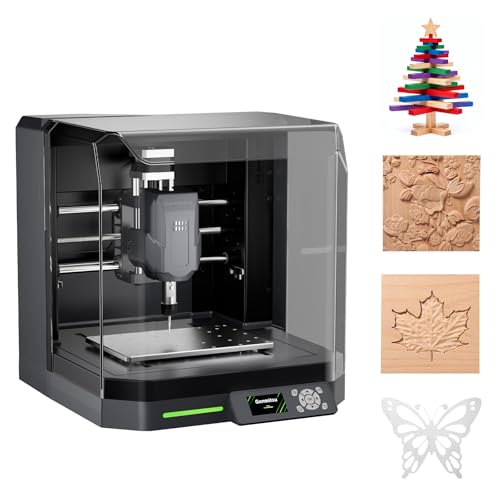
This genmitsu cubiko desktop cnc router review covers a pre-assembled machine built for beginners. It features a compact 13 x 13 x 12.5-inch footprint and weighs 24.4 pounds. The unit includes an integrated enclosure to contain debris and reduce noise. You can control it via the Genmitsu App over WiFi or use compatible PC software. Auto Z-probing simplifies setup by measuring material thickness. Smart surface mapping helps maintain consistent engraving depth on uneven boards. This machine targets users who want a straightforward path from unboxing to their first project without complex assembly steps.
- Pre-assembled design for quick setup
- Integrated enclosure with auto-pause safety
- Auto Z-probing for tool height
- Smart surface mapping for PCB milling
- WiFi and App control interface
Good fit for
This router suits beginners who want a simple, enclosed workflow. It is ideal for home workshops or maker spaces where noise and debris are concerns. Users who create projects in wood, acrylic, PCB, and soft plastics will appreciate the ±0.1 mm positioning accuracy. The auto Z-probing and smart surface mapping features help those who struggle with manual leveling. If you prefer app-based control and want to skip complex assembly, this machine fits your needs.
Who can skip it
You should look elsewhere if you need high-volume industrial production. The enclosed structure limits the size of materials you can process, as the build area is fixed at 13 inches square. Users requiring open-frame access for large sheets will find this too restrictive. Additionally, if you prefer manual control over digital interfaces, the reliance on the Genmitsu App and WiFi may not suit your workflow. This is a desktop unit, not a heavy-duty industrial tool.
Verdict
The Genmitsu Cubiko offers a safe, easy entry point for beginners with its pre-assembled design and smart features. It is best for small-scale projects in wood, acrylic, and PCBs.
Key specs explained for Cubiko
13 x 13 x 12.5 inches
This compact footprint fits easily on standard desks or small workbenches. You can place it in home offices or tight maker spaces without needing a large industrial floor area. When comparing machines, this size suits users who want a desktop solution rather than a bulky floor-standing unit. It balances a usable build volume with a small physical presence.
24.4 pounds
The weight provides stability during cutting operations to reduce vibration. You can move it between rooms with relative ease, unlike heavier industrial routers. This mass helps keep the machine steady when milling wood or acrylic. When shopping, compare this to lighter kits that may require external bracing for similar precision during operation.
Enclosed structure
The integrated cover contains chips and debris while lowering operating noise. Opening the lid automatically pauses the machine for safety. This feature makes it suitable for indoor environments like home workshops. When comparing to open-frame routers, this enclosure offers a cleaner workspace and better protection for the user during extended carving or milling sessions.
App Control via WiFi
You can manage jobs wirelessly using the Genmitsu App or compatible PC software. This flexibility allows you to start projects without being tethered directly to the machine. It simplifies the workflow for beginners who want remote monitoring. When comparing interfaces, this wireless option offers more convenience than models requiring direct USB connections for every operation.
Design and build overview
According to the listing, the Genmitsu Cubiko is a pre-assembled desktop CNC router designed for beginners. Its compact dimensions measure 13 inches wide, 13 inches long, and 12.5 inches high. This footprint allows the unit to fit on standard desks or small workbenches. You do not need a large industrial floor area to operate it. The machine weighs 24.4 pounds, making it stable enough for desktop use while remaining portable. This weight distribution helps minimize vibration during operation.
The Cubiko features an integrated enclosure that surrounds the work area. This design choice contains chips and debris while reducing operating noise. Opening the cover automatically pauses the machine, adding a layer of protection during use. This layout makes it suitable for home workshops and maker spaces where space and noise are concerns. You can place it in tighter environments without worrying about scattered material or loud running sounds.
Control is handled through the Genmitsu App via WiFi, or through compatible PC software. You can also use offline control methods. This flexible control interface means you can manage projects from your phone or computer. The enclosed structure and smart controls simplify the workflow for new users. You can start creating projects in wood, acrylic, and PCB materials without complex setup procedures.
Setup and everyday use guide
The Genmitsu Cubiko is designed to skip the lengthy assembly typical of traditional CNC kits. It arrives pre-assembled, which allows you to move from unboxing to your first project with a simpler setup process. This approach helps beginners start creating faster without dealing with complex mechanical construction.
For daily operation, the machine includes an integrated enclosure. This feature helps contain chips and debris while reducing operating noise, making it suitable for home workshops or maker spaces. For safety, opening the cover automatically pauses the machine during use.
Setup is further simplified by auto Z-probing. Instead of manually finding the Z-zero point, you enter your material thickness, and the machine automatically sets the tool height. This removes one of the most important and tedious setup steps before engraving, carving, or milling.
The Cubiko supports WiFi and app control for flexible workflow management. You can control the machine through the Genmitsu App, WiFi, compatible PC software, or offline control. This variety of interfaces lets you choose the method that fits your desktop CNC workflow best.
In terms of performance, the machine offers ±0.1 mm positioning accuracy. It is compatible with wood, acrylic, PCBs, plastics, and suitable soft metals. A smart surface mapping feature measures multiple points across the work surface to compensate for small height variations. This helps maintain consistent engraving depth for PCB traces and other precision projects on uneven surfaces.
Before you buy Cubiko
You need to check what materials you plan to use. The listing says it handles wood, acrylic, PCBs, plastics, and soft metals. Verify that your stock fits within the 13 by 13 inch working area. You must also confirm your computer has WiFi for app control. The machine relies on the Genmitsu App and compatible PC software. You should have a stable network connection nearby. Keep the enclosure clean to maintain accuracy. Dust can affect the auto Z-probing sensor. Store your bits properly to prevent rust. This unit sits among 1 other options in our 3D Printers & Laser Engravers guide. It suits those who want a tidy, enclosed workspace. It is not for heavy industrial milling. You should compare its ±0.1 mm accuracy against larger routers. If you need wider beds, look elsewhere. This model is for precise, smaller projects. You will need to manage debris regularly. The enclosure helps, but it is not sealed. You should wear safety glasses even with the cover down. Check your local voltage requirements before plugging it in.
Check before you buy
- Confirm your materials fit the 13×13 inch bed.
- Ensure your WiFi network is stable for app control.
- Verify your PC runs compatible control software.
- Check that your workspace has adequate ventilation.
Genmitsu Cubiko Desktop CNC
Best for: beginners needing a quiet, compact CNC
- Features
- Enclosure, Wi-Fi
- Target Audience
- Beginners
- Compatible Material
- Wood, Acrylic, PCB
- Structure
- Enclosed
- Control Interface
- App Control
- Dimensions
- 13 × 13 × 12.5 inches
The Genmitsu Cubiko is a pre-assembled desktop CNC router designed for beginners. It features an enclosed structure to contain debris and reduce noise. The machine includes auto Z-probing and smart surface mapping for PCB milling. You control it via WiFi and the Genmitsu App. With a 13-inch work area and ±0.1 mm accuracy, it handles wood, acrylic, and plastics.
- Pre-assembled for quick setup
- Integrated enclosure reduces noise
- Auto Z-probing simplifies setup
- Smart surface mapping for PCBs
- WiFi and App control
- 24.4-pound weight adds bulk
- 13-inch work area limits large projects
- App control requires WiFi connection
- You want a beginner-friendly machine
- You need a quiet desktop setup
- You mill PCBs frequently
- You need a large work area
- You prefer manual control only
- You lack WiFi access
Verdict: Genmitsu Cubiko Desktop CNC Router is a practical choice for beginners who value ease of use and noise reduction in a compact footprint.
Specifications side by side
| Spec | Genmitsu Cubiko Desktop CNC |
|---|---|
| Features | Enclosure, Wi-Fi |
| Target Audience | Beginners |
| Compatible Material | Wood, Acrylic, PCB |
| Structure | Enclosed |
| Control Interface | App Control |
| Dimensions | 13 × 13 × 12.5 inches |
| Weight | 24.4 pounds |
| Model | CUBIKO |
Frequently asked questions
Is the Genmitsu Cubiko good for beginners?
Yes, it is a practical choice for beginners who value ease of use. The machine arrives pre-assembled, skipping the complex setup typical of traditional CNC kits. This allows you to move from unboxing to your first project with a simpler process, making it ideal for those new to desktop machining.
What materials can the Cubiko cut?
The listing states it is compatible with wood, acrylic, PCBs, plastics, and soft metals. You should verify that your stock fits within the 13 by 13 inch working area before starting. This range of compatible materials makes it versatile for hobbyist projects involving signage, electronics, or small wooden components.
How quiet is the Genmitsu Cubiko?
It is designed to be a quiet option for home use. The unit features an integrated enclosure that helps contain debris and reduce noise levels. This makes it a suitable choice for beginners who need a compact CNC that can operate in shared spaces like home offices without excessive disturbance.
Does the Cubiko have Wi-Fi or app control?
Yes, the specifications list Wi-Fi and app control as key features. You can manage the machine using a dedicated application rather than relying solely on direct computer connections. This wireless capability adds convenience for users who want to send jobs to the router from their mobile devices or tablets.
What is the size of the Genmitsu Cubiko?
The dimensions are 13 inches wide, 13 inches long, and 12.5 inches high. It weighs 24.4 pounds, making it portable enough for standard desks or small workbenches. This compact footprint allows you to place it in tight maker spaces without requiring a large industrial floor area for operation.
Is the Cubiko enclosed or open frame?
The Genmitsu Cubiko has an enclosed structure. This design choice helps keep cutting debris contained within the machine during operation. For beginners, this enclosure also contributes to a cleaner workspace and can improve safety by preventing chips and dust from scattering across your desk or surrounding area.