FLASHFORGE Creator 4-Toolhead 3D Printer Review: Specs, Pros and Cons
As Amazon Associates, we earn from qualifying purchases. This means we may receive a small commission at no extra cost to you if you click through and make a purchase.
As an Amazon Associate we earn from qualifying purchases. Links on this page are affiliate links.
This flashforge creator 4 toolhead 3d printer review covers the C5 model. It uses a CoreXY frame for rigid movement and four independent toolheads for multicolor printing. The build volume is 256x256x256mm. You get speeds up to 600mm/s. The system switches tools in seven seconds via FlashSwap. Each hotend runs its own material. This setup prevents color bleed. You can print dark to light without streaks. The printer includes one-tap bed leveling and auto XYZ offset. Sensors monitor filament tangle and runout. It is designed for batch runs and large detailed models.
- Four independent toolheads with zero-waste material printing
- 600mm/s maximum print speed on a CoreXY frame
- 256x256x256mm build volume for large parts
- 7-second tool switching via FlashSwap technology
- Auto XYZ offset with ≤0.04mm precision
Good fit for
You should choose this printer if you need multicolor parts without flushing. It suits makers who want to combine rigid and flexible materials in one job. The large build volume helps those printing detailed models. The high speed is good for batch production. Users who want remote monitoring will like the single dashboard control. It is also good for those who prefer quick setup with one-tap leveling.
Who can skip it
You should look elsewhere if you need a larger build area. The 256mm limit may be too small for big projects. If you only print single-color parts, the four toolheads are unnecessary. You might prefer a simpler machine without the extra complexity. Users wanting a smaller footprint should check the dimensions carefully. The 30.9-pound weight means it is not a portable device. It is best for fixed desktop setups.
Verdict
The Flashforge C5 offers fast, precise multicolor printing with independent toolheads. It is a solid choice for batch production and detailed large models.
Key specs explained for this printer
4 Independent Toolheads
The listing specifies four separate toolheads rather than a single mixing chamber. This setup allows each material to run through its own dedicated hotend. You can switch tools in seven seconds via FlashSwap. This enables printing dark-to-light colors without streaks or color bleed. It also lets you combine rigid and flexible materials in one job. This is ideal if you need multi-material prints without flushing waste.
CoreXY
The printer uses a CoreXY kinematic system for its movement. This design provides a rigid frame that helps maintain precision during high-speed motion. The data notes vibration compensation to support production-paced printing. This setup is beneficial for batch runs or large, detailed models. It offers a stable printing platform compared to simpler gantry systems, ensuring consistent layer adhesion even at faster speeds.
600mm/s
The maximum print speed is listed as 600 millimeters per second. This high speed allows for rapid production of parts. The rigid CoreXY frame supports this pace by reducing vibration artifacts. You get precise parts delivered at a faster rate. This spec is relevant for users who prioritize throughput and efficiency. It suggests the printer is suitable for time-sensitive projects or larger volume output compared to standard speed printers.
256x256x256mm
The build volume is 256 by 256 by 256 millimeters. This cubic space defines the maximum size of objects you can print in a single piece. It is sufficient for medium-sized detailed models or multiple smaller parts. You can arrange layouts to maximize this volume. This size is practical for hobbyists and small teams who need decent capacity without requiring an industrial-scale machine footprint.
One tap bed leveling
The system features a one-tap bed leveling function. This simplifies the initial setup process by automating the bed calibration. The listing also mentions auto XYZ offset with a precision of 0.04mm or better. Sensors monitor filament tangle, runout, and first layer quality. This means you can unbox, plug in, and print with minimal manual adjustment, reducing setup friction for new users.
Design and build details
According to the listing, the C5 model measures 16.1 inches in length, 17.2 inches in width, and 18.3 inches in height. The unit weighs 30.9 pounds. These dimensions define the footprint you need on your workbench. The CoreXY frame provides a rigid structure. This design minimizes vibration during high-speed operations. You benefit from stable movement when printing large or detailed parts.
The build volume is 256x256x256mm. This cubic space accommodates medium-sized batches. The printer uses four independent toolheads. Each material runs through its own dedicated hotend. You can switch tools in seven seconds via FlashSwap. This layout allows you to combine rigid and flexible materials in a single job. You avoid color bleed between layers.
The listing mentions a PEI flex plate for the build surface. This finish helps with effortless part removal. One tap bed leveling simplifies setup. Auto XYZ offset fine-tunes alignment to within 0.04mm. Sensors monitor filament tangle and runout. You get a system that prioritizes consistent output. The design supports production pace without complex manual adjustments. You can trust the physical layout to handle multicolor tasks efficiently.
Setup and daily use guide
The listing states the printer is ready to print out of the box. You simply unbox the unit, plug it in, and start. Setup involves a one-tap bed leveling process. The system also performs auto XYZ offset adjustments with a tolerance of 0.04mm or less. This fine-tunes the alignment without manual intervention. Sensors monitor filament tangle, runout, and first layer quality during this phase. These automated steps reduce the initial configuration time. Daily use relies on the four independent toolheads. You can print dark-to-light colors without streaks. The system switches tools in seven seconds via FlashSwap. This allows you to combine rigid and flexible materials in a single job without flushing. Maintenance is quick. You can change the nozzle in thirty seconds without disassembling the hotend. The PEI flex plate aids in effortless part removal. Remote management is handled through a single dashboard. You can view live status and filament data for each connected printer. The interface lets you organize devices by location. You can remotely pause or adjust prints as needed. This setup supports batch runs and large, detailed models. The rigid CoreXY frame and vibration compensation help maintain precision at speeds up to 600mm/s. You get consistent results for production-paced tasks. The build volume of 256x256x256mm provides ample space for these projects. The system is designed for straightforward operation and efficient material usage.
Before You Buy This Printer
Before you buy, check your filament compatibility. This unit supports rigid and flexible materials across four toolheads. Ensure your spools fit the automatic sensors for tangle and runout detection. You need adequate ventilation for multi-material printing, especially if using flexible filaments that may emit odors. The 256x256x256mm build volume suits medium batches, but large single pieces require rethinking your workflow. Keep spare nozzles handy. The quick-change system saves time, but having backups prevents downtime. Verify your space for the 16.1 by 17.2 by 18.3-inch footprint. Consider how this fits with your existing 1 printers in 2026. If you need remote monitoring, the smart dashboard helps, but ensure your network supports it. This printer targets users who value speed and color accuracy over simplicity. It demands more setup attention than basic models but rewards you with professional-grade output. Keep your workspace clean to maintain the precision of the CoreXY frame.
Check before you buy
- Verify filament types fit the four independent toolheads
- Check ventilation for flexible material printing
- Ensure network supports remote dashboard monitoring
- Confirm workspace fits 16.1 by 17.2 by 18.3-inch footprint
- Keep spare nozzles for quick maintenance
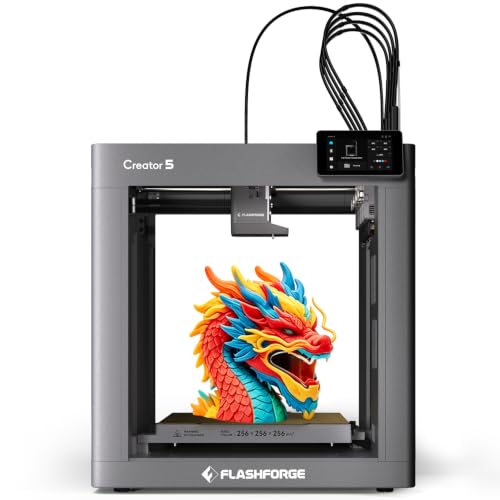
FLASHFORGE Creator 4-Toolhead 3D Printer
Best for: multicolor batch production and remote monitoring
- Build Volume
- 256x256x256mm
- Max Print Speed
- 600mm/s
- Printing Technology
- CoreXY
- Multicolor Capacity
- 4 Independent Toolheads
- Bed Leveling
- One tap bed leveling
- Printing Speed
- 600 mm/s
The Flashforge Creator 5 uses a CoreXY frame with four independent toolheads for multicolor printing. It reaches speeds up to 600mm/s and offers a 256x256x256mm build volume. The system includes one-tap bed leveling and auto XYZ offset. You get remote control via a single dashboard. This printer suits users who need batch production capabilities and large, detailed models without color bleed.
- Four independent toolheads prevent color bleed
- Prints at speeds up to 600mm/s
- 256x256x256mm build volume for large models
- Auto XYZ offset ensures precision
- Remote dashboard for live status monitoring
- 256mm build volume is smaller than larger industrial options
- Weighs 30.9 pounds, adding bulk to your workspace
- 600mm/s speed is lower than high-end production printers
- You need multicolor prints without flushing
- You want to print large detailed models
- You require remote monitoring capabilities
- You need a build volume larger than 256mm
- You prefer a lighter, more portable unit
- You only print single-color rigid materials
Verdict: Flashforge Creator 5 256mm CoreXY delivers precise multicolor output for users who value batch production and remote management over maximum speed or size.
Specifications side by side
| Spec | FLASHFORGE Creator 4-Toolhead 3D Printer |
|---|---|
| Build Volume | 256x256x256mm |
| Max Print Speed | 600mm/s |
| Printing Technology | CoreXY |
| Multicolor Capacity | 4 Independent Toolheads |
| Bed Leveling | One tap bed leveling |
| Printing Speed | 600 mm/s |
| Features | Multi-Color Printing |
| Dimensions | 16.1 × 17.2 × 18.3 inches |
| Weight | 30.9 pounds |
| Color | C5 |
| Model | C5 |
Frequently asked questions
Does the Flashforge Creator 4 support multi-color printing?
Yes, this printer features four independent toolheads for multi-color printing. The system uses FlashSwap to switch tools in seven seconds. This allows you to print with four different materials simultaneously. You do not need a mixing chamber. Each material runs through its own dedicated hotend for precise color changes.
What is the build volume of this 3D printer?
The build volume is 256x256x256mm. This cubic space accommodates medium-sized models. The printer uses a CoreXY frame to ensure rigid movement during these prints. You can fit a variety of objects within this volume without exceeding the machine's physical limits.
How fast can this Flashforge printer print?
The listing specifies printing speeds up to 600 mm/s. This high speed helps reduce production time for batch jobs. The CoreXY design supports these rapid movements while maintaining precision. You get faster output without sacrificing the quality of the final piece.
What are the dimensions of the Flashforge Creator 4?
The unit measures 16.1 inches in length, 17.2 inches in width, and 18.3 inches in height. These dimensions define the footprint you need on your workbench. The device weighs 30.9 pounds. Ensure you have enough space for these measurements plus clearance for operation.
Is this printer ready to use out of the box?
Yes, the listing states the printer is ready to print out of the box. You simply unbox the unit, plug it in, and start. Setup involves a one-tap bed leveling process. The system also performs auto XYZ offset adjustments. This minimizes initial configuration time.
What filament types are compatible with this machine?
This unit supports rigid and flexible materials across all four toolheads. You must ensure your spools fit the automatic sensors for tangle and runout detection. Adequate ventilation is recommended, especially for flexible filaments that may emit odors. Check your filament compatibility before starting a print.
How does the tool switching mechanism work?
The printer uses four separate toolheads rather than a single mixing chamber. You can switch tools in seven seconds via FlashSwap. This setup allows each material to run through its own dedicated hotend. The process is automated, enabling seamless multicolor output during a single print job.