ELEGOO Centauri Carbon 2 Combo 3D Printer Review: Specs, Pros and Cons
As Amazon Associates, we earn from qualifying purchases. This means we may receive a small commission at no extra cost to you if you click through and make a purchase.
As an Amazon Associate we earn from qualifying purchases. Links on this page are affiliate links.
This elegoo centauri carbon 2 combo 3d printer review focuses on a machine built for speed and color. It features a CoreXY system that supports print speeds up to 500 mm/s. The build volume measures 256x256x256mm, offering a compact footprint for desktop use. You get four-color printing via the CANVAS system, which handles filament switching automatically. This setup targets users who want high-quality, multi-material output without manual intervention. The printer includes 1-click auto leveling to simplify your workflow. It is designed for those who prioritize rapid production and detailed, vibrant results in a small space.
- 500 mm/s max print speed with 20,000 mm/s² acceleration
- 4-color CANVAS system with smart filament detection
- 256x256x256mm build volume
- CoreXY structure for stable high-speed printing
- 1-click auto leveling for quick setup
Good fit for
This printer suits hobbyists and small studios who need fast, colorful prints. The 4-color system is ideal for detailed models, miniatures, or prototypes requiring multiple hues. Users who value speed will appreciate the 500 mm/s capability and rigid aluminum frame. The compact 256mm cube fits well on standard desks. If you want automated calibration and seamless connectivity to streamline your workflow, this model aligns with your needs. It is best for those who prioritize vibrant, multi-material output over massive single-color builds.
Who can skip it
You should look elsewhere if you need to print very large parts. The 256x256x256mm build volume limits the size of your objects. Users who primarily print large, single-color functional parts may find this space too restrictive. If you do not need multicolor capabilities, the extra complexity of the CANVAS system might not be necessary for your projects. Additionally, if you prefer manual control over automated calibration and monitoring, this fully automated approach may feel limiting. Consider a larger, single-toolhead printer if volume is your primary concern.
Verdict
The ELEGOO Centauri Carbon 2 Combo is a fast, compact printer designed for users who need reliable 4-color output and high speed. It is a strong choice for detailed, vibrant projects within a small footprint.
Key specs explained for you
Max Print Speed: 500mm/s
This listing states the printer moves the print head at speeds up to 500 millimeters per second. High speed reduces the time needed to finish large or complex models. You benefit from faster turnaround times for prototypes or batch production. When shopping, compare this figure to standard FDM printers that often cap around 150 to 200 mm/s. Faster speeds require a rigid frame to maintain layer adhesion and surface quality without wobble or defects.
Build Volume: 256x256x256mm
The build area measures 256 by 256 by 256 millimeters. This cubic space allows you to print medium-sized objects in one piece. It fits well on most desktops without requiring a dedicated floor stand. You should check if your common models exceed these dimensions. If you need larger parts, look for printers with 300mm or greater axes. This volume is ideal for functional parts, miniatures, and small mechanical assemblies that do not require industrial scale.
Multicolor Capacity: 4-color
The data indicates support for four distinct colors or materials simultaneously. You can print multi-colored objects without manual filament swaps during the job. This feature suits users who want vibrant models or functional parts with color-coded components. Compare this to single-extruder machines that require post-processing painting. Four-color systems often use a switching mechanism to manage filament flow. Ensure your software supports multi-color slicing for best results.
Printing Technology: CoreXY
This printer uses a CoreXY motion system for the X and Y axes. This configuration moves the print head rather than the entire gantry, reducing inertia. You get smoother movements and higher acceleration capabilities. This technology is common in high-performance desktop printers. When comparing, note that Cartesian systems move the bed or head separately. CoreXY allows for faster printing and better consistency at high speeds due to the balanced mechanical design.
Bed Leveling: 1-click auto leveling
The listing specifies a one-click automatic bed leveling process. The printer calibrates the nozzle distance to the build plate without manual adjustment. You save time and reduce the risk of failed prints due to poor first layers. This feature is essential for consistent adhesion across the entire build surface. Compare this to manual screw adjustment, which requires patience and tools. Auto-leveling ensures the bed remains parallel to the nozzle throughout the print job.
Design and build quality
The listing describes the ELEGOO Centauri Carbon 2 Combo as a rigid aluminum frame machine. This structural choice supports the high-speed CoreXY system by minimizing vibration during rapid movements. A stiff frame helps maintain print accuracy when the print head travels at 500 mm/s. You get a durable chassis that aims to keep layers aligned even at high acceleration rates of 20,000 mm/s².
In terms of physical footprint, the printer measures 19.7 inches in width, 18.9 inches in length, and 29.3 inches in height. It weighs 42.7 pounds. These dimensions indicate a substantial desktop unit. The size accommodates a 256x256x256mm build volume while leaving room for the integrated CANVAS multicolor system. The weight suggests it stays stable on a workbench without excessive movement.
The listing notes a gray color finish for the exterior. The design includes a fully automated calibration process. You benefit from one-click auto-leveling, which simplifies setup. The layout integrates smart filament detection and auto-refill capabilities. This approach reduces manual intervention during long prints. The overall build prioritizes a streamlined workflow. You can load material and start printing with minimal adjustment. The physical design supports the machine's focus on speed and multicolor versatility without requiring constant user monitoring.
Setup and daily operation guide
The ELEGOO Centauri Carbon 2 Combo simplifies your initial setup through fully automated calibration. The listing highlights 1-click auto leveling, which removes the manual effort of adjusting the build plate. You do not need to manually fine-tune the bed height before starting. This automation allows you to load filament and begin printing with minimal friction. The process is designed to be straightforward, letting you tap print and proceed without complex pre-flight checks.
Daily use centers on the integrated CANVAS system for multicolor printing. You can engage 4-color printing with instant color switching. The system includes smart filament detection and auto refill features. These specs imply that tangle detection and seamless material changes occur automatically. You maintain smooth, hassle-free multicolor output without constant intervention. The printer also supports a wide range of materials, from basic to engineering-grade. Advanced process and temperature control manage these diverse filaments for you.
The CoreXY structure and rigid aluminum frame support speeds up to 500 mm/s and acceleration of 20,000 mm/s². Active vibration compensation works in tandem with smart calibration to ensure crisp details at high speeds. You benefit from stable prints even when the machine operates at its maximum velocity. The ELEGOO ecosystem provides seamless connectivity, streamlining your workflow. You can monitor and manage prints through connected tools. The compact build volume of 256x256x256mm fits well on most desktops. This setup allows you to focus on design rather than mechanical troubleshooting.
Before You Buy
The ELEGOO Centauri Carbon 2 Combo requires a stable workspace due to its 42.7-pound weight and 19.7-inch width. Its 256x256x256mm build volume suits small to medium parts. You should verify that your filament spools fit the auto-refill system. The 4-color CANVAS setup demands specific nozzle and tube compatibility for seamless switching. Regular maintenance includes cleaning the nozzle and checking the smart filament detection sensors. This model fits alongside other CoreXY printers in our 1 guide. It stands out for high-speed CoreXY movement and automated calibration. Unlike entry-level FDM machines, it offers engineering-grade material versatility. You benefit from active vibration compensation for sharper details. Consider this if you prioritize speed and multicolor output over massive build sizes. It complements laser engravers for mixed-media projects. Ensure your computer meets the connectivity requirements for the ELEGOO ecosystem tools. This setup reduces manual tweaking, allowing you to focus on design rather than machine tuning.
Check before you buy
- Verify filament spool compatibility with the auto-refill system.
- Check nozzle and tube specs for 4-color switching.
- Ensure workspace supports the 42.7-pound machine weight.
- Confirm computer meets ELEGOO ecosystem connectivity needs.
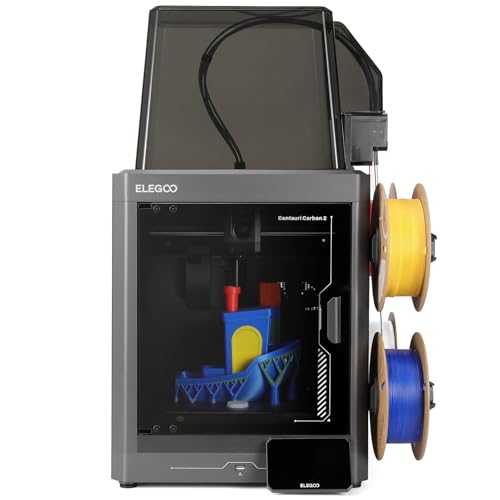
ELEGOO Centauri Carbon 2 Combo 3D Printer
Best for: fast multicolor printing
- Build Volume
- 256x256x256mm
- Max Print Speed
- 500mm/s
- Printing Technology
- CoreXY
- Multicolor Capacity
- 4-color
- Bed Leveling
- 1-click auto leveling
- Printing Speed
- 500 mm/s
The ELEGOO Centauri Carbon 2 Combo is a 256x256x256mm CoreXY printer designed for speed and multicolor output. It reaches 500mm/s with 20,000mm/s² acceleration. The system supports 4-color printing via CANVAS with auto-refill and tangle detection. It includes 1-click auto leveling and active vibration compensation. This machine suits users who want fast, detailed prints across various materials without manual calibration.
- 500mm/s max print speed
- 4-color multicolor printing
- 1-click auto leveling
- Active vibration compensation
- 256x256x256mm build volume
- 42.7 pounds weight
- You need fast, high-quality prints
- You want multicolor capability
- You require a large build volume
- You prefer a lighter machine
Verdict: The ELEGOO Centauri Carbon 2 Combo fits users who prioritize speed and multicolor capability in a compact footprint. It is ideal for makers who want automated calibration and vibrant prints without manual intervention.
Specifications side by side
| Spec | ELEGOO Centauri Carbon 2 Combo 3D Printer |
|---|---|
| Build Volume | 256x256x256mm |
| Max Print Speed | 500mm/s |
| Printing Technology | CoreXY |
| Multicolor Capacity | 4-color |
| Bed Leveling | 1-click auto leveling |
| Printing Speed | 500 mm/s |
| Features | Auto Leveling, Multi-Color Printing, CoreXY Structure |
| Dimensions | 18.9 × 19.7 × 29.3 inches |
| Weight | 42.7 pounds |
| Size | Centauri Carbon 2 Combo |
| Color | Gray |
| Model | US-EL-3DF-CC2C |
Frequently asked questions
What is the build volume of the ELEGOO Centauri Carbon 2 Combo?
The build volume is 256x256x256mm. This cubic space allows you to print small to medium-sized parts efficiently. It fits well on most desktops while providing enough room for detailed models. The compact dimensions balance size with usability for hobbyists.
Does this printer support multicolor printing?
Yes, it supports multicolor printing. The system is designed for vibrant, multi-hued outputs without manual intervention. You can create complex color models automatically. This feature is ideal for makers who want detailed results without switching filaments by hand.
How fast can the ELEGOO Centauri Carbon 2 print?
It prints at speeds up to 500 mm/s. This high speed significantly reduces the time needed for large or intricate projects. The CoreXY structure enables these rapid movements while maintaining stability. You benefit from faster turnaround times for your prints.
What is the weight of the ELEGOO Centauri Carbon 2 Combo?
The unit weighs 42.7 pounds. This substantial weight helps stabilize the machine during high-speed operations. It minimizes vibration, which is crucial for maintaining print accuracy. You should ensure your workspace can support this mass securely.
Is the ELEGOO Centauri Carbon 2 easy to set up?
Yes, it features fully automated calibration. The one-click auto-leveling function removes the need for manual bed adjustments. You do not need to fine-tune the height yourself. This simplifies the initial setup process, allowing you to start printing quickly.
What kind of structure does the ELEGOO Centauri Carbon 2 use?
It uses a CoreXY structure. This design supports high-speed printing by coordinating the X and Y axes efficiently. The system works with a rigid aluminum frame to reduce vibration. This combination ensures precise movements even at maximum speed.
What are the physical dimensions of the ELEGOO Centauri Carbon 2 Combo?
The dimensions are 19.7 inches in width, 29.3 inches in height, and 18.9 inches in length. These measurements define its footprint on your desk. The compact design fits well in limited spaces while housing the necessary components for automated printing tasks.