Creality K2 Pro Multicolor 3D Printer Review: Specs, Pros and Cons
As Amazon Associates, we earn from qualifying purchases. This means we may receive a small commission at no extra cost to you if you click through and make a purchase.
As an Amazon Associate we earn from qualifying purchases. Links on this page are affiliate links.
This creality k2 pro multicolor 3d printer review covers the machine’s core capabilities. It is a high-speed desktop printer designed for complex, multi-material projects. The device features a 300 x 300 x 300 mm build volume, allowing you to print large prototypes or batch small parts efficiently. It also supports up to 16 colors via the CFS system, enabling vibrant, multi-material output. With speeds reaching 600 mm/s and an active heated chamber, it targets users who need speed and material stability. This listing details the specs that drive these performance metrics.
- Up to 16-color printing with the CFS Smart Filament System
- 600 mm/s max print speed with 20,000 mm/s² acceleration
- Active heated chamber maintaining temperatures up to 60 °C
- 300 x 300 x 300 mm build volume for large parts
- Dual AI cameras for monitoring and real-time flow tuning
Good fit for
This printer suits ambitious creators, professionals, and industrial users who require large batch production or complex multi-material designs. The 300 mm cube volume helps you fit multiple items in one print, saving time. The active chamber heating makes it ideal for engineering materials like ASA, PPA, and carbon-fiber composites that warp easily. If you need high throughput with minimal manual intervention, the auto-leveling and AI monitoring features reduce setup and failure risks significantly.
Who can skip it
You should look elsewhere if you only print small PLA models and do not need large build volumes. The machine’s size and weight make it less suitable for small desks or portable setups. If you prefer manual bed leveling or do not want to manage filament moisture, the CFS system adds complexity. Users seeking a basic, entry-level machine may find the advanced features and price point unnecessary for simple hobbyist projects.
Verdict
The Creality K2 Pro Combo delivers high-speed, multi-color printing with a large volume and heated chamber. It is a strong choice for users who need professional-grade material support and automation.
Creality K2 Pro Key Specs
Build Volume: 300 x 300 x 300 mm
This cubic space lets you print large single objects or batch-produce smaller parts. You save time by fitting multiple items on one bed. Compare this size to smaller 220mm printers if you need bigger prototypes. It suits professionals making detailed models or hobbyists creating larger functional pieces without assembly.
Max Print Speed: 600 mm/s
This speed reduces production time significantly for standard prints. The machine uses linear rails and servo motors to maintain accuracy at high velocities. You get finished parts faster than with slower desktop printers. Check acceleration rates too, as they affect corner quality. This spec helps you balance speed with surface finish needs.
Multicolor Capacity: Up to 16 colors
You can print complex, multi-material objects without manual filament swaps. The system identifies filaments automatically and manages moisture. This feature is ideal for detailed miniatures or educational models. Compare it to single-extruder printers that require post-processing. It simplifies workflow for users wanting vibrant, multi-material results directly from the machine.
Enclosure Type: Active heated chamber up to 60 °C
A heated chamber stabilizes temperatures for advanced materials like ASA or PPA. This prevents warping and improves layer adhesion for engineering plastics. You get reliable results with technical filaments that fail in open frames. Compare this to unheated enclosures if you primarily use PLA. It ensures consistent quality for professional-grade materials.
Bed Leveling: Auto leveling
The printer probes specific areas where your model will print, not the whole bed. This reduces setup time and ensures first-layer adhesion. You avoid manual adjustments and guesswork. Compare this targeted approach to full-bed probing systems. It offers a faster, intelligent setup process while maintaining print reliability for every job.
Design and Build Overview
The listing describes the Creality K2 Pro Combo as a substantial desktop unit. Its dimensions are 20 inches wide, 17 inches long, and 18 inches high. The total weight is 61.7 pounds. This mass suggests a stable frame that resists vibration during high-speed operations. You need a dedicated workspace that can support this footprint and load. The black finish is practical for a professional or educational environment, hiding minor scuffs from daily use. The machine includes an active heated chamber capable of reaching 60 °C. This enclosure design helps manage temperature for engineering materials like ASA or PPA-CF. It prevents warping on large prints by keeping the build area consistent. You benefit from stable prints when working with sensitive polymers that cool unevenly in open environments.
According to the listing, the printer uses a direct drive extruder with hardened steel gears. This layout allows you to print abrasive filaments, such as carbon fiber composites, without clogging. The system supports up to 16 colors via the CFS Smart Filament System. This multicolor capacity requires careful filament management but offers significant creative flexibility. The unit features auto leveling, which probes only where your model will print. This reduces setup time and ensures reliable first-layer adhesion. You do not need to manually adjust the bed before every job. The controls are integrated into Creality OS, with support for remote monitoring via Wi-Fi or LAN. You can manage prints from a distance, checking status through the dual AI cameras. The design prioritizes automation and material versatility for users who need consistent, high-quality outputs without constant intervention.
Setup and daily operation details
You begin setup by connecting the printer to your network via Wi-Fi or LAN. This connectivity enables remote monitoring and OTA updates through Creality OS. The system integrates with Creality Print and Cura software for streamlined file management. Physical installation is simplified by intelligent auto-leveling. The machine probes only the areas where your model will print. This targeted approach reduces initial calibration time while ensuring consistent first-layer adhesion. The package includes a CFS Smart Filament System and Hyper RFID filament. This combination allows for automatic filament identification and intelligent feeding. You benefit from moisture-proof storage and hassle-free material handling. Daily operation focuses on speed and stability. The printer supports up to 600 mm/s print speeds with linear rails. This hardware configuration helps maintain precision during rapid movements. The active heated chamber maintains temperatures up to 60°C. This feature prevents corner warping when printing technical materials like ASA or PPA. You can print up to 16 colors using the CFS system. The dual AI cameras assist in real-time management. The chamber camera monitors print status and detects failures. The nozzle camera auto-tunes flow rate and detects blockages. The direct drive extruder handles abrasive filaments like carbon fiber. It features automatic filament cutting and a quick-swap hotend. Power-loss recovery ensures your prints remain safe during interruptions. The system supports a wide range of materials, from standard PLA to composite filaments. This versatility allows you to switch between projects without changing hardware components. Remote control via WiFi or LAN lets you manage jobs from another room. You can start, stop, or pause prints without being at the machine. The integrated sensors provide reliable performance for complex multi-material jobs.
Before You Buy Checklist
You need to verify your workspace can hold this 20 by 17 by 18 inch unit. The 61.7 pound weight requires a sturdy table to dampen vibrations during 600 mm/s runs. Check your filament storage, as the CFS system needs dry conditions to prevent clogs. Ensure your computer has enough RAM for AI camera processing and large 300 mm files. Confirm your local power outlet supports the active heated chamber, which draws significant power to maintain 60°C. Compare this model against other high-speed options if you rarely use multi-color printing. You will need to manage software updates via Creality OS and Cura. Plan for regular nozzle cleaning, especially when printing carbon fiber composites. This printer suits users who value speed and complex material handling over compact size.
Check before you buy
- Measure your desk space for the 20-inch width and 61.7-pound weight.
- Verify your room temperature can handle the 60°C active chamber heat.
- Check if your PC meets AI camera processing requirements.
- Ensure you have dry filament storage for the CFS system.
- Confirm software compatibility with Creality Print or Cura.
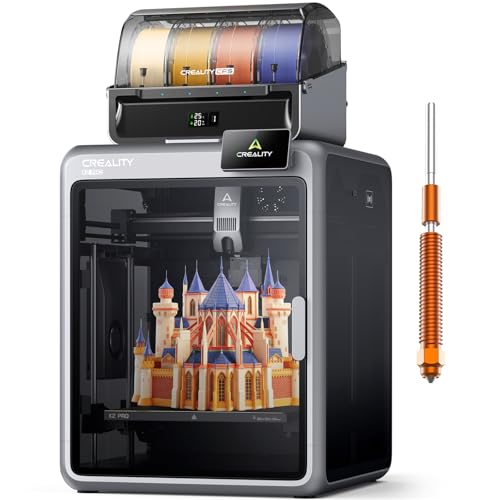
Creality K2 Pro Multicolor 3D Printer
Best for: Large, high-speed, multi-material professional prints
- Build Volume
- 300 x 300 x 300 mm
- Max Print Speed
- 600 mm/s
- Multicolor Capacity
- Up to 16 colors
- Enclosure Type
- Active heated chamber up to 60 °C
- Bed Leveling
- Auto leveling
- Connectivity
- Wi-Fi, LAN
The Creality K2 Pro Combo offers a 300 x 300 x 300 mm build volume and speeds up to 600 mm/s. It supports multicolor printing with up to 16 colors using the CFS system. An active heated chamber maintains temperatures up to 60 °C for stable results with engineering materials. Dual AI cameras monitor the process and auto-tune flow rates. This model suits users needing high-speed production and large, multi-material prints.
- 600 mm/s maximum print speed with 20,000 mm/s² acceleration
- Active heated chamber reaches 60 °C for material stability
- Supports up to 16-color multicolor printing via CFS
- Dual AI cameras for real-time flow tuning and monitoring
- 61.7 pounds weight requires sturdy placement
- 20 x 18 x 17 inch footprint occupies significant desk space
- You need to print large prototypes in a single batch
- You require high-speed production for multiple small parts
- You work with engineering filaments like ASA or PPA-CF
- You have limited workspace for a 20-inch wide machine
- You only print small PLA models and need a compact unit
- You prefer manual bed leveling over automated systems
Verdict: The Creality K2 Pro 300mm 600mm/s is a high-capacity machine for professionals who need speed and large build volumes. It fits users managing complex, multi-material projects that demand stable chamber temperatures.
Specifications side by side
| Spec | Creality K2 Pro Multicolor 3D Printer |
|---|---|
| Build Volume | 300 x 300 x 300 mm |
| Max Print Speed | 600 mm/s |
| Multicolor Capacity | Up to 16 colors |
| Enclosure Type | Active heated chamber up to 60 °C |
| Bed Leveling | Auto leveling |
| Connectivity | Wi-Fi, LAN |
| Printing Speed | 600 mm/s |
| Features | Auto Leveling, Camera, Multi-Color Printing, AI Camera |
| Dimensions | 17 × 20 × 18 inches |
| Weight | 61.7 pounds |
| Color | black |
| Model | K2 Pro Combo |
Frequently asked questions
Does the Creality K2 Pro support multi-color printing?
Yes, this model includes multi-color printing capabilities. It features a dedicated system for handling multiple filaments simultaneously. This allows you to create complex, multi-material projects without manual filament swaps. The hardware supports seamless color changes during a single print job.
What is the maximum printing speed of the K2 Pro?
The Creality K2 Pro reaches a maximum printing speed of 600 mm/s. This high velocity enables faster production of prototypes and parts. You benefit from reduced print times for large objects while maintaining layer stability. The speed is suitable for professional workflows requiring quick turnarounds.
Is the K2 Pro equipped with auto-leveling?
Yes, the printer includes auto-leveling functionality. This feature simplifies the initial setup process by automatically adjusting the bed height. You do not need to manually level the build plate before every print. This ensures consistent first layers and improves overall print reliability.
Does the Creality K2 Pro have a camera?
Yes, the device comes with an integrated camera. It also features an AI camera for enhanced monitoring. You can track print progress remotely through the Creality OS interface. This allows you to detect potential issues early without being physically present at the machine.
What is the build volume of the K2 Pro?
The build volume is 300 x 300 x 300 mm. This cubic space accommodates large single objects or multiple smaller parts. You can batch-produce components to save time. The size is ideal for users managing complex projects that require substantial physical dimensions.
How heavy is the Creality K2 Pro?
The unit weighs 61.7 pounds. This mass contributes to frame stability during high-speed operations. You should place it on a sturdy table to dampen vibrations. The weight helps maintain print quality when the printer runs at 600 mm/s.
What are the physical dimensions of the printer?
The dimensions are 20 inches wide, 17 inches long, and 18 inches high. You need sufficient desk or floor space to accommodate this footprint. The size classifies it as a substantial desktop unit. Ensure your workspace can hold these measurements comfortably.
Is the K2 Pro suitable for professional use?
Yes, it is designed for professional applications. The combination of high speed and large volume suits complex, multi-material projects. The stable chamber and auto-leveling features support consistent results. It fits users who manage demanding workflows requiring reliability and capacity.