Best Laser Engravers Under $3000: 15 Spec-Based Picks
As Amazon Associates, we earn from qualifying purchases. This means we may receive a small commission at no extra cost to you if you click through and make a purchase.
As an Amazon Associate we earn from qualifying purchases. Links on this page are affiliate links.
Finding the best laser engravers under $3000 requires looking at specific capabilities rather than general marketing. This guide compares 15 models based strictly on their published specifications. The top pick is the xTool P2S 55W CO2 Laser Cutter. It leads because its 29.1-inch width and 44.1-inch length provide a large format for wood and acrylic cutting. Each selection reflects the data listed on the product pages. This approach helps you decide which machine fits your workspace and material needs.
Match laser type to your materials
Your material choice dictates the necessary laser type. CO2 lasers cut wood and acrylic effectively, as seen in the xTool P2S 55W. Fiber lasers mark metal precisely, like the OMTech 30W. Diode lasers offer versatility for mixed materials. Select the technology that aligns with your primary medium to ensure clean results and efficient operation.
| # | Product | Best for | Price |
|---|---|---|---|
| 1 | xTool P2S 55W CO2 Laser Cutter Best overall | large format wood and acrylic cutting | |
| 2 | Creality Falcon2 Pro 60W Diode with IR Best infrared laser | Mixed material engraving with metal and wood | |
| 3 | OMTech 30W Fiber Laser Engraver Best budget | precise metal marking and jewelry engraving | |
| 4 | Aliencell X1 Lite 40W Laser Engraver Also great | Large format Class 1 safety and LightBurn users | |
| 5 | WTTTOOLS 20W Handheld Fiber Laser Best 20w | portable metal marking | |
| 6 | Cloudray 60W JPT MOPA Fiber Laser Engraver Also great | Portable metal color marking and deep engraving | |
| 7 | Creality Falcon T1 40W Enclosed Galvo Laser Best enclosure | Fast galvo engraving in a safe enclosure | |
| 8 | Monport 60W Fiber Laser Engraver Best premium | metal marking and industrial prototyping | |
| 9 | OMTech Maker 90W CO2 Laser Engraver with Chiller Also great | Large-format engraving and high-power cutting | |
| 10 | OMTech Maker 60W CO2 Engraver Also great | large format wood and acrylic cutting | |
| 11 | Creality Falcon T1 40W Diode Also great | Users needing enclosed safety and module swapping | |
| 12 | OMTech 60W CO2 Laser with Chiller & LightBurn Also great | large nonmetallic projects | |
| 13 | VEVOR 80W CO2 Laser Engraver 20 x 28 in Best windows | large wood and acrylic cutting projects | |
| 14 | Ovsuqu 10W UV Fiber Laser Engraver Best 10w | 3D inner crystal and glass engraving | |
| 15 | ATOMSTACK Hurricane 55W CO2 Laser Engraver Best auto focus | enclosed CO2 cutting and autofocus precision |
The best fit for you
- You want the best overall large-format cutter – xTool P2S 55W CO2 Laser Cutter – Its 55W CO2 laser and 29.1 x 44.1 inch bed handle large wood and acrylic projects.
- You need to engrave metal and wood in one machine – Creality Falcon2 Pro 60W Diode with IR – The 60W diode laser cuts wood while the 4W IR module engraves metal.
- You need precise metal marking on a budget – OMTech 30W Fiber Laser Engraver – The 30W fiber laser delivers fast, detailed marking on metal and aluminum.
- You want a Class 1 safe enclosure for home use – Aliencell X1 Lite 40W Laser Engraver – The enclosed design and 40W laser provide a safe workspace for wood and leather.

xTool P2S 55W CO2 Laser Cutter
Best for: large format wood and acrylic cutting
- Laser Power
- 55W (55000mW)
- Laser Type
- CO2
- Work Area
- 26" x 14"
- Engraving Speed
- 600mm/s
- Safety Class
- Class 4
- Compatible Material
- Wood, Metal, Acrylic, Leather, Glass, Fabric
The xTool P2S is a Class 4 desktop CO2 laser cutter and engraver with a 55W output. It features a 26" x 14" working area and engraving speeds up to 600mm/s. Dual 16MP cameras and LiDAR autofocus ensure precision. This machine suits users needing large format cutting for acrylics and wood, along with smart automation for efficient batch processing.
- 55W CO2 laser cuts 20mm acrylic in one pass
- 26" x 14" bed with 118" auto-passthrough
- Dual 16MP cameras for real-time preview
- LiDAR ranging system with 0.001" autofocus
- 600mm/s engraving speed for high productivity
- Class 4 safety rating requires strict enclosure handling
- 29.1" width and 44.1" length demand significant desktop space
- 55W power is lower than the 60W and 90W CO2 options on this list
- You need to cut thick acrylic or wood in a single pass
- You require a large 26" x 14" working area for wide projects
- You want automated autofocus and camera preview for precision
- You need a Class 1 enclosed machine for safe office use
- You require fiber laser capability for direct metal marking
- You have limited desktop space under 45 inches long
Verdict: The xTool P2S 55W CO2 Laser Cutter fits makers who prioritize large-format cutting and smart automation over maximum power. It is ideal for those with ample desk space who need precise, high-speed results on wood and acrylic.

Creality Falcon2 Pro 60W Diode with IR
Best for: Mixed material engraving with metal and wood
- Laser Power
- 60W, 4W
- Laser Type
- Diode, IR
- Safety Class
- Class 1
- Features
- Camera, Air Assist
- Compatible Material
- Wood, Metal, Acrylic, Leather
- Dimensions
- 26.1 × 22.4 × 12.9 inches
The Creality Falcon2 Pro combines a 60W diode laser for wood and acrylic with a 4W infrared module for metal. This Class 1 enclosed machine features a built-in camera for automated positioning and includes air assist. It cuts up to 22mm basswood and 30mm black acrylic in a single pass. The full metal frame and fireproof cover isolate smoke and noise. You get a safe, high-speed desktop solution for mixed-material projects.
- Includes both 60W diode and 4W IR laser modules
- Built-in camera enables automatic batch positioning
- Class 1 certified with flame detector and safety lock
- Cuts 22mm basswood and 30mm black acrylic in one pass
- IR laser power is 4W, lower than the 20W to 60W fiber lasers on this list
- Work area dimensions are not listed in the provided data
- You need to engrave metal using an included infrared module
- You want automated positioning via a built-in camera
- You require a Class 1 enclosed safety design
- You need higher power metal engraving than 4W IR provides
- You require a large work area larger than standard desktop sizes
- You prefer a dedicated fiber laser over a diode system
Verdict: The Creality Falcon2 Pro 60W Diode with IR offers a unique dual-laser setup for users needing both wood cutting and metal engraving capabilities in one enclosed unit.

OMTech 30W Fiber Laser Engraver
Best for: precise metal marking and jewelry engraving
- Laser Power
- 30W
- Laser Type
- Fiber
- Work Area
- 175 x 175 mm (6.9 x 6.9 in.)
- Engraving Speed
- 10,000 mm/s
- Safety Class
- Class 2
- Software Compatibility
- EzCad2, LightBurn
This OMTech fiber laser engraver uses a 30W solid-state source for precise marking on metals. It features a 175 x 175 mm work area and reaches engraving speeds up to 10,000 mm/s. The system includes LightBurn and EzCad2 software compatibility. You get a compact galvanometric setup ideal for jewelry and industrial workshops. The unit weighs 65 pounds and supports rotary axis connections for curved surfaces.
- 30W solid-state fiber laser source for metal engraving
- 175 x 175 mm (6.9 x 6.9 in.) work area
- High-speed galvanometric system up to 10,000 mm/s
- Compatible with LightBurn and EzCad2 software
- 4-pin port allows easy connection of a rotary axis
- Smaller 175 x 175 mm work area compared to other list options
- Lower 30W laser power than the 40W to 90W options available
- Heavier 65-pound build due to solid construction
- You need precise marking on metals and jewelry
- You require high-speed engraving for small parts
- You want LightBurn software compatibility for fiber lasers
- You need to engrave large wood or acrylic sheets
- You prefer a lighter, more portable machine
- You require higher power for cutting thicker materials
Verdict: OMTech 30W Fiber Laser Engraver fits jewelers and small business owners who need fast, precise metal marking on a compact footprint. It is a practical tool for detailed work rather than large-scale cutting.

Aliencell X1 Lite 40W Laser Engraver
Best for: Large format Class 1 safety and LightBurn users
- Laser Power
- 40W
- Work Area
- 26 x 21 inches
- Engraving Speed
- 600 mm/s
- Safety Class
- Class 1
- Software Compatibility
- LightBurn, Aliencell Space
- Features
- Rotary Roller, Air Assist, LightBurn Support
The Aliencell X1 Lite is a Class 1 enclosed laser engraver featuring a 40W diode module and a spacious 26 x 21 inch work area. It reaches engraving speeds of 600 mm/s with 20,000 mm/s² acceleration. The system includes LightBurn support and an intelligent auto-focus feature. This unit suits users needing a large bed for batch production while maintaining strict safety standards.
- Class 1 enclosed safety design with flame sensors
- Generous 26 x 21 inch work area
- Supports LightBurn and Aliencell Space software
- Intelligent auto-focus with crosshair positioning
- 40W laser power is lower than the 60W and 90W CO2 options on this list
- 65 pound weight makes it bulkier than many desktop diode units
- Rotary chuck requires a separately sold riser base for full height clearance
- You need a Class 1 enclosed machine for safe home use
- You require a large 26 x 21 inch bed for big projects
- You want LightBurn compatibility for professional design control
- You need the highest possible cutting speed available under $3000
- You prefer a lighter, more portable desktop footprint
- You want a rotary attachment included in the base price
Verdict: The Aliencell X1 Lite 40W Enclosed Laser fits makers who prioritize safety and a large workspace over raw cutting power. It is ideal for those who need a Class 1 enclosure for home environments.
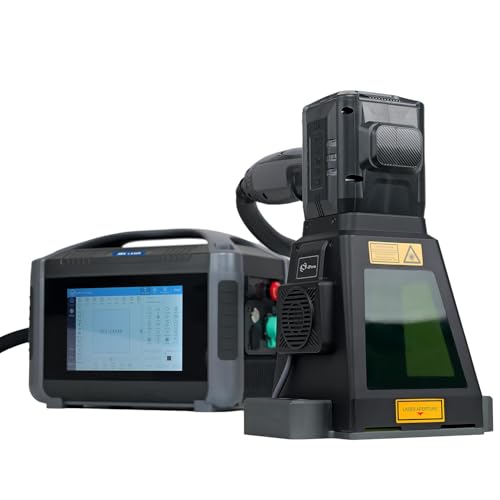
WTTTOOLS 20W Handheld Fiber Laser
Best for: portable metal marking
- Laser Power
- 20W
- Laser Type
- Fiber
- Work Area
- 100 * 100mm
- Engraving Speed
- <7000mm/s
- Safety Class
- Class 1
- Compatible Material
- Metal
This WTTTOOLS 20W Pro is a portable fiber laser engraver designed for precise marking on metal surfaces. It features a Class 1 safety rating and an OD4+ protective cover for eye safety. The unit includes a built-in fan and lighting for clearer visibility. You can use the 8-inch touchscreen to adjust parameters quickly. With a marking speed under 7000mm/s and a 100x100mm work area, it suits users needing portability and high precision for small items.
- Class 1 safety rating with OD4+ protective cover
- Portable handheld design with battery option
- 8-inch touchscreen for easy parameter adjustment
- High repeatability accuracy of 0.01mm
- Built-in fan and lighting for better visibility
- Smaller 100x100mm work area compared to desktop models
- Lower 20W power output limits depth on hard metals
- Handheld form factor requires manual steadying
- You need a portable tool for on-site metal marking
- You prioritize safety with a Class 1 rating
- You work with small metal parts requiring high precision
- You require large format engraving beyond 100mm
- You need high-power cutting capabilities for thick materials
- You prefer a stationary desktop setup for stability
Verdict: WTTTOOLS 20W Handheld Fiber Laser is ideal for professionals who need portable, high-precision marking on small metal components. Its compact size and safety features make it a practical choice for mobile workshops.

Cloudray 60W JPT MOPA Fiber Laser Engraver
Best for: Portable metal color marking and deep engraving
- Laser Power
- 60W
- Laser Type
- Fiber
- Work Area
- 110x110mm, 200x200mm
- Engraving Speed
- 10,000mm/s
- Safety Class
- Class 2
- Compatible Material
- Metal
The Cloudray CLM60F is a 60W fiber laser engraver designed for metal marking. It features a JPT MOPA source capable of 10,000mm/s speed and 100+ color markings. You get two F-Theta lenses for 110x110mm or 200x200mm work areas. The unit weighs 43 lbs and supports deep engraving up to 0.5mm with 0.01mm resolution. It suits users needing portable, high-speed metal marking with color capabilities.
- 60W JPT MOPA fiber laser source for color marking
- Fast engraving speed up to 10,000mm/s
- Two interchangeable F-Theta lenses for 110x110mm or 200x200mm areas
- Deep engraving capability up to 0.5mm depth
- High resolution accuracy of 0.01mm for intricate details
- Smaller maximum work area of 200x200mm compared to larger CO2 models on this list
- Heavier build at 43 lbs gross weight
- Class 2 safety rating requires more caution than Class 1 enclosed systems
- You need to engrave metals like stainless steel, aluminum, or brass
- You require color marking capabilities on metal surfaces
- You want a portable unit for quick, high-speed marking tasks
- You need to engrave non-metal materials like wood or acrylic
- You require a large work area larger than 200x200mm
- You prefer a fully enclosed Class 1 safety system for home use
Verdict: Cloudray 60W Fiber Laser Engraver delivers fast, precise color marking on metals. It fits professionals needing portable, high-resolution metal engraving with interchangeable lens options.

Creality Falcon T1 40W Enclosed Galvo Laser
Best for: Fast galvo engraving in a safe enclosure
- Laser Power
- 40W
- Laser Type
- Diode
- Engraving Speed
- Up to 10,000 mm/s
- Safety Class
- Class 1
- Software Compatibility
- Falcon Design Space
- Features
- Enclosure
The Creality Falcon T1 is a Class 1 enclosed laser engraver featuring a 40W diode module and galvo scanning. It reaches engraving speeds up to 10,000 mm/s for high-volume work. The system supports quick-swap modules, allowing you to upgrade to fiber or UV sources later. It includes AI auto-focus and flame detection for safety. This machine suits makers who need speed and a secure, enclosed workspace.
- Class 1 safety rating with full enclosure
- Galvo speed up to 10,000 mm/s
- 40W diode laser for thick materials
- 15-second quick-swap modular design
- AI visual auto-focus system
- 40W power is lower than the 60W or 80W CO2 options on this list
- 54.3-pound weight makes it heavier than many desktop diode units
- Engraving area is limited by the galvo lens range
- You need a Class 1 enclosed system for home use
- You want to scale from diode to fiber or UV later
- You prioritize high-speed galvo engraving over large-format cutting
- You require a large bed for big sheets of material
- You need immediate high-power cutting for thick wood
- You prefer a traditional gantry movement system
Verdict: The Creality Falcon T1 40W Enclosed Galvo fits small businesses and makers who need fast, safe engraving in a compact footprint. It is ideal for users who plan to upgrade laser sources without buying a new machine.

Monport 60W Fiber Laser Engraver
Best for: metal marking and industrial prototyping
- Laser Power
- 60W
- Laser Type
- Fiber
- Work Area
- 7.9" x 7.9"
- Software Compatibility
- LightBurn
- Features
- Rotary Roller, LightBurn Support
- Compatible Material
- Metal
This Monport fiber laser engraver delivers 60W of power for marking metals like stainless steel, gold, and brass. It features a 7.9 x 7.9 inch work area and supports LightBurn software. The unit includes a red dot locator and manual focus wheel for precise setup. It is designed for users who need reliable metal marking capabilities in a compact desktop footprint.
- 60W Raycus fiber laser source for metal marking
- 7.9 x 7.9 inch work area with grid
- LightBurn software compatibility
- Red dot locator for quick focus
- 7.9 x 7.9 inch work area is smaller than many CO2 competitors
- Rotary axis is sold separately and not included
- You primarily mark metals like steel or brass
- You prefer manual focus control over auto-focus
- You need a compact footprint for a desk
- You need to engrave wood or acrylic
- You require a larger than 8-inch work area
- You want a rotary attachment included in the box
Verdict: Monport 60W Fiber Laser Engraver fits users who need dedicated metal marking power in a small space. It suits those who prioritize fiber laser precision over large-format cutting.

OMTech Maker 90W CO2 Laser Engraver with Chiller
Best for: Large-format engraving and high-power cutting
- Laser Power
- 90W
- Laser Type
- CO2
- Work Area
- 20"x28"
- Engraving Speed
- up to 23.6 ips
- Safety Class
- Class 2
- Features
- Water Chiller
The OMTech Maker 90W CO2 laser engraver features a 20×28 inch work area and reaches speeds up to 23.6 ips. It includes a bundled water chiller to support extended sessions. This Class 2 machine handles wood, acrylic, and leather. It suits users needing a large footprint and commercial-grade power within the under $3000 category.
- 90W CO2 laser tube for high power output
- 20×28 inch work area with four-way pass-through doors
- Built-in water chiller for extended operation
- Engraving speeds up to 23.6 ips
- Class 2 safety rating with cover interlock
- Weighs 227 pounds, making it significantly heavier than other picks
- Dimensions of 57.1 inches long require substantial floor space
- Class 2 safety rating offers less protection than Class 1 enclosures
- You need a large 20×28 inch work area for big projects
- You want a high-power 90W CO2 laser for deep engraving
- You have the floor space for a heavy, bulky machine
- You need a compact desktop unit with a small footprint
- You require a Class 1 enclosed machine for maximum safety
- You cannot support a 227-pound weight load
Verdict: The OMTech Maker 90W CO2 Laser fits users who prioritize raw power and a large bed over portability. Its heavy build and Class 2 design suit fixed workshops rather than small spaces.

OMTech Maker 60W CO2 Engraver
Best for: large format wood and acrylic cutting
- Laser Power
- 60W
- Laser Type
- CO2
- Work Area
- 28" x 20"
- Engraving Speed
- 600 mm/s
- Safety Class
- Class 2
The OMTech Maker 60W CO2 Laser Engraver offers a spacious 28 x 20 inch work area for large projects. It features a 60W DC tube capable of cutting wood up to 0.4 inches deep and engraving at speeds up to 600 mm/s. This Class 2 machine includes autofocus for quick setup and four-way pass-through doors. It suits users needing a high-power desktop CO2 system for versatile material processing.
- 60W CO2 laser power for deep cutting
- 28 x 20 inch large work area
- Autofocus feature for rapid setup
- Engraving speed up to 600 mm/s
- Class 2 safety rating limits power output
- Lower cutting depth than 90W or 150W variants
- Requires external chiller for sustained use
- You need a large 28 x 20 inch workspace
- You want fast 600 mm/s engraving speeds
- You prefer autofocus convenience over manual focus
- You require metal engraving capabilities
- You need a compact desktop footprint
- You prefer a Class 1 enclosed safety design
Verdict: The OMTech Maker 60W CO2 Engraver fits makers who prioritize a large 28 x 20 inch workspace and fast 600 mm/s speeds for wood and acrylic projects. Its autofocus and pass-through doors streamline large-scale workflows.

Creality Falcon T1 40W Diode
Best for: Users needing enclosed safety and module swapping
- Laser Power
- 40W
- Laser Type
- Diode
- Engraving Speed
- Up to 10,000mm/s
- Safety Class
- Class 1
- Software Compatibility
- Falcon Design Space, LightBurn
- Compatible Material
- Wood, Acrylic
The Creality Falcon T1 is a Class 1 enclosed laser engraver with a 40W diode module. It features a 5-in-1 interchangeable platform, allowing you to swap in 20W diode, 20W fiber, 5W UV, or 60W MOPA modules. Engraving speeds reach 10,000mm/s with 0.001mm repeat accuracy. It supports LightBurn and Falcon Design Space. This machine suits users who need high precision and material versatility in a safe, compact footprint.
- 40W diode laser power for fast cutting
- Engraving speeds up to 10,000mm/s
- 0.001mm repeat accuracy for fine details
- Class 1 enclosed safety system
- Compatible with LightBurn software
- 40W power is lower than the 60W modules on several competitors
- 25.2 x 27.2 x 27.2 inch footprint is bulkier than open-frame diode engravers
- Base package includes only one laser module
- You want a Class 1 enclosed machine for safe indoor use
- You need high-speed engraving for production work
- You plan to swap laser types for different materials
- You need a larger 28×20 inch work area
- You require a fiber laser included in the base price
- You prefer an open-frame design for easy access
Verdict: The Creality Falcon T1 40W Diode Laser is a precise, enclosed workstation for users who value safety and speed. It fits those who want to upgrade their laser type without buying a new machine.

OMTech 60W CO2 Laser with Chiller & LightBurn
Best for: large nonmetallic projects
- Laser Power
- 60W
- Laser Type
- CO2
- Work Area
- 20"x28" (500×700 mm)
- Engraving Speed
- Up to 600 mm/s (23.6 ips)
- Safety Class
- Class 2
- Software Compatibility
- LightBurn
This OMTech CO2 laser engraver offers a 20×28 inch work area and 60W power. It includes a water chiller and LightBurn software for consistent performance. The motorized autolift bed simplifies focus adjustments. With speeds up to 23.6 ips, it handles large projects efficiently. It suits users needing a spacious, commercial-grade machine for nonmetallic materials.
- 20×28 inch large work area
- 60W CO2 laser power
- Includes water chiller
- Motorized autolift workbed
- LightBurn software compatible
- 223 pounds heavy weight
- 48.8 inches length requires space
- Class 2 safety rating
- You need a large 20×28 inch workspace
- You want a motorized autolift bed
- You prefer CO2 laser technology
- You have limited floor space
- You need metal engraving
- You want a portable unit
Verdict: OMTech 60W CO2 Laser 28×20 is a substantial machine for users with the space and weight tolerance to handle large, nonmetallic projects. Its included chiller and autolift make it a practical choice for serious hobbyists or small businesses.

VEVOR 80W CO2 Laser Engraver 20 x 28 in
Best for: large wood and acrylic cutting projects
- Laser Power
- 80W
- Laser Type
- CO2
- Work Area
- 20 x 28 in (500 x 700 mm)
- Engraving Speed
- Up to 19.7 ips
- Software Compatibility
- LightBurn, CorelDRAW, AutoCAD
- Features
- Air Assist, LightBurn Support
The VEVOR 80W CO2 laser engraver offers a large 20 x 28 inch working area for substantial projects. It cuts materials up to 0.59 inches thick in a single pass and engraves at speeds up to 19.7 ips. The machine supports Windows, Linux, and macOS with LightBurn compatibility. Its Class 1 safety rating and tinted window allow for secure operation. This unit suits users needing high power and a spacious bed for wood or acrylic.
- 80W CO2 laser power for fast cutting
- 20 x 28 inch honeycomb bed
- Compatible with LightBurn and CorelDRAW
- Class 1 safety rating with auto-cut-off
- 282 pounds weight requires stable flooring
- 57.1 inches length needs significant floor space
- 2.161 mW output is lower than fiber options
- You need to cut thick wood or acrylic
- You require a large 20 x 28 inch workspace
- You use Windows or Linux for design software
- You have limited floor space for a 57-inch machine
- You cannot support a 282-pound unit
- You only engrave small metal items
Verdict: The VEVOR 80W CO2 Laser Engraver 20×28 in fits makers who need a large, powerful desktop cutter for non-metal materials. It handles thick wood and acrylic well but demands a sturdy, spacious workspace.

Ovsuqu 10W UV Fiber Laser Engraver
Best for: 3D inner crystal and glass engraving
- Laser Power
- 5W
- Laser Type
- Fiber Laser, UV Laser
- Compatible Material
- Acrylic, Glass
- Dimensions
- 25.6 × 21.7 × 29.5 inches
This Ovsuqu UV fiber laser machine creates 3D inner engravings in crystal, glass, and acrylic. It uses a 10W UV laser source for high-precision marking on heat-sensitive materials. The unit measures 21.7 by 25.6 by 29.5 inches. It supports multiple file formats for easy operation. This system suits users needing deep internal marking rather than surface engraving.
- 10W UV fiber laser power for precise marking
- Capable of 3D inner engraving in crystal and glass
- Suitable for heat-sensitive materials like ceramics and plastics
- Supports import of multiple file formats
- 5W base power option is lower than many competitors
- Not compatible with Lightburn software
- Large footprint at 21.7 by 25.6 inches
- You need to create 3D inner engravings in crystal or glass
- You work with heat-sensitive materials like acrylic or ceramics
- You want a dedicated UV fiber laser for high-precision marking
- You require Lightburn software compatibility
- You need a large work area for cutting wood or thick materials
- You prefer a standard diode or CO2 laser system
Verdict: Ovsuqu 10W UV Fiber Laser Engraver is a specialized tool for artisans who need to embed designs inside crystal or glass. It fits buyers focused on high-precision UV marking rather than general surface engraving.

ATOMSTACK Hurricane 55W CO2 Laser Engraver
Best for: enclosed CO2 cutting and autofocus precision
- Laser Power
- 55W (55,000mW)
- Laser Type
- CO2
- Work Area
- 50 x 30 cm (19.6” x 11.8”)
- Software Compatibility
- AtomStack Studio, LightBurn
- Features
- Camera, Auto Focus
- Compatible Material
- Wood, Acrylic, Leather, Glass
The AtomStack Hurricane is a 55W CO2 laser engraver with a 19.6 x 11.8 inch workspace. It features an autofocus system and a 5 MP HD camera for precise alignment. The unit supports LightBurn and AtomStack Studio software. Its enclosed design meets FDA Class 1 safety standards. This machine suits users who need to cut thicker materials like wood and acrylic.
- 55W CO2 laser power for cutting and engraving
- 19.6 x 11.8 inch large working area
- Built-in autofocus and 5 MP HD camera
- Compatible with LightBurn and AtomStack Studio
- 19.7 IPS speed is slower than the VEVOR 80W model
- 19.6 x 11.8 inch workspace is smaller than the OMTech Maker 90W
- 55W power is lower than the 60W and 80W CO2 options
- You need an enclosed CO2 laser for safe home use
- You want autofocus to simplify setup and alignment
- You require LightBurn software compatibility for advanced control
- You need to engrave metal surfaces directly
- You require a workspace larger than 19.6 x 11.8 inches
- You prefer a diode laser for lower operating costs
Verdict: AtomStack Hurricane 55W CO2 Engraver fits hobbyists who value safety and precision in a compact footprint. It is ideal for those cutting wood or acrylic who want automated focus without manual calibration.
Specifications side by side
| Spec | xTool P2S 55W CO2 Laser Cutter | Creality Falcon2 Pro 60W Diode with IR | OMTech 30W Fiber Laser Engraver | Aliencell X1 Lite 40W Laser Engraver | WTTTOOLS 20W Handheld Fiber Laser | Cloudray 60W JPT MOPA Fiber Laser Engraver | Creality Falcon T1 40W Enclosed Galvo Laser | Monport 60W Fiber Laser Engraver | OMTech Maker 90W CO2 Laser Engraver with Chiller | OMTech Maker 60W CO2 Engraver | Creality Falcon T1 40W Diode | OMTech 60W CO2 Laser with Chiller & LightBurn | VEVOR 80W CO2 Laser Engraver 20 x 28 in | Ovsuqu 10W UV Fiber Laser Engraver | ATOMSTACK Hurricane 55W CO2 Laser Engraver |
|---|---|---|---|---|---|---|---|---|---|---|---|---|---|---|---|
| Laser Power | 55W (55000mW) | 60W, 4W | 30W | 40W | 20W | 60W | 40W | 60W | 90W | 60W | 40W | 60W | 80W | 5W | 55W (55,000mW) |
| Laser Type | CO2 | Diode, IR | Fiber | – | Fiber | Fiber | Diode | Fiber | CO2 | CO2 | Diode | CO2 | CO2 | – | CO2 |
| Work Area | 26" x 14" | – | 175 x 175 mm (6.9 x 6.9 in.) | 26 x 21 inches | 100 * 100mm | 110x110mm, 200x200mm | – | 7.9" x 7.9" | 20"x28" | 28" x 20" | – | 20"x28" (500×700 mm) | 20 x 28 in (500 x 700 mm) | – | 50 x 30 cm (19.6” x 11.8”) |
| Engraving Speed | 600mm/s | – | 10,000 mm/s | 600 mm/s | <7000mm/s | 10,000mm/s | Up to 10,000 mm/s | – | up to 23.6 ips | 600 mm/s | Up to 10,000mm/s | Up to 600 mm/s (23.6 ips) | Up to 19.7 ips | – | – |
| Safety Class | Class 4 | Class 1 | Class 2 | Class 1 | Class 1 | Class 2 | Class 1 | – | Class 2 | Class 2 | Class 1 | Class 2 | – | – | – |
| Software Compatibility | – | – | EzCad2, LightBurn | LightBurn, Aliencell Space | – | – | Falcon Design Space | LightBurn | – | – | Falcon Design Space, LightBurn | LightBurn | LightBurn, CorelDRAW, AutoCAD | – | AtomStack Studio, LightBurn |
| Features | – | Camera, Air Assist | LightBurn Support | Rotary Roller, Air Assist, LightBurn Support | – | – | Enclosure | Rotary Roller, LightBurn Support | Water Chiller | – | – | Air Assist, LightBurn Support, Water Chiller | Air Assist, LightBurn Support | – | Camera, Auto Focus |
| Compatible Material | Wood, Metal, Acrylic, Leather, Glass, Fabric | Wood, Metal, Acrylic, Leather | Metal, Aluminum | Wood, Metal, Leather | Metal | Metal | Wood, Acrylic, Leather | Metal | – | – | Wood, Acrylic | Wood, Glass | Wood, Acrylic, Fabric | Acrylic, Glass | Wood, Acrylic, Leather, Glass |
| Application | – | – | Jewelry | – | – | – | – | – | – | – | – | – | – | – | – |
| Structure | – | – | – | – | – | – | Enclosed | – | – | – | – | – | – | – | – |
| Compatible Operating System | – | – | – | – | – | – | – | – | – | – | – | – | Windows, macOS | – | – |
| Dimensions | 44.1 × 29.1 × 13.8 inches | 26.1 × 22.4 × 12.9 inches | – | 35.6 × 31 × 0.1 inches | – | 15 × 11 × 20.8 inches | 12 × 19 × 18 inches | 10 × 10 × 13 inches | 57.1 × 34.3 × 27.6 inches | – | 27.2 × 25.2 × 27.2 inches | 48.8 × 34.3 × 26.4 inches | 57.1 × 35.4 × 29.5 inches | 25.6 × 21.7 × 29.5 inches | 114 × 41 × 27 inches |
| Weight | – | – | 65 pounds | 65 pounds | – | – | 54.3 pounds | – | 227 pounds | – | – | 223 pounds | 282 pounds | – | – |
| Length | – | – | – | – | 3.94 inches | – | – | – | – | – | – | – | – | – | – |
| Width | – | – | – | – | 3.94 inches | – | – | – | – | – | – | – | – | – | – |
| Size | xTool P2S | – | 30W | 40W | 20W(with Battery) | 27"Lx14"Wx22"H-60W US | – | – | with Water Chiller | AF 60W | – | with LB&Chiller | – | – | – |
| Color | Gray | Falcon2 Pro 60W with 4W IR laser module | Galvo Basic + Lightburn | X1 Lite+rotary+honeycomb Panel | Electromagnetic Cover | Black | diode 40 W | Grey | Blue, Gray | AF 60W | T1 Diode 40W | Black, Red | Orange | 5w | Black |
| Model | MXP-K011-004 | Falcon2 Pro + IR | RYGEL-FMM3RW2U1 | XL-2418-A0 | – | CLM60F | Falcon T1 | YX1060 | RYGEL-USB0705U2&LCW5200 | SH-G570 | Falcon T1 | SH-G570 | KH7050 | Laser Marking Machine | Hurricane |
You can review published specifications for the best laser engravers under 3000 to compare listed hardware metrics.
Choose Laser Type for Your Materials
Check laser type first
Your material choice dictates the necessary laser technology. CO2 lasers cut wood and acrylic effectively, as seen in the xTool P2S 55W. Fiber lasers mark metal precisely, like the OMTech 30W. Diode lasers offer versatility for mixed materials. Select the type that matches your primary workflow to avoid purchasing a machine that cannot handle your most common jobs. This ensures you get the right tool for the job without unnecessary compromise.
Match power to cutting needs
Higher wattage allows for thicker material cutting. The OMTech Maker 90W CO2 Laser handles large-format engraving and high-power cutting tasks. For lighter work, the WTTTOOLS 20W Handheld Fiber Laser provides portable metal marking. Consider your maximum material thickness. If you only engrave thin wood, lower power suffices. If you cut thick acrylic, you need higher wattage to maintain clean edges and speed. Match the spec to your physical requirements.
Verify software compatibility
Ensure the machine supports your preferred design software. The OMTech 30W Fiber Laser Engraver includes LightBurn support, which offers advanced control for precise metal marking. The VEVOR 80W CO2 Laser Engraver works with Windows and macOS. Check the attributes list for software mentions before buying. Proprietary software may limit your design flexibility. Open-source or widely supported platforms give you more control over laser parameters and job management.
Consider enclosure safety
An enclosed machine improves safety in home environments. The Aliencell X1 Lite 40W Laser Engraver offers Class 1 safety features. The Creality Falcon T1 40W Enclosed Galvo Laser provides fast engraving in a safe enclosure. If you work in shared spaces, look for these features. Enclosures contain fumes and prevent accidental exposure to laser light. This is crucial for diode and CO2 lasers that emit visible or invisible radiation during operation.
Check workspace dimensions
Measure your available desk space before ordering. The xTool P2S 55W CO2 Laser Cutter is 44.1 inches long. The OMTech Maker 90W CO2 Laser Engraver with Chiller weighs 227 pounds and requires significant floor space. The WTTTOOLS 20W Handheld Fiber Laser is compact for mobile workshops. Compare the length, width, and height specs to your room. Large machines offer bigger beds but demand more room for operation and maintenance access.
Frequently asked questions
Which laser engraver is best for cutting large wood and acrylic sheets?
The xTool P2S 55W CO2 Laser Cutter is ideal for large-format cutting. It features a 29.1-inch width and 44.1-inch length, providing ample space for big projects. This model prioritizes precise, high-speed results on wood and acrylic, making it a top choice for makers with desk space.
Can I engrave metal with a diode laser engraver under $3000?
Yes, but you need an infrared module. The Creality Falcon2 Pro 60W Diode with IR includes a 4W IR laser specifically for metal engraving. This dual-laser setup allows you to cut wood with the diode beam and engrave metal with the infrared module in one enclosed unit.
What is the most portable laser engraver for marking metal on the go?
The WTTTOOLS 20W Handheld Fiber Laser is designed for portability. It weighs very little and includes a battery for mobile use. This compact tool offers high-precision marking on small metal components, making it practical for professionals working in mobile workshops or field environments.
Which laser engraver includes a built-in water chiller?
The OMTech Maker 90W CO2 Laser Engraver comes with an integrated water chiller. This system helps manage heat during extended high-power cutting sessions. The machine is heavy at 227 pounds, so it suits fixed workshops rather than portable setups or small home offices.
Is there a safe laser engraver for home use with a Class 1 enclosure?
The Aliencell X1 Lite 40W Laser Engraver features a Class 1 enclosure for home safety. It offers a large workspace while containing the laser beam. This model supports LightBurn and includes a rotary roller, making it suitable for users who prioritize safety without sacrificing workspace size.
Which laser engraver supports LightBurn software out of the box?
Several models support LightBurn, including the OMTech 30W Fiber Laser Engraver and the Aliencell X1 Lite 40W. The OMTech model is specifically noted for LightBurn support in its attributes. This compatibility allows for precise control and advanced features for jewelry engraving and detailed metal marking.
Can I engrave inside glass or crystal with these machines?
Yes, the Ovsuqu 10W UV Fiber Laser Engraver is designed for this. It uses UV technology to embed designs inside crystal or glass. This specialized tool is ideal for artisans needing high-precision UV marking rather than general surface engraving on wood or metal.
Which laser engraver has autofocus for easier setup?
The OMTech Maker 60W CO2 Engraver includes autofocus technology. This feature streamlines workflows by automatically adjusting the focus point. It also has pass-through doors for large materials, making it efficient for makers who prioritize speed and ease of use for wood and acrylic projects.