14 Best Laser Engravers Under $1000, Compared
As Amazon Associates, we earn from qualifying purchases. This means we may receive a small commission at no extra cost to you if you click through and make a purchase.
As an Amazon Associate we earn from qualifying purchases. Links on this page are affiliate links.
Finding the best laser engravers under $1000 requires comparing published specs, not just marketing claims. We evaluated 14 models to help you choose based on actual performance data. Our top pick is the xTool M2 20W Enclosed Laser Engraver. It leads because its 20W diode laser and enclosed structure offer safe, precise DIY projects for home users. This list covers diode, CO2, and fiber options. You will find details on speed, build quality, and material compatibility. Use this guide to decide which machine fits your workspace and project needs.
Match laser type to your materials
You must choose the right laser technology for your target materials. Diode lasers like the xTool M2 20W handle wood and leather well. Fiber lasers, such as the TOIREISX H1 10W, are required for metal marking. CO2 options, like the OMTech K40+, cut thick acrylic. Select based on whether you engrave wood, metal, or glass.
| # | Product | Best for | Price |
|---|---|---|---|
| 1 | xTool M2 20W Enclosed Laser Engraver Best overall | Home DIYers needing safe, enclosed laser engraving | |
| 2 | ATOMSTACK 48W Laser Engraver with Rotary Chuck Best budget | High-speed cutting and batch production | |
| 3 | Creality Falcon A1 Pro 20W Enclosed Engraver Also great | Safe indoor wood and plastic engraving | |
| 4 | LaserPecker LP2 Plus Portable Laser Engraver Also great | portable curved-surface engraving | |
| 5 | xTool SafetyPro AP2 Smoke Purifier Best premium | stationary xTool laser setups | |
| 6 | Creality Falcon2 Pro S 22W Desktop Laser Best 600 mm/s | fast batch processing of wood and acrylic | |
| 7 | Creality Falcon2 Pro S 22W Enclosed Laser Also great | safe enclosed engraving with camera alignment | |
| 8 | ATOMSTACK A40 Pro V2 with Rotary Chuck Also great | fast cutting and versatile rotary engraving | |
| 9 | Therble 10W Handheld Laser Marker Best glass | on-site industrial marking | |
| 10 | Creality Falcon A1 Pro 20W Enclosed Laser Also great | Home users wanting safe enclosed engraving | |
| 11 | OMTech K40+ 45W CO2 Laser Engraver Also great | Cutting thick wood and acrylic | |
| 12 | OMTech K40+ CO2 Laser Engraver with Chiller Also great | Nonmetallic engraving with included accessories | |
| 13 | TOIREISX 10W Handheld Fiber Laser Engraver Best infrared laser | portable metal jewelry and tag marking | |
| 14 | Creality Falcon2 Pro S 22W Also great | Safe, enclosed engraving with visual alignment |
The best fit for you
- You want the safest enclosed machine for home use – xTool M2 20W Enclosed Laser Engraver – The 20W enclosed design keeps sparks contained for safe home crafting.
- You need high power for fast batch cutting – ATOMSTACK 48W Laser Engraver with Rotary Chuck – Its 48W laser power and rotary chuck handle thick materials quickly.
- You want a portable tool for curved surfaces – LaserPecker LP2 Plus Portable Laser Engraver – The lightweight SpinTrack module allows engraving on curved objects anywhere.
- You need to mark metal on-site – Therble 10W Handheld Laser Marker – The handheld 10W fiber laser marks metal and glass directly on location.

xTool M2 20W Enclosed Laser Engraver
Best for: Home DIYers needing safe, enclosed laser engraving
- Laser Power
- 20W
- Laser Type
- Diode
- Safety Class
- Class 1
- Software Compatibility
- xTool Studio
- Features
- Enclosure
- Compatible Material
- Wood, Leather, Fabric, Paper
The xTool M2 is a Class 1 enclosed diode laser engraver with 20W output. It features built-in dual cameras for real-time workspace preview and precise motion control. The machine runs on xTool Studio software with customizable templates. This design prioritizes home safety and ease of use for DIY projects. It suits makers who want a contained, safe environment for engraving wood, leather, and fabric without complex setup.
- Class 1 safety rating for enclosed operation
- 20W diode laser power for cutting and engraving
- Built-in dual cameras for accurate placement
- xTool Studio software with AI image generation
- 20W laser power is lower than the 48W ATOMSTACK A40 PRO V2
- 20W output is less than the 40W variation available for this model
- Enclosed structure limits access compared to open-frame designs
- You need a Class 1 safe laser for home use
- You want dual-camera precision for detailed work
- You prefer enclosed safety for family environments
- You require higher than 20W power for thick materials
- You need metal engraving without buying separate modules
- You prefer open-frame machines for larger build areas
Verdict: The xTool M2 20W Enclosed Laser Engraver fits home crafters who value safety and ease of use over raw power. Its enclosed design and camera system make it ideal for safe, precise DIY projects in shared living spaces.

ATOMSTACK 48W Laser Engraver with Rotary Chuck
Best for: High-speed cutting and batch production
- Laser Power
- 24W / 48W
- Engraving Speed
- 500 mm/s (30,000 mm/min)
- Software Compatibility
- LightBurn, LaserGRBL
- Features
- Rotary Roller, Air Assist
- Compatible Material
- Wood, Metal, Acrylic, Leather
- Application
- Jewelry
The ATOMSTACK A40 Pro V2 delivers 48W of output power, enabling it to cut through 18mm basswood and 0.1mm stainless steel in a single pass. It reaches engraving speeds of 500 mm/s and includes an R8 rotary chuck for cylindrical work. You get an auto air assist system and a full aluminum frame for stability. This machine suits users who need high-speed production capabilities and versatile material handling.
- 48W laser output for heavy-duty cutting
- 500 mm/s engraving speed
- Includes R8 rotary chuck and air assist
- Dual mode switch between 24W and 48W
- 24W precision mode is lower power than competitors offering 20W continuous or higher peak outputs
- 10-inch build dimensions may limit workspace compared to larger open-frame models
- You need to cut thick materials like 18mm basswood quickly
- You require a rotary chuck for cylindrical engraving projects
- You want an aluminum frame for reduced vibration at high speeds
- You only need light engraving on thin materials
- You prefer a fully enclosed Class 1 safety system
- You need a handheld or portable marking device
Verdict: ATOMSTACK A40 Pro V2 48W Laser Engraver fits users who prioritize raw cutting power and speed for batch production. Its dual power modes and included rotary attachments make it a strong option for serious DIYers and small businesses.

Creality Falcon A1 Pro 20W Enclosed Engraver
Best for: Safe indoor wood and plastic engraving
- Laser Power
- 20W
- Engraving Speed
- 600 mm/s
- Safety Class
- Class 1
- Software Compatibility
- Falcon Design Space
- Features
- Enclosure, Touchscreen, Auto Focus
- Compatible Material
- Wood, Metal
The Creality Falcon A1 Pro is a Class 1 enclosed laser engraver with a 20W diode laser. It reaches speeds of 600 mm/s and includes a touchscreen for direct control. The unit measures 27 by 32 inches and weighs 37.5 pounds. You get auto-focus and app monitoring. This model suits users who need a safe, enclosed workspace for wood and plastic projects.
- Class 1 safety rating with full enclosure
- Engraving speed up to 600 mm/s
- 20W blue laser for cutting up to 10 mm basswood
- Smart touchscreen and app control interface
- 20W laser power is lower than the 48W ATOMSTACK A40 Pro V2 on this list
- Weighs 37.5 pounds, making it heavier and bulkier than portable options
- 2W IR module for metal engraving is not included
- You want a Class 1 enclosed machine for safer indoor use
- You need fast engraving speeds for batch work
- You prefer touchscreen control without cables
- You require metal engraving without buying extra modules
- You need more than 20W of laser power for thick materials
- You want a lighter, portable unit for travel
Verdict: The Creality Falcon A1 Pro 20W delivers safe, fast engraving for wood and plastic. It fits small businesses needing a quiet, enclosed workspace with quick setup.

LaserPecker LP2 Plus Portable Laser Engraver
Best for: portable curved-surface engraving
- Laser Power
- 10W
- Laser Type
- Diode
- Engraving Speed
- 4000 mm/s
- Compatible Material
- Wood, Metal, Acrylic, Leather
- Dimensions
- 11.2 × 7.01 × 11.4 inches
The LaserPecker LP2 Plus is a portable 10W diode laser engraver designed for mobility and speed. It reaches engraving speeds of 4000 mm/s and includes a SpinTrack module for trolley and cylinder modes. Weighing 3.39 kg, it is lighter than many desktop alternatives. The unit features a 1.5x stronger cutting power with an F-theta lens. This compact system suits users who need to engrave curved surfaces or move between locations.
- 10W diode laser with 4000 mm/s engraving speed
- SpinTrack module supports trolley and cylinder modes
- Lightweight 3.39 kg build for portability
- Dual red-dot focus for instant alignment
- 10W laser power is lower than the 20W to 48W options on this list
- Maximum 6mm cutting depth is less than higher-power competitors
- 7-inch smart touchscreen limits control compared to larger display models
- You need to engrave curved items like bottles or tubes
- You require a lightweight unit for travel or on-site work
- You want fast engraving speeds for batch processing small items
- You need to cut thick materials beyond 6mm
- You prefer a high-power laser for faster deep cutting
- You require a large fixed work area for big panels
Verdict: The LaserPecker LP2 Plus Portable Laser fits users who prioritize mobility and curved-surface engraving over raw cutting power. Its lightweight design and SpinTrack module make it ideal for on-the-go projects rather than heavy-duty workshop use.

xTool SafetyPro AP2 Smoke Purifier
Best for: stationary xTool laser setups
- Laser Type
- Fiber Laser, Diode Laser, CO2 Laser
- Dimensions
- 25.6 × 16.1 × 26.4 inches
- Weight
- 46.1 pounds
The xTool SafetyPro AP2 is a 46.1-pound air purification unit designed to remove 99.99% of dust and odors from your workspace. It features SuperCyclone Technology with 36 cyclones to capture large particles and a 6-layer filtration system, including an Ultra-Dense Carbon Mesh. This device works with diode, CO2, and fiber lasers, provided the machine's fume extraction is 150 m³/h or less. It syncs automatically with xTool lasers for tailored settings.
- 6-layer filtration removes 99.99% of dust and odors
- SuperCyclone Technology uses 36 cyclones for particle capture
- Auto syncs with xTool lasers for tailored material settings
- Compatible with diode, CO2, and fiber laser types
- Heavy 46.1-pound build requires significant floor space
- Limited to machines with fume extraction of 150 m³/h or less
- Large footprint measuring 25.6 by 16.1 by 26.4 inches
- You own an xTool laser engraver and need dedicated air purification
- You want to extend filter life with cyclone technology
- You use a machine with fume extraction over 150 m³/h
- You need a portable or lightweight air purifier
Verdict: The xTool SafetyPro AP2 Smoke Purifier fits users who prioritize clean air and have xTool-compatible machines with lower extraction rates. Its heavy, large frame suits stationary setups rather than portable workflows.

Creality Falcon2 Pro S 22W Desktop Laser
Best for: fast batch processing of wood and acrylic
- Laser Power
- 22W
- Laser Type
- Diode
- Engraving Speed
- 600mm/s
- Safety Class
- Class 1
- Printing Speed
- 600 mm/s
- Features
- Camera, Enclosure, Air Assist, Auto Focus
The Creality Falcon2 Pro S 22W is a Class 1 enclosed diode laser with 600 mm/s engraving speed. It features 22W optical output and auto focus. The built-in camera aids positioning. You get a debris drawer for easy cleaning. This unit suits makers needing fast batch processing. It cuts 15mm basswood in one pass. The full enclosure contains smoke and dust.
- 600 mm/s engraving speed
- 22W optical output
- Class 1 safety enclosure
- Built-in camera and auto focus
- Integrated debris drawer
- 22W power is lower than the 48W ATOMSTACK A40 Pro V2 on this list
- 49.3 lb weight makes it bulkier than handheld markers like the Therble
- Diode laser limits direct metal engraving compared to fiber options
- You need high-speed batch production
- You want a fully enclosed Class 1 machine
- You value auto focus and camera positioning
- You require direct metal engraving without markers
- You need a lightweight portable device
- You prefer a higher 48W cutting power
Verdict: The Creality Falcon2 Pro S 22W fits makers who need fast, enclosed batch processing. Its 600 mm/s speed and 22W output handle wood and acrylic well. You get reliable safety features and easy cleaning.

Creality Falcon2 Pro S 22W Enclosed Laser
Best for: safe enclosed engraving with camera alignment
- Laser Power
- 22W
- Engraving Speed
- 25,000 mm/min
- Safety Class
- Class 1
- Features
- Camera, Enclosure, Air Assist
- Compatible Material
- Wood, Metal
- Structure
- Enclosed
The Creality Falcon2 Pro S 22W is a Class 1 enclosed laser engraver with 22W power and speeds up to 25,000 mm/min. It features a built-in camera for visual positioning and one-click auto-focus. This machine suits users who need a safe, enclosed design for cutting wood and engraving thin metals efficiently.
- Class 1 enclosed design for eye safety
- 22W laser power for rapid cutting
- Built-in camera with pilot technology
- One-click smart auto-focus system
- 22W power is lower than the 45W OMTech K40+ and 48W ATOMSTACK A40 Pro V2
- Engraving speed of 25,000 mm/min is slower than the 120,000 mW Creality Falcon2 Pro S
- You want a Class 1 enclosed machine for safe indoor use
- You need visual positioning via a built-in camera
- You require one-click auto-focus for quick setup
- You need higher power for thick material cutting
- You prefer a faster engraving speed
- You want a non-enclosed desktop unit
Verdict: The Creality Falcon2 Pro S 22W fits users who prioritize safety and visual precision in an enclosed unit. It is ideal for those who need reliable auto-focus and camera alignment for detailed work on wood and thin metals.

ATOMSTACK A40 Pro V2 with Rotary Chuck
Best for: fast cutting and versatile rotary engraving
- Laser Power
- 24W / 48W
- Engraving Speed
- 500mm/s (30,000mm/min)
- Software Compatibility
- LightBurn, LaserGRBL
- Features
- Rotary Roller, Air Assist
- Compatible Material
- Wood, Metal, Acrylic, Leather
- Application
- DIY Projects, Jewelry
The ATOMSTACK A40 Pro V2 delivers up to 48W of laser power with a physical switch for instant mode changes. It reaches engraving speeds of 500mm/s and cuts through 18mm basswood or 0.1mm stainless steel. The aluminum frame and included rotary modules support detailed work on wood, metal, and acrylic. This machine suits users who need fast production capabilities and versatile material handling for their projects.
- Switchable 24W or 48W output power
- 500mm/s engraving speed
- Full aluminum alloy frame for stability
- Includes 4-in-1 rotary module set
- Auto air assist system
- 48W power is lower than the 22W equivalent 120000mW output of the Creality Falcon2 Pro S
- 23.2-inch width and 26.8-inch length require more desktop space than handheld markers
- Requires LightBurn or LaserGRBL software rather than a proprietary app
- You need to cut thick materials like 18mm basswood quickly
- You want to engrave cylindrical items like rings or tumblers
- You prefer a sturdy aluminum build over plastic frames
- You need to mark metal directly without a spray coating
- You require a fully enclosed Class 1 safety system
- You have very limited desk space for a large footprint
Verdict: The ATOMSTACK A40 Pro V2 48W is a high-speed production tool for makers who value power and material versatility. It fits users who need to cut thick wood and engrave metals with a stable, aluminum-built machine.

Therble 10W Handheld Laser Marker
Best for: on-site industrial marking
- Laser Power
- 10W
- Compatible Material
- Wood, Metal, Leather, Glass, Plastic
- Dimensions
- 9.4 × 4 × 11 inches
The Therble R4 Ultra is a 10W handheld laser marker designed for industrial marking on metal, plastic, and glass. It features a 5-inch touchscreen and dual 9900mAh batteries for cordless operation. This unit allows you to bring the machine to large workpieces instead of moving parts to a bed. It supports variable data and batch marking via USB. It suits professionals needing portable, permanent identification.
- 10W laser power for permanent marking
- Dual 9900mAh batteries for cordless use
- 5-inch HD touchscreen for standalone operation
- Compatible with metal, plastic, and glass
- 10W power is lower than the 22W and 48W desktop engravers on this list
- Fixed 10W output limits versatility compared to variable power models
- You need to mark large or fixed workpieces on-site
- You require permanent industrial identification on metal or glass
- You want a standalone unit without a computer
- You need high-speed engraving on wood or acrylic
- You prefer a desktop unit with a larger working area
- You require more than 10W of laser power
Verdict: The Therble R4 Ultra 10W Handheld Laser is a specialized tool for on-site industrial marking. It fits buyers who need to mark large metal or glass items away from a workbench.
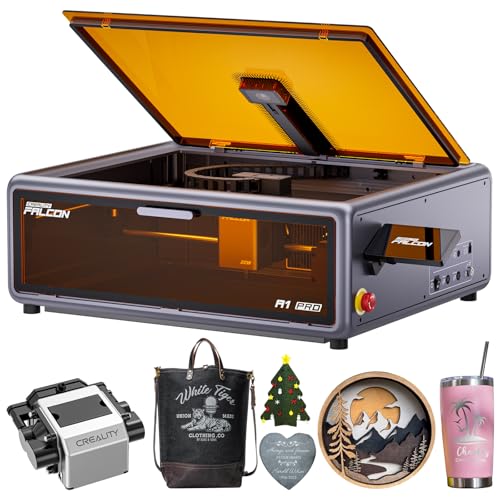
Creality Falcon A1 Pro 20W Enclosed Laser
Best for: Home users wanting safe enclosed engraving
- Laser Power
- 20W
- Engraving Speed
- 600 mm/s
- Safety Class
- Class 1
- Features
- Camera, Enclosure, Air Assist, Touchscreen, Auto Focus
- Compatible Material
- Wood, Metal
- Structure
- Enclosed
The Creality Falcon A1 Pro is a 20W enclosed laser engraver with Class 1 safety. It features a smart touchscreen, auto focus, and a built-in camera for precise placement. The CoreXY structure allows speeds up to 600 mm/s. This machine handles materials like wood and acrylic with air assist. It suits users who want a quiet, safe desktop solution for common maker projects.
- 20W laser power for clean cuts
- Class 1 enclosed safety design
- Auto focus and HD camera
- Smart touchscreen interface
- Up to 600 mm/s speed
- 20W power is lower than the 48W ATOMSTACK A40 Pro V2
- 20W power is lower than the 22W Creality Falcon2 Pro S
- 20W power is lower than the 45W OMTech K40+
- You need a Class 1 enclosed laser for home use
- You want a smart touchscreen for easy operation
- You prioritize safety and noise reduction
- You require higher power for thick materials
- You prefer a handheld portable device
- You need a fiber laser for metal marking
Verdict: The Creality Falcon A1 Pro 20W is a safe, enclosed desktop laser engraver for users who value Class 1 safety and touchscreen convenience over raw cutting power. It fits makers who work with wood and acrylic in a home environment.

OMTech K40+ 45W CO2 Laser Engraver
Best for: Cutting thick wood and acrylic
- Laser Power
- 45W
- Laser Type
- CO2
- Work Area
- 12" x 8"
- Software Compatibility
- LightBurn, LaserGRBL
- Features
- Air Assist, LightBurn Support, Water Chiller
- Compatible Material
- Wood, Acrylic, Glass
The OMTech K40+ is a 45W CO2 laser engraver with a 12 by 8 inch work area. It includes a CW-3000 water chiller and supports LightBurn software. This machine cuts up to 0.4 inch acrylic and 0.31 inch wood. You get built-in air assist and safety features like an emergency stop. It suits users needing high power for thicker materials in a desktop format.
- 45W CO2 laser power for fast cutting
- 12 by 8 inch work area
- Includes CW-3000 water chiller
- Supports LightBurn software
- Built-in air assist system
- Heavier at 53.8 pounds than diode models
- Requires water cooling maintenance
- Smaller 12 by 8 inch bed than larger units
- You need to cut thick acrylic or wood
- You want included software support
- You prefer CO2 laser precision
- You need a portable handheld unit
- You only engrave metal surfaces
- You want a lightweight desktop device
Verdict: The OMTech K40+ 45W CO2 Laser fits makers who need serious cutting power for wood and acrylic. It is best for users who prioritize material thickness capacity over portability.

OMTech K40+ CO2 Laser Engraver with Chiller
Best for: Nonmetallic engraving with included accessories
- Laser Power
- 40W, 45W
- Laser Type
- CO2
- Work Area
- 8"x12" (200×300 mm)
- Engraving Speed
- Up to 350 mm/s (13.8 ips)
- Safety Class
- Class 2
- Software Compatibility
- LightBurn
The OMTech K40+ is a 45W CO2 laser engraver with an 8×12 inch work area. It includes a water chiller and LightBurn software for consistent performance. The machine engraves up to 13.8 inches per second on nonmetallic materials. You get a detachable base and rotary axis compatibility for varied projects. This bundle suits users needing reliable power and included accessories.
- 45W CO2 laser power for deep engraving
- Includes water chiller for stable operation
- Comes with LightBurn software
- 8×12 inch flat work area
- Rotary axis compatibility for curved items
- Class 2 safety rating is lower than enclosed Class 1 units
- Requires water cooling maintenance unlike air-cooled diode models
- 45W power is less than the 48W ATOMSTACK option
- You need a complete bundle with software and chiller
- You engrave on wood, acrylic, or leather
- You want a detachable base for large objects
- You require Class 1 enclosed safety
- You only engrave metal without a fiber upgrade
- You prefer air-cooled diode lasers
Verdict: The OMTech K40+ 45W CO2 Laser Engraver offers a solid 45W output and essential accessories for nonmetallic engraving. It fits makers who want a ready-to-use system with LightBurn and a chiller included.

TOIREISX 10W Handheld Fiber Laser Engraver
Best for: portable metal jewelry and tag marking
- Laser Power
- 10W
- Laser Type
- Fiber
- Work Area
- 110×110 mm
- Engraving Speed
- 12,000 mm/s
- Safety Class
- Class 4
- Features
- Touchscreen
The TOIREISX H1 is a handheld fiber laser engraver using a 10W infrared laser. It features a 7-inch touchscreen for offline operation and a 110×110 mm working area. With a maximum engraving speed of 12,000 mm/s and 0.003mm repeat positioning accuracy, it handles metal and non-metal materials. This portable unit weighs 12.4 pounds, making it suitable for jewelry marking and small personalization projects where mobility is key.
- 10W fiber laser for precise metal marking
- 7-inch touchscreen enables offline operation
- 12,000 mm/s maximum engraving speed
- 0.003mm repeat positioning accuracy
- Handheld design for flexible positioning
- Smaller 110×110 mm work area compared to desktop models
- Lower 10W laser power than higher-end options
- Class 4 safety rating requires strict precautions
- You need to engrave jewelry or small metal tags
- You require portable marking for on-site projects
- You want offline operation via a built-in screen
- You need to engrave large sheets of material
- You prefer a fixed desktop enclosure for safety
- You require higher power for deep cutting
Verdict: The TOIREISX H1 10W Fiber Laser fits professionals who need a portable, high-speed tool for detailed metal work. Its handheld form and touchscreen interface make it ideal for jewelry makers and tag printers who move between locations.

Creality Falcon2 Pro S 22W
Best for: Safe, enclosed engraving with visual alignment
- Laser Power
- 22W (20000mW)
- Laser Type
- Diode
- Engraving Speed
- >600mm/s
- Spot Size
- 0.06 x 0.08mm
- Safety Class
- Class 1
- Software Compatibility
- Falcon Design Space, LightBurn
The Creality Falcon2 Pro S 22W is a Class 1 enclosed diode laser with 22W output. It features a built-in HD camera for visual alignment and auto-focus for consistent results. The unit reaches engraving speeds over 600mm/s and cuts 12mm wood in one pass. You get lifetime technical support and an 18-month warranty. This machine suits users who need safety certifications and batch processing capabilities.
- Class 1 safety certification with fire-resistant metal enclosure
- Built-in HD camera for visual alignment and batch work
- Auto-focus system eliminates manual focusing steps
- 22W laser power cuts 12mm wood in a single pass
- 22W output is lower than the 48W ATOMSTACK A40 Pro V2 on this list
- 41.5-pound weight makes it heavier than handheld or portable markers
- Requires LightBurn for camera-based batch processing features
- You need a Class 1 certified machine for office or home use
- You want auto-focus to simplify setup and improve accuracy
- You require a built-in camera for visual alignment
- You need the highest cutting speed available under $1000
- You prefer a lightweight portable device for travel
- You do not have access to LightBurn software
Verdict: The Creality Falcon2 Pro S 22W Laser Engraver fits users who prioritize safety and visual alignment over raw cutting power. It is ideal for small businesses needing certified, enclosed operation with batch processing support.
Specifications side by side
| Spec | xTool M2 20W Enclosed Laser Engraver | ATOMSTACK 48W Laser Engraver with Rotary Chuck | Creality Falcon A1 Pro 20W Enclosed Engraver | LaserPecker LP2 Plus Portable Laser Engraver | xTool SafetyPro AP2 Smoke Purifier | Creality Falcon2 Pro S 22W Desktop Laser | Creality Falcon2 Pro S 22W Enclosed Laser | ATOMSTACK A40 Pro V2 with Rotary Chuck | Therble 10W Handheld Laser Marker | Creality Falcon A1 Pro 20W Enclosed Laser | OMTech K40+ 45W CO2 Laser Engraver | OMTech K40+ CO2 Laser Engraver with Chiller | TOIREISX 10W Handheld Fiber Laser Engraver | Creality Falcon2 Pro S 22W |
|---|---|---|---|---|---|---|---|---|---|---|---|---|---|---|
| Laser Power | 20W | 24W / 48W | 20W | 10W | – | 22W | 22W | 24W / 48W | 10W | 20W | 45W | 40W, 45W | 10W | 22W (20000mW) |
| Laser Type | Diode | – | – | Diode | – | Diode | – | – | – | – | CO2 | CO2 | Fiber | Diode |
| Work Area | – | – | – | – | – | – | – | – | – | – | 12" x 8" | 8"x12" (200×300 mm) | 110×110 mm | – |
| Engraving Speed | – | 500 mm/s (30,000 mm/min) | 600 mm/s | 4000 mm/s | – | 600mm/s | 25,000 mm/min | 500mm/s (30,000mm/min) | – | 600 mm/s | – | Up to 350 mm/s (13.8 ips) | 12,000 mm/s | >600mm/s |
| Spot Size | – | – | – | – | – | – | – | – | – | – | – | – | – | 0.06 x 0.08mm |
| Safety Class | Class 1 | – | Class 1 | – | – | Class 1 | Class 1 | – | – | Class 1 | – | Class 2 | Class 4 | Class 1 |
| Software Compatibility | xTool Studio | LightBurn, LaserGRBL | Falcon Design Space | – | – | – | – | LightBurn, LaserGRBL | – | – | LightBurn, LaserGRBL | LightBurn | – | Falcon Design Space, LightBurn |
| Printing Speed | – | – | – | – | – | 600 mm/s | – | – | – | – | – | – | – | – |
| Features | Enclosure | Rotary Roller, Air Assist | Enclosure, Touchscreen, Auto Focus | – | – | Camera, Enclosure, Air Assist, Auto Focus | Camera, Enclosure, Air Assist | Rotary Roller, Air Assist | – | Camera, Enclosure, Air Assist, Touchscreen, Auto Focus | Air Assist, LightBurn Support, Water Chiller | LightBurn Support, Water Chiller | Touchscreen | Camera, Enclosure, Air Assist, Auto Focus |
| Compatible Material | Wood, Leather, Fabric, Paper | Wood, Metal, Acrylic, Leather | Wood, Metal | Wood, Metal, Acrylic, Leather | – | Wood, Acrylic | Wood, Metal | Wood, Metal, Acrylic, Leather | Wood, Metal, Leather, Glass, Plastic | Wood, Metal | Wood, Acrylic, Glass | – | Metal | Wood, Metal, Acrylic, Leather |
| Application | DIY Projects | Jewelry | – | – | – | – | – | DIY Projects, Jewelry | – | – | – | – | Jewelry | – |
| Structure | Enclosed | – | Enclosed | – | – | Enclosed | Enclosed | – | – | Enclosed | – | – | – | Enclosed |
| Control Interface | – | – | App Control | – | – | – | – | – | – | App Control | – | – | – | – |
| Dimensions | – | 10 × 10 × 10 inches | 32 × 27 × 15 inches | 11.2 × 7.01 × 11.4 inches | 25.6 × 16.1 × 26.4 inches | 26 × 22 × 12.9 inches | 25.4 × 11.2 × 30.3 inches | 26.8 × 23.2 × 6.69 inches | 9.4 × 4 × 11 inches | 177 × 94.5 × 256 inches | 31.9 × 19.7 × 9.8 inches | – | 13.5 × 7.8 × 0.1 inches | 24.4 × 21.7 × 16.9 inches |
| Weight | – | – | 37.5 pounds | – | 46.1 pounds | 49.3 pounds | – | – | – | – | 53.8 pounds | – | 12.4 pounds | 41.5 pounds |
| Size | 20W | A40 PRO V2 + R8 | – | LP2 Plus Suit | 290*491*542mm | Falcon2 Pro-22W with Integrated Enclosure | – | A40 Pro V2&R8 | – | – | 45W with LB&Chiller | – | – | Pro S 22W |
| Color | M2 Basic | Black | Falcon-A1 Pro 20W | LP2 Plus (SpinTrack) | White+Black | Falcon2 Pro S 22W | Falcon2 Pro S 22W | A40 Pro V2&R8 | sliver | Dark Gray | Blue | – | Grey | Pro S 22W Laser |
| Model | MLM-K610-001 | A40 Pro V2+R8 | Falcon A1 Pro | LP2 Plus | MAX-S300-P01 | Falcon2 pro 22W | Creality Falcon2 Pro 22W | MH-A40 Pro V2&R8 | R4 ultra | Creality Falcon A1 | K40+ 45W | SH-G350 | TOIREISX H1 | Creality Faclon2 Pro S 22W |
You can evaluate optical power and bed dimensions across the best laser engravers under 1000 for your specific materials.
Key Specs to Compare Before Buying
Check laser power output
Wattage determines cutting depth and speed. Higher numbers mean faster processing of thick materials. The ATOMSTACK A40 Pro V2 offers 48W for rapid batch production. Most home units sit between 10W and 20W. This range suits light engraving on wood or leather. You should match power to your heaviest material. Low power struggles with dense woods. High power cuts acrylic cleanly. Check the spec sheet for exact output. Avoid units with vague power claims. Consistent wattage ensures reliable results every time.
Verify laser type compatibility
The laser source dictates which materials you can process. Diode lasers work well on wood, leather, and acrylic. Fiber lasers are required for permanent metal marking. The TOIREISX H1 10W uses fiber for jewelry tags. CO2 lasers, like the OMTech K40+, excel at cutting thick non-metals. You must select a type that matches your primary projects. Mixing materials often requires multiple machines. Check the compatible material list carefully. Do not assume one machine handles all surfaces. Verify the laser type before purchasing to avoid limitations.
Assess enclosure and safety
Enclosed units contain sparks and fumes for safer indoor use. The xTool M2 20W provides a fully enclosed design. This feature is critical for home crafters in shared spaces. Open-frame machines require dedicated ventilation and protective gear. The Creality Falcon2 Pro S 22W also offers enclosure safety. You should prioritize enclosed models if you work in living areas. Check for safety certifications like Class 1 ratings. Enclosures also protect the optics from dust. Verify that the enclosure allows proper airflow for cooling.
Evaluate build size and weight
Dimensions determine where you can place the machine. The xTool M2 Basic fits on standard desks. Larger units like the Creality Falcon2 Pro S 22W need dedicated workspaces. Weight affects portability and stability. The LaserPecker LP2 Plus is lightweight for mobile use. Heavy machines like the OMTech K40+ require sturdy tables. Measure your workspace before buying. Check width, height, and length specs. Ensure you have clearance for exhaust tubes. Consider weight if you plan to move the unit often.
Review control interface options
Interface type affects ease of use and setup speed. Touchscreens allow direct operation without a computer. The Creality Falcon A1 Pro includes a touchscreen. App control offers remote monitoring and design adjustments. Some units rely solely on desktop software. The xTool M2 uses app-based workflows. You should choose an interface that matches your comfort level. Touchscreens simplify operations for beginners. App control provides flexibility for advanced users. Check if the interface supports your operating system. Verify connectivity options for seamless integration.
Frequently asked questions
Which laser engraver is best for home DIY projects?
The xTool M2 20W Enclosed Laser Engraver is the top choice for home crafters. Its enclosed design ensures safety in shared living spaces. The 20W power handles wood, leather, and fabric effectively. A built-in camera system helps with precise alignment for detailed DIY projects without risking exposure to the laser beam.
What is the most powerful laser engraver under $1000?
The ATOMSTACK A40 Pro V2 48W Laser Engraver offers the highest power in this list. Its 48W output allows for fast cutting and batch production of thick materials. It includes a rotary chuck for versatile engraving. This machine is ideal for users who prioritize raw speed and cutting depth over compact size.
Can I engrave metal with these machines?
Yes, but you must choose the right laser type. Diode lasers like the Creality Falcon2 Pro S 22W can mark thin metals. For reliable metal engraving, fiber lasers are better. The TOIREISX H1 10W Fiber Laser is designed specifically for metal jewelry and tag marking. It provides high-speed, detailed results on metallic surfaces.
Is a portable laser engraver worth buying?
Portable units like the LaserPecker LP2 Plus are ideal for on-the-go projects. It features a SpinTrack module for curved-surface engraving. Its lightweight design suits users who need mobility over raw power. However, it is not suitable for heavy-duty workshop use or cutting thick materials compared to stationary desktop models.
Do I need an enclosure for safety?
Enclosed machines like the Creality Falcon A1 Pro 20W provide Class 1 safety. The enclosure contains sparks and fumes, making it safe for home or office use. It also includes air assist and auto-focus features for consistent results. If you work with wood or acrylic indoors, an enclosed unit is the safest option.
What is the fastest laser engraver speed?
The Creality Falcon2 Pro S 22W boasts a printing speed of 600 mm/s. This high speed allows for rapid batch processing of wood and acrylic. It combines fast movement with a 22W diode laser for efficient production. If you need to process many items quickly, this model offers superior throughput compared to slower home units.
Which laser engraver is best for glass?
The Therble R4 Ultra 10W Handheld Laser Marker is best for glass. It is designed for on-site industrial marking of large items. Its handheld form allows you to mark glass away from a workbench. It handles wood, metal, leather, and glass, making it a specialized tool for field work rather than desktop crafting.
Do these engravers support LightBurn software?
Yes, the OMTech K40+ 45W CO2 Laser Engraver supports LightBurn software. It comes with a water chiller and includes the software for easy operation. This compatibility allows for advanced vector and raster engraving. It is a solid choice for makers who want a ready-to-use system with essential accessories included for nonmetallic projects.