15 Best 10W Laser Engravers, Compared
As Amazon Associates, we earn from qualifying purchases. This means we may receive a small commission at no extra cost to you if you click through and make a purchase.
As an Amazon Associate we earn from qualifying purchases. Links on this page are affiliate links.
Finding the best 10W laser engravers requires looking at the specs that matter for your workflow. We compared 15 models ranked by their published listings. The xTool M2 10W Color Craft leads because it combines an enclosed structure with full-color scanning capabilities. This spec allows you to print and cut in one unit without extra modules. Other picks focus on large workspaces, portability, or specific material compatibility. We based these picks strictly on the specifications published on the listings. This guide helps you decide which machine fits your safety needs and project type.
Choose your structure based on safety needs
Your first decision is between enclosed and open frames. Enclosed units like the xTool M2 and Ortur R2 trap fumes for safer indoor use. Open models like the Longer Ray5 offer larger 400 x 400 mm workspaces for bigger projects. Pick enclosed for safety and open for maximum build area.
| # | Product | Best for | Price |
|---|---|---|---|
| 1 | xTool M2 10W Color Craft Best overall | Full-color printing and cutting in one unit | |
| 2 | Longer Ray5 10W Laser Engraver Best budget | large workspace DIY projects and small business | |
| 3 | Creality Falcon Pro 10W Engraver Also great | safety-focused desktop engraving | |
| 4 | LaserPecker LP2 Plus Portable 10W Best premium | Portable high-speed engraving on angled surfaces | |
| 5 | Creality Falcon 10W Laser Engraver with Honeycomb Bed Also great | large format wood and acrylic cutting | |
| 6 | Twotrees TTS-10 Pro 10W Laser Engraver Also great | medium projects on wood and coated metals | |
| 7 | ATOMSTACK A10 Pro V2 10W Laser Engraver Also great | Users wanting LightBurn support and a mid-sized bed | |
| 8 | BlazeX M3 10W Laser Engraver with Camera Also great | precise small-scale engraving | |
| 9 | Ortur R2 10W Enclosed Laser Engraver Also great | safe, offline engraving of small items | |
| 10 | Carverall A1 Pro 10W Laser Engraver Best small business | Small business precision engraving | |
| 11 | AlgoLaser 10W Engraver with Rotary Roller Best rotary roller | Engraving cylindrical objects like tumblers | |
| 12 | LaserPecker LP4 Dual Laser Engraver Best infrared laser | metal marking and high-precision jewelry engraving | |
| 13 | Creality Falcon A1 10W Enclosed Laser Engraver Also great | safe indoor engraving with moderate workspace needs | |
| 14 | AlgoLaser Pixi 10W Portable Engraver Best wireless | portable, standalone engraving tasks | |
| 15 | Creality Falcon A1 10W Enclosed Engraver Also great | Fast, safe indoor engraving |
The best fit for you
- You want full-color printing and cutting in one unit – xTool M2 10W Color Craft – The xTool M2 includes a CMYK inkjet system for full-color scanning and printing alongside laser cutting.
- You need a large workspace for detailed wood projects – Longer Ray5 10W Laser Engraver – The Longer Ray5 offers a 400 x 400 mm build area and 24,000 mm/min speed.
- You prioritize safety with an enclosed desktop setup – Creality Falcon Pro 10W Engraver – The Creality Falcon Pro features an enclosed structure and air assist for safer stationary engraving.
- You need to engrave cylindrical objects like tumblers – AlgoLaser 10W Engraver with Rotary Roller – The AlgoLaser 10W includes a dedicated rotary roller and touchscreen for cylindrical engraving tasks.
- You require extreme precision for metal jewelry marking – LaserPecker LP4 Dual Laser Engraver – The LaserPecker LP4 uses a dual diode and infrared laser system for high-precision metal work.

xTool M2 10W Color Craft
Best for: Full-color printing and cutting in one unit
- Laser Power
- 10W
- Laser Type
- Diode
- Safety Class
- Class 1
- Software Compatibility
- xTool Studio
- Features
- Enclosure, Full-Color Scanning
- Compatible Material
- Wood, Leather, Fabric, Paper
The xTool M2 10W Color Craft combines a diode laser with a CMYK inkjet module for full-color printing and precision cutting. It features a Class 1 enclosed design and dual cameras for real-time workspace preview. This all-in-one machine handles over 300 materials, including wood, leather, and fabric. It suits makers who want to print and cut in a single setup without switching devices. The included software offers templates and AI tools for easy design.
- Integrated CMYK inkjet module for full-color printing
- Class 1 enclosed safety design
- Built-in dual cameras for real-time preview
- Supports over 300 materials including wood and leather
- IR laser module is sold separately
- RA3 rotary accessory is sold separately
- You want to print and cut in one machine
- You need full-color output on materials like wood
- You prefer a Class 1 enclosed safety design
- You only need basic black-and-white engraving
- You prefer an open-frame desktop machine
- You want IR laser capability included in the base price
Verdict: The xTool M2 10W Color Craft fits makers who need full-color printing and cutting in one enclosed unit. It is ideal for those who value safety and versatility over modular add-ons.

Longer Ray5 10W Laser Engraver
Best for: large workspace DIY projects and small business
- Laser Power
- 10W
- Work Area
- 400 × 400 mm
- Engraving Speed
- 24,000 mm/min
- Spot Size
- 0.06 × 0.06 mm
- Software Compatibility
- LaserGRBL, LightBurn
- Features
- Touchscreen
The Longer Ray5 10W delivers a 400 x 400 mm working area and 24,000 mm/min engraving speed. It features a 0.06 x 0.06 mm spot size for precise detail on wood, leather, and acrylic. The 3.5-inch touchscreen and Wi-Fi connectivity allow for easy offline or online operation. This machine suits makers who need a large workspace and fast processing for DIY projects and small business production.
- 400 x 400 mm large working area
- 24,000 mm/min high engraving speed
- 3.5-inch touchscreen for direct control
- 0.06 x 0.06 mm laser spot size
- 10W laser power is standard for this category
- Enclosure is not mentioned in the specifications
- You need a large 400 x 400 mm workspace
- You want fast engraving speeds up to 24,000 mm/min
- You prefer direct touchscreen control over a computer
- You require an enclosed Class 1 safety rating
- You need IR laser capability for marking metals
- You prefer a compact portable design under 12 inches
Verdict: The Longer Ray5 10W 400x400mm Engraver fits makers who prioritize a large 400 x 400 mm workspace and high-speed 24,000 mm/min processing for detailed projects on wood and leather.

Creality Falcon Pro 10W Engraver
Best for: safety-focused desktop engraving
- Laser Power
- 10W
- Spot Size
- 0.06mm
- Features
- Air Assist
- Compatible Material
- Wood, Metal, Acrylic, Leather, Paper
- Dimensions
- 12.2 × 24.2 × 7.68 inches
- Weight
- 11.2 pounds
The Creality Falcon Pro 10W delivers 72000mW output for cutting wood, leather, and acrylic. It features a 0.06mm spot size for fine detail engraving on metal and glass. Built-in air assist keeps surfaces clean. An emergency stop button and safety lock prioritize user protection. This model weighs 11.2 pounds and measures 24.2 by 12.2 inches.
- 72000mW output power
- 0.06mm spot size
- Built-in air assist
- Emergency stop button
- 11.2 pounds weight
- 24.2 inches width
- You need air assist for clean cuts
- You prioritize safety features
- You want offline TF card operation
- You need a smaller footprint
- You require a lighter device
- You want a fully enclosed Class 1 design
Verdict: The Creality Falcon Pro 10W suits users who value safety and air assist over portability. It is a solid choice for stationary desktop engraving.

LaserPecker LP2 Plus Portable 10W
Best for: Portable high-speed engraving on angled surfaces
- Laser Power
- 10W
- Laser Type
- Diode
- Engraving Speed
- 4000 mm/s
- Compatible Material
- Wood, Metal, Acrylic, Leather
- Dimensions
- 11.2 × 7.01 × 11.4 inches
The LaserPecker LP2 Plus is a portable 10W diode laser engraver built for speed. It reaches 4000 mm/s, which is significantly faster than standard models in this guide. The unit weighs 3.39 kg and features a multi-angle head for angled surfaces. It uses a 450nm laser with an F-theta lens for sharp 4K precision. This machine suits users who need rapid output for batch projects or gifts.
- Engraves at 4000 mm/s for high throughput
- Weighs only 3.39 kg for portability
- Multi-angle laser head for versatile positioning
- Dual red-dot focus for quick alignment
- 4000 mm/s speed is lower than the 8000 mm/s found on some competitors
- Basic version lacks the protective suit enclosure included with other variants
- Single 10W diode laser limits deep cutting compared to hybrid or higher-power options
- You need fast engraving speeds for batch orders
- You want a lightweight unit under 4 kg
- You require angled engraving on irregular surfaces
- You need a fully enclosed Class 1 machine for safety
- You want a higher cutting speed than 4000 mm/s
- You prefer a heavier, more stable desktop build
Verdict: The LaserPecker LP2 Plus 10W Diode delivers 4000 mm/s speed in a 3.39 kg package. It fits users who prioritize portability and angled engraving over maximum cutting depth or enclosure safety.

Creality Falcon 10W Laser Engraver with Honeycomb Bed
Best for: large format wood and acrylic cutting
- Laser Power
- 10W
- Work Area
- 15.7" x 16.3"
- Engraving Speed
- 10,000 mm/min
- Safety Class
- Class 4
- Software Compatibility
- LaserGRBL, LightBurn
- Compatible Material
- Wood, Metal, Acrylic
The Creality Falcon 10W offers a 500 by 500 millimeter working area and engraving speeds up to 10,000 mm per minute. It includes a honeycomb bed for better airflow and safety features like an emergency stop. You get Class 4 laser safety with compatible software support for Windows and macOS. This setup suits hobbyists and small businesses needing a large, efficient workspace for wood, acrylic, and leather projects.
- 10W laser power for fast cutting
- 500 by 500 mm honeycomb work area
- 10,000 mm per minute engraving speed
- Emergency stop with tilt detection
- Supports LightBurn and LaserGRBL
- Class 4 safety rating requires extra precautions
- Open-frame design exposes the laser path
- Limited to 10W output compared to higher power options
- You need a large 500 by 500 mm workspace
- You prioritize high engraving speeds up to 10,000 mm per minute
- You want a machine ready to use in five to ten minutes
- You require a fully enclosed Class 1 safety rating
- You need to engrave on metal surfaces
- You prefer a compact unit under 15 inches wide
Verdict: Creality Falcon 10W 500mm Engraver fits users who need a large, fast workspace for wood and acrylic. It delivers high efficiency for small business owners or serious hobbyists who can manage Class 4 safety protocols.

Twotrees TTS-10 Pro 10W Laser Engraver
Best for: medium projects on wood and coated metals
- Laser Power
- 10W
- Laser Type
- Diode
- Work Area
- 300x300mm
- Engraving Speed
- 30000mm/min
- Spot Size
- 0.069mm
- Software Compatibility
- LightBurn, LaserGRBL
The Twotrees TTS-10 Pro delivers 10W of optical power for fast engraving on wood, acrylic, and coated metals. You get a 300x300mm work area and a 0.069mm spot size for detailed work. It reaches speeds up to 30000mm/min. The machine uses a 32-bit dual-core MCU and supports LightBurn and LaserGRBL software. It is a solid option for hobbyists needing reliable offline engraving via TF card.
- 10W (10000mW) diode laser power for deep engraving
- 300x300mm work area for medium-sized projects
- 0.069mm spot size for high precision
- 30000mm/min engraving speed
- Supports LightBurn and LaserGRBL software
- 300x300mm work area is smaller than many competitors
- 0.069mm spot size is less precise than 0.01mm options
- Not suitable for bare stainless steel without marking spray
- You need a 10W diode laser for wood and acrylic
- You prefer offline engraving via TF card
- You want a full metal frame build
- You require a work area larger than 300x300mm
- You need to engrave bare metals without preparation
- You want sub-0.05mm spot size precision
Verdict: The Twotrees TTS-10 Pro 10W Laser Engraver fits users who prioritize a sturdy metal frame and offline TF card functionality over maximum precision or large build volume.

ATOMSTACK A10 Pro V2 10W Laser Engraver
Best for: Users wanting LightBurn support and a mid-sized bed
- Laser Power
- 10W
- Work Area
- 410 x 380 mm
- Engraving Speed
- 400 mm/s
- Software Compatibility
- ATOMSTACK App, LightBurn, LaserGRBL
- Compatible Material
- Wood, Metal, Acrylic, Leather, Glass
- Dimensions
- 10 × 10 × 10 inches
The Atomstack A10 Pro V2 is a 10W laser engraver with a 410 x 380 mm work area. It reaches engraving speeds of 400 mm/s, allowing you to process materials quickly. The machine supports ATOMSTACK App, LightBurn, and LaserGRBL software. It handles wood, metal, acrylic, leather, and glass. This model suits users who need a balance of speed and a moderate workspace size.
- 10W laser power for strong cutting
- 400 mm/s engraving speed
- 410 x 380 mm work area
- Compatible with LightBurn and LaserGRBL
- 400 mm/s speed is slower than some 4000 mm/s competitors
- 410 x 380 mm area is smaller than 400×400 mm or larger beds
- 4000 mW effective power is lower than 72000 mW options
- You need a moderate 410 x 380 mm workspace
- You want compatibility with LightBurn software
- You engrave wood, acrylic, or leather
- You require ultra-fast 4000 mm/s speeds
- You need to cut thick metal with high power
- You want a fully enclosed Class 1 machine
Verdict: The Atomstack A10 Pro V2 10W Engraver offers a solid 410 x 380 mm area and 400 mm/s speed for standard projects. It fits you well if you prioritize software flexibility and a mid-sized build over maximum speed.

BlazeX M3 10W Laser Engraver with Camera
Best for: precise small-scale engraving
- Laser Power
- 10W
- Safety Class
- Class 1
- Software Compatibility
- LightBurn, CutLabX, LaserGRBL
- Features
- Camera, Enclosure
- Compatible Material
- Wood, Metal, Leather, Glass
- Structure
- Enclosed
The BlazeX M3 is an enclosed 10W laser engraver and cutter designed for precision work. It features a 0.01mm ultra-fine laser spot and includes a smart camera for accurate placement. The Class 1 safety rating and integrated enclosure make it suitable for indoor use. You get a honeycomb bed and material samples included. It supports LightBurn and LaserGRBL for flexible software control.
- 0.01mm ultra-precision laser spot
- Class 1 enclosed safety design
- Smart camera for preview positioning
- Compatible with LightBurn and LaserGRBL
- Smaller build dimensions compared to larger beds
- Standard honeycomb bed included without advanced accessories
- 10W power is lower than some high-output competitors
- You need precise engraving on small items
- You want a safe enclosed unit for home use
- You prefer software like LightBurn for control
- You require large format cutting capacity
- You need high-speed industrial production
- You prefer open-frame machines for easy access
Verdict: The BlazeX M3 10W Laser Engraver fits users who value safety and precision in a compact footprint. It is ideal for hobbyists who need accurate small-scale engraving without the noise of open frames.

Ortur R2 10W Enclosed Laser Engraver
Best for: safe, offline engraving of small items
- Laser Power
- 10W
- Work Area
- 300 × 210 mm
- Engraving Speed
- 20,000 mm/min
- Safety Class
- Class 1
- Features
- Camera, Enclosure, Touchscreen
- Compatible Material
- Wood, Metal, Acrylic, Leather
The ORTUR R2 is a Class 1 enclosed laser engraver with a 300 by 210 mm work area. It features a 10W laser module and engraving speeds up to 20,000 mm/min. The built-in touch screen and HD camera let you operate the machine offline without a computer. This compact unit suits beginners who want a safe, self-contained setup for wood, leather, acrylic, and metal projects.
- Class 1 fully enclosed safety rating
- Built-in touch screen for offline control
- HD camera for precise alignment
- 10W laser power for cutting and engraving
- 300 by 210 mm work area is smaller than many competitors
- 20,000 mm/min engraving speed is lower than the 4000 mm/s options listed
- You want a safe, enclosed machine for home use
- You prefer offline operation without a computer
- You need precise alignment for small items
- You require a large work area over 400 mm
- You need maximum engraving speed above 20,000 mm/min
- You prefer open-frame machines for easy access
Verdict: The ORTUR R2 10W Enclosed Laser fits users who prioritize safety and offline convenience over raw speed or large build volumes. Its enclosed design and camera system make it ideal for careful, small-scale personal projects.

Carverall A1 Pro 10W Laser Engraver
Best for: Small business precision engraving
- Laser Power
- 10W
- Engraving Speed
- 12,000 mm/min
- Safety Class
- Class 1
- Features
- Camera
- Compatible Material
- Wood, Metal, Leather, Glass
- Application
- DIY Projects, Small Business
The Carverall A1 Pro is a Class 1 enclosed 10W laser engraver designed for small business use. It features a built-in HD camera for precise drag-and-drop positioning and 12,000 mm/min engraving speed. The unit supports mobile WiFi and Type-C connections. It handles wood, leather, and plastic. The compact design allows for portable operation on various surfaces.
- Class 1 fully enclosed safety design
- Built-in HD camera for precise positioning
- 12,000 mm/min engraving speed
- Mobile WiFi and Type-C connectivity
- Smaller build footprint than competitors
- Lower engraving speed compared to 4000mm+ models
- Requires optional IR head for uncoated metal
- You need Class 1 safety for home or office use
- You want precise camera positioning for small items
- You require portable engraving capabilities
- You need to engrave uncoated metal without upgrades
- You require faster speeds than 12,000 mm/min
- You need a large working area for big projects
Verdict: The Carverall A1 Pro 10W Mini Laser suits users prioritizing safety and precision over raw speed. It is ideal for small business customization and portable work.

AlgoLaser 10W Engraver with Rotary Roller
Best for: Engraving cylindrical objects like tumblers
- Laser Power
- 10W
- Engraving Speed
- 12,000 mm/min
- Safety Class
- Class 1
- Software Compatibility
- LightBurn, LaserGRBL
- Features
- Rotary Roller, Touchscreen
- Target Audience
- Beginners
This 10W laser engraver includes a rotary roller for tumblers and a 3.5-inch touchscreen. It reaches engraving speeds of 12,000 mm/min and supports LightBurn software. The Class 1 safety design and included riser make it suitable for beginners. You get a DIY kit that handles wood, metal, and glass. It offers flexible connectivity via WiFi or USB for convenient file transfer.
- Includes rotary roller for cylindrical items
- 12,000 mm/min engraving speed
- Built-in 3.5-inch smart touchscreen
- Class 1 safety certification
- 14.3 pounds weight is heavier than many competitors
- 23.7 inches width requires significant desk space
- You need to engrave tumblers or mugs
- You prefer direct touchscreen control
- You want Class 1 safety certification
- You require a fully enclosed machine
- You need a compact portable design
- You want to avoid assembly
Verdict: AlgoLaser 10W with Rotary Roller fits users who need dedicated rotary capabilities and a built-in screen. It suits those who have space for a larger, heavier unit and want Class 1 safety.

LaserPecker LP4 Dual Laser Engraver
Best for: metal marking and high-precision jewelry engraving
- Laser Power
- 10W
- Laser Type
- Diode + IR
- Work Area
- 160 x 120 mm
- Engraving Speed
- 4000 mm/s
- Software Compatibility
- LaserPecker Design Space, LightBurn
- Compatible Material
- Wood, Metal, Leather
The LaserPecker LP4 combines a 10W diode laser with a 2W infrared source for marking metals and plastics. It features a 160 x 120 mm work area and reaches speeds of 4000 mm/s. You get 8K precision with 0.003mm detail. The unit includes an HD LED touchscreen for direct control. It supports LightBurn software for advanced users. This compact machine suits those needing metal engraving.
- Dual 10W diode and 2W infrared lasers
- 8K precision with 0.003mm resolution
- Fast 4000 mm/s engraving speed
- Built-in HD LED touchscreen
- LightBurn software compatibility
- 160 x 120 mm work area is smaller than the 400×400 mm beds on other models
- 2W infrared laser has lower power than the 10W diode for cutting
- 13.2 x 15 x 11.2 inch footprint limits portability compared to mini units
- You need to engrave metals like stainless steel or jewelry
- You require high-resolution text and fine details
- You want a portable unit with an integrated display
- You need to cut thick wood or large acrylic sheets
- You require a large work area for big projects
- You prefer a fully enclosed Class 1 safety design
Verdict: The LaserPecker LP4 Dual Laser is ideal for users who need to mark metals and plastics with extreme precision. Its dual-source capability and fast speed make it a strong choice for jewelry and small detailed parts.

Creality Falcon A1 10W Enclosed Laser Engraver
Best for: safe indoor engraving with moderate workspace needs
- Laser Power
- 10W
- Laser Type
- Diode
- Work Area
- 15.0" × 12.0"
- Engraving Speed
- 600 mm/s
- Spot Size
- 0.06 × 0.08 mm
- Safety Class
- Class 1
The Creality Falcon A1 is a 10W diode laser engraver with a fully enclosed Class 1 design. It features a 15.0 by 12.0 inch work area and reaches engraving speeds of 600 mm/s. The unit includes a built-in camera for auto-positioning and supports LightBurn and LaserGRBL software. Its 0.06 by 0.08 mm spot size delivers precise details for wood and acrylic projects.
- Fully enclosed Class 1 safety design
- 600 mm/s engraving speed
- 15.0 x 12.0 inch work area
- Built-in camera for positioning
- 0.06 x 0.08 mm spot size
- Heavier 28.7 pound build compared to portable models
- Smaller 15.0 x 12.0 inch work area than larger desktop units
- Limited to 18.11 x 13.62 inch honeycomb panel compatibility
- You want a fully enclosed Class 1 machine for safer indoor use
- You need a 15.0 x 12.0 inch workspace for medium projects
- You prefer software compatibility with LightBurn and LaserGRBL
- You require a larger work area than 15.0 x 12.0 inches
- You need a portable unit under 20 pounds
Verdict: The Creality Falcon A1 10W Enclosed suits users who prioritize safety and speed in a stationary setup. It fits those who need a mid-sized workspace and do not require a portable design.
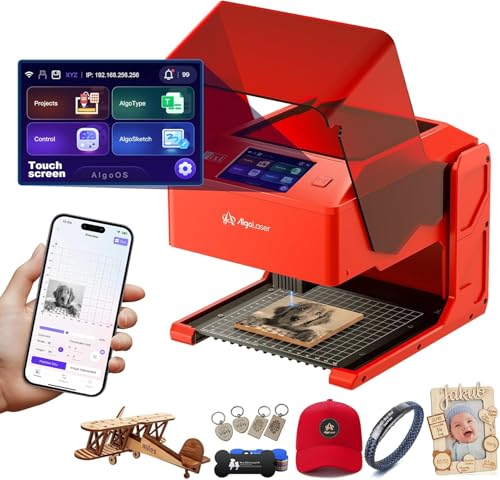
AlgoLaser Pixi 10W Portable Engraver
Best for: portable, standalone engraving tasks
- Laser Power
- 10W
- Safety Class
- Class 1
- Features
- Touchscreen
- Compatible Material
- Wood, Acrylic, Leather
- Connectivity
- Wireless
- Dimensions
- 10.5 × 8.5 × 7.7 inches
The AlgoLaser Pixi is a 10W laser engraver designed for portability and standalone operation. It features a 3.5-inch touchscreen and wireless connectivity, allowing you to engrave without a computer. Weighing 4.41 pounds, it fits easily on a desk. This Class 1 system includes safety locks and auto-pause doors. It suits beginners who want simple, mobile engraving for wood, leather, or acrylic.
- 10W laser power for cutting and engraving
- 3.5-inch touchscreen for standalone operation
- Wireless connectivity and USB-C support
- Class 1 safety certification with auto-pause
- Compact 8.5 x 7.7 x 10.5 inch footprint
- Heavier at 4.41 pounds compared to lighter portable options
- Smaller build size limits large project capacity
- Limited to 10W power versus higher output models
- You want to engrave without a computer
- You need a portable device for small projects
- You prioritize safety features like auto-pause doors
- You require high-speed engraving for large batches
- You need to engrave materials larger than the bed
- You prefer a heavier, stationary machine for stability
Verdict: AlgoLaser Pixi 10W Portable Engraver fits users who value mobility and simple touchscreen controls for small-scale customizing tasks.

Creality Falcon A1 10W Enclosed Engraver
Best for: Fast, safe indoor engraving
- Laser Power
- 10W
- Work Area
- 381 × 305mm
- Engraving Speed
- 600mm/s
- Safety Class
- Class 1
- Software Compatibility
- LightBurn, LaserGRBL, Cutlabx
- Printing Speed
- 600 mm/s
The Creality Falcon A1 is a Class 1 enclosed laser engraver with a 381 × 305mm work area. It delivers 10W of laser power and reaches engraving speeds of 600mm/s using a CoreXY motion system. The unit includes a smart camera, air assist, and pre-set parameters. You get a safe, smoke-controlled environment for wood and metal projects. It suits users who want faster output without manual calibration.
- 600mm/s engraving speed via CoreXY system
- Class 1 enclosed safety with auto-lock
- Built-in HD smart camera for framing
- Pre-set optimal parameter settings
- Supports LightBurn and LaserGRBL software
- 381 × 305mm work area is smaller than the 400 × 400mm standard on competitors
- Cannot cut acrylic or highly reflective materials
- Incompatible with 500 × 500mm honeycomb panels
- You need a Class 1 safe machine for indoor use
- You want faster engraving speeds up to 600mm/s
- You prefer pre-set parameters to skip trial runs
- You require a 500 × 500mm work area
- You plan to cut acrylic sheets
- You need to engrave mirror-finished metals
Verdict: Creality Falcon A1 10W Enclosed fits users who prioritize safety and speed over maximum workspace. It is ideal for those who want to engrave wood and metal quickly without dealing with open-laser smoke or noise.
Specifications side by side
| Spec | xTool M2 10W Color Craft | Longer Ray5 10W Laser Engraver | Creality Falcon Pro 10W Engraver | LaserPecker LP2 Plus Portable 10W | Creality Falcon 10W Laser Engraver with Honeycomb Bed | Twotrees TTS-10 Pro 10W Laser Engraver | ATOMSTACK A10 Pro V2 10W Laser Engraver | BlazeX M3 10W Laser Engraver with Camera | Ortur R2 10W Enclosed Laser Engraver | Carverall A1 Pro 10W Laser Engraver | AlgoLaser 10W Engraver with Rotary Roller | LaserPecker LP4 Dual Laser Engraver | Creality Falcon A1 10W Enclosed Laser Engraver | AlgoLaser Pixi 10W Portable Engraver | Creality Falcon A1 10W Enclosed Engraver |
|---|---|---|---|---|---|---|---|---|---|---|---|---|---|---|---|
| Laser Power | 10W | 10W | 10W | 10W | 10W | 10W (10000mW) | 10W | 10W | 10W | 10W | 10W | 10W + 2W | 10W | 10W | 10W |
| Laser Type | Diode | – | – | Diode | – | Diode | – | – | – | – | – | Diode + IR | Diode | – | – |
| Work Area | – | 400 × 400 mm | – | – | 15.7" x 16.3" | 300x300mm | 410 x 380 mm | – | 300 × 210 mm | – | – | 160 x 120 mm | 15.0" × 12.0" | – | 381 × 305mm |
| Engraving Speed | – | 24,000 mm/min | – | 4000 mm/s | 10,000 mm/min | 30000mm/min | 400 mm/s | – | 20,000 mm/min | 12,000 mm/min | 12,000 mm/min | 4000 mm/s | 600 mm/s | – | 600mm/s |
| Spot Size | – | 0.06 × 0.06 mm | 0.06mm | – | – | 0.069mm | – | – | – | – | – | – | 0.06 × 0.08 mm | – | – |
| Safety Class | Class 1 | – | – | – | Class 4 | – | – | Class 1 | Class 1 | Class 1 | Class 1 | – | Class 1 | Class 1 | Class 1 |
| Software Compatibility | xTool Studio | LaserGRBL, LightBurn | – | – | LaserGRBL, LightBurn | LightBurn, LaserGRBL | ATOMSTACK App, LightBurn, LaserGRBL | LightBurn, CutLabX, LaserGRBL | – | – | LightBurn, LaserGRBL | LaserPecker Design Space, LightBurn | LightBurn, LaserGRBL | – | LightBurn, LaserGRBL, Cutlabx |
| Printing Speed | – | – | – | – | – | – | – | – | – | – | – | – | 600 mm/s | – | 600 mm/s |
| Features | Enclosure, Full-Color Scanning | Touchscreen | Air Assist | – | – | – | – | Camera, Enclosure | Camera, Enclosure, Touchscreen | Camera | Rotary Roller, Touchscreen | – | Camera, Enclosure | Touchscreen | Camera, Enclosure, Air Assist |
| Target Audience | – | – | – | – | – | – | – | – | – | – | Beginners | – | – | – | – |
| Compatible Material | Wood, Leather, Fabric, Paper | Wood, Metal, Acrylic, Leather, Glass | Wood, Metal, Acrylic, Leather, Paper | Wood, Metal, Acrylic, Leather | Wood, Metal, Acrylic | Wood, Metal, Acrylic, Glass | Wood, Metal, Acrylic, Leather, Glass | Wood, Metal, Leather, Glass | Wood, Metal, Acrylic, Leather | Wood, Metal, Leather, Glass | Wood, Metal, Glass | Wood, Metal, Leather | Wood, Metal | Wood, Acrylic, Leather | Wood, Metal |
| Application | DIY Projects | DIY Projects | – | – | – | DIY Projects | – | – | DIY Projects | DIY Projects, Small Business | Tumblers | Jewelry | – | – | – |
| Structure | Enclosed | – | – | – | – | – | – | Enclosed | Enclosed | – | – | – | Enclosed | – | Enclosed |
| Connectivity | – | – | – | – | – | – | – | – | – | – | – | – | – | Wireless | – |
| Dimensions | – | 24.5 × 12 × 5 inches | 12.2 × 24.2 × 7.68 inches | 11.2 × 7.01 × 11.4 inches | – | 10 × 5 × 7 inches | 10 × 10 × 10 inches | 4.3 × 1.2 × 4.7 inches | 18.5 × 15.7 × 8.43 inches | – | 25.3 × 23.7 × 7.17 inches | 11.2 × 13.2 × 15 inches | 30 × 25 × 15 inches | 10.5 × 8.5 × 7.7 inches | – |
| Weight | – | – | 11.2 pounds | – | – | – | – | – | – | – | 14.3 pounds | – | 28.7 pounds | 4.41 pounds | – |
| Length | – | – | – | – | – | – | – | – | – | 3.94 inches | – | – | – | – | – |
| Width | – | – | – | – | – | – | – | – | – | 3.94 inches | – | – | – | – | – |
| Size | 10W | 400×400mm | Falcon Pro-10W with Air Assist Pump | LP2 Plus Basic | Falcon-10W-preset | TTS-10 Pro | A10 PRO V2 | 10W | R2 10W Camera Laser Engraver | – | DIY KIT MK2 10W with Rotary Roller | LP4 | Falcon-A1 | 10W | Creality Falcon A1 |
| Color | M2 Basic + CMYK Inkjet | black | Falcon Pro-10W with Air Assist Pump | LP2 Plus (Basic) | Falcon-10W-preset | Black, Blue | Black | 10w With Camera | R2 10W Camera Laser Engraver | 10w | Size-2 | Space Gray | Falcon-A1 10W Gray | Passion Red | Gray |
| Model | MLM-K610-001 | Ray5 10W | Falcon Pro 10W | LP2 Plus | CR-Laser Falcon (10W) | TTS-10 Pro | A10 Pro V2 | – | Ortur R2 | A1 PRO | Algolaser Laser Engraver | LaserPecker 4 | Laser Engraver | Pixi-Red-10W | Creality Falcon A1 |
You can compare published machine specifications across the best 10W laser engravers in our spec-ranked guide.
Key Specs for 10W Laser Engravers
Check Build Volume Size
The workspace dimensions determine what you can engrave in a single pass. Larger beds reduce the need to reposition materials. The Longer Ray5 offers a 400 x 400 mm area, which is ideal for large wood panels or acrylic sheets. Smaller units like the LaserPecker LP2 Plus are better for small tags or jewelry. Measure your largest project before buying to ensure the machine fits your workflow needs.
Evaluate Laser Type
Most 10W units use diode lasers, which are versatile for wood and leather. However, some models include infrared lasers for marking metals without paint. The LaserPecker LP4 Dual Laser adds an infrared source, making it suitable for bare metal and jewelry. If you only work with organic materials, a standard diode is sufficient. Choose a dual-laser system only if you plan to mark metals regularly.
Look for Safety Enclosures
Enclosed structures trap smoke and contain the laser beam, improving indoor safety. The xTool M2 and Ortur R2 both feature full enclosures. This is crucial for home workshops where ventilation is limited. Open-frame models like the Creality Falcon Pro require external fume extraction. If you engrave in a bedroom or office, prioritize an enclosed unit to protect your lungs and eyes from stray reflections.
Consider Portability Needs
Weight and dimensions dictate whether you can move the machine easily. The LaserPecker LP2 Plus weighs just 3.39 kg, making it highly portable. In contrast, the Creality Falcon A1 weighs 28.7 pounds and is designed for stationary use. If you travel to craft fairs or work in multiple locations, choose a lightweight, compact model. Heavy units are better for dedicated workshop benches.
Review Control Interface
Some engravers include built-in touchscreens for standalone operation without a computer. The AlgoLaser 10W with Rotary Roller and the Ortur R2 feature touchscreens for direct control. This is useful for quick jobs or offline engraving. Other models rely on software connected to a PC. If you prefer simplicity and want to avoid cable management, select a unit with an integrated display for navigation and settings.
Frequently asked questions
Which 10W laser engraver is best for full-color printing?
The xTool M2 10W Color Craft is the top choice for this task. It combines an enclosed structure with full-color scanning and CMYK inkjet capabilities. This allows you to print and cut in one unit. It is ideal if you value safety and versatility over modular add-ons.
What is the largest build area available in this list?
The Longer Ray5 10W offers the largest workspace at 400 x 400 mm. This size is ideal for detailed projects on wood and leather. It also features a high processing speed of 24,000 mm/min. This makes it a strong option for DIY projects and small business use.
Are there portable 10W laser engravers for angled surfaces?
Yes, the LaserPecker LP2 Plus is designed for portability and angled engraving. It weighs only 3.39 kg and delivers a speed of 4000 mm/s. It uses a diode laser and fits users who prioritize mobility over maximum cutting depth or enclosure safety.
Which models include an enclosure for safer indoor use?
Several models feature enclosed structures for better safety. These include the xTool M2, BlazeX M3, Ortur R2, and the Creality Falcon A1. The enclosed design traps fumes, making them suitable for indoor environments. The Ortur R2 and Creality Falcon A1 also include cameras for precise alignment.
Can I engrave cylindrical objects like tumblers with these machines?
The AlgoLaser 10W with Rotary Roller is specifically designed for this. It includes a built-in touchscreen and dedicated rotary capabilities. It is ideal for engraving tumblers and other cylindrical items. The unit is larger and heavier, so ensure you have space for it.
Do any 10W engravers support infrared lasers for metal?
The LaserPecker LP4 Dual Laser Engraver supports both diode and infrared lasers. This dual-source capability allows for extreme precision when marking metals and plastics. It is ideal for jewelry engraving and small detailed parts. It offers fast speeds and high-precision results for metalworking tasks.
Which engraver is best for small business customization?
The Carverall A1 Pro 10W Mini Laser is ranked for small business use. It prioritizes safety and precision over raw speed. It includes a camera for accurate placement. This makes it suitable for portable work and precise customization tasks in a professional setting.
Is there a wireless option for standalone engraving?
The AlgoLaser Pixi 10W Portable Engraver features wireless connectivity. It has a touchscreen for simple, standalone controls. It is designed for mobility and small-scale customizing tasks. The unit weighs 4.41 pounds and fits users who value ease of use and portability.