Bambu Lab A1 Combo Multi-Color 3D Printer Alternatives: 6 Similar Picks Compared
As Amazon Associates, we earn from qualifying purchases. This means we may receive a small commission at no extra cost to you if you click through and make a purchase.
As an Amazon Associate we earn from qualifying purchases. Links on this page are affiliate links.
The Bambu Lab A1 Combo Multi-Color 3D Printer offers automated calibration and high-speed precision for beginners. If you need different dimensions, a larger build volume, or a specific printing speed, you should consider these bambu lab a1 combo multi color 3d printer alternatives. This list includes 6 options that share key features like multi-color printing and automatic bed leveling. We selected these picks because their specifications overlap with the original model. You can compare dimensions, weight, and acceleration rates to find the best fit for your workspace. The original printer excels in ease of use with full-auto calibration and active flow rate compensation. However, you might prefer a different brand or a more compact footprint. Some alternatives offer faster print speeds or additional toolhead options. Others provide larger build areas for bigger projects. Each option listed here targets specific needs while maintaining core capabilities. Review the specs to see which machine aligns with your requirements. This guide helps you navigate the choices without guesswork. Focus on the data to make an informed decision. Your next printer should match your exact technical needs.
How Alternatives Compare to A1 Combo
Snapmaker U1 4-Toolhead 3D Printer
The Snapmaker U1 4-Toolhead distinguishes itself with a 4-toolhead system, offering more color and material options than the A1 Combo’s AMS lite. It prioritizes minimal waste during multi-color printing, a key advantage for users who want to reduce filament consumption. However, it is significantly heavier at 59.1 pounds compared to the A1’s 28.5 pounds, making it less portable. The footprint is also narrower, measuring 13 inches wide versus 21.1 inches. You should choose this if you value toolhead versatility and material efficiency over the compact, lighter design of the Bambu Lab. It suits makers who need reliable mixed-material capabilities without the bulk of larger industrial machines.
ELEGOO Centauri Carbon 2 Combo 3D Printer
The ELEGOO Centauri Carbon 2 Combo focuses on high-speed performance, targeting users who prioritize velocity over maximum build volume. It features a CoreXY structure and auto-leveling, similar to the A1, but aims for faster small to medium prints. The unit is taller at 29.3 inches, requiring more vertical clearance than the A1’s 16.8 inches. It weighs 42.7 pounds, nearly 14 pounds more than the Bambu Lab. If you need a stable, fast printer for detailed small projects and do not mind the extra height and weight, this is a strong alternative. It trades the A1’s beginner-friendly LED kit integration for raw speed and structural rigidity.
Bambu Lab A1 Mini Combo Multi-Color 3D Printer
The Bambu Lab A1 Mini Combo is the compact sibling to the A1 Combo, designed for beginners with limited space. It shares the same auto-calibration and multi-color capabilities via AMS lite but in a significantly smaller footprint. It measures 14.8 inches wide and 16.8 inches long, compared to the A1’s 21.1 by 23 inches. It also weighs less at 22 pounds. You should pick this if your workspace is tight or you do not need the larger build volume of the standard A1. It offers the same ease of use and reliability but sacrifices print size for portability and a lower physical presence.
Anycubic Kobra X Multicolor 3D Printer
The Anycubic Kobra X Multicolor emphasizes remote monitoring and connectivity alongside fast printing. It includes a camera and AI camera features, which the A1 Combo does not list in its specifications. This makes it suitable for users who need to check on prints from a distance. It is lighter at 20.9 pounds and narrower at 13 inches wide, though it stands taller at 22 inches. If you prioritize the ability to monitor prints remotely and want a smaller footprint, this is a practical choice. It trades the A1’s integrated LED lamp kit for enhanced digital monitoring capabilities and a slimmer profile.
Creality K2 Direct-Drive 3D Printer
The Creality K2 Direct-Drive offers extensive 16-color capabilities and high-speed printing at 600 mm/s. It includes a camera and AI monitoring, features not present in the A1 Combo. The build volume is larger, with a width of 36 inches, making it suitable for bigger projects. It weighs more and occupies more floor space. You should choose this if you need maximum color variety and speed for larger outputs. It is ideal for users who value targeted auto-leveling and smart monitoring over the compact, beginner-focused design of the Bambu Lab. It sacrifices portability for significant capacity and advanced monitoring.
Creality K2 High-Speed 3D Printer
The Creality K2 High-Speed 3D Printer delivers robust construction and high precision with 600 mm/s speed. Like the other K2 model, it includes a camera and AI camera for monitoring. It is designed for users who prioritize print quality and speed, noting that the multi-color system may need to be purchased separately. The dimensions are identical to the direct-drive version, with a 36-inch width. This option fits makers who need fast output and do not mind configuring their multi-color setup independently. It trades the A1 Combo’s all-in-one beginner ecosystem for a more industrial, high-velocity approach to printing.
| # | Product | Best for | Price |
|---|---|---|---|
| 1 | Bambu Lab A1 Combo Multi-Color 3D Printer Best overall | beginners seeking automated multi-color printing | |
| 2 | Snapmaker U1 4-Toolhead 3D Printer Best premium | Fast multi-color printing with minimal waste | |
| 3 | ELEGOO Centauri Carbon 2 Combo 3D Printer Best 500 mm/s | fast small multicolor prints | |
| 4 | Bambu Lab A1 Mini Combo Multi-Color 3D Printer Best budget | Beginners wanting compact multi-color printing | |
| 5 | Anycubic Kobra X Multicolor 3D Printer Best fdm | Fast multi-color printing with remote monitoring | |
| 6 | Creality K2 Direct-Drive 3D Printer Also great | High-speed multicolor printing with AI monitoring | |
| 7 | Creality K2 High-Speed 3D Printer Also great | high-speed printing and precision |

Bambu Lab A1 Combo Multi-Color 3D Printer
Best for: beginners seeking automated multi-color printing
- Printing Technology
- FDM
- Bed Leveling
- Automatic
- Features
- Multi-Color Printing
- Target Audience
- Beginners
- Dimensions
- 23 × 21.1 × 16.8 inches
- Weight
- 28.5 pounds
The Bambu Lab A1 Combo includes the AMS lite for multi-color printing and an LED lamp kit for functional light projects. It features 10,000 mm/s² acceleration and full-auto calibration for precise, high-speed output. The printer weighs 28.5 pounds and measures 23 by 21.1 by 16.8 inches. This ecosystem suits beginners who want easy setup and quiet operation with active motor noise canceling.
- 10,000 mm/s² acceleration for high-speed precision
- Full-auto calibration including Z-offset and bed-leveling
- Active flow rate compensation for smooth prints
- Includes LED Lamp Kit for functional light projects
- Active motor noise canceling for quiet operation
- 28.5-pound weight is heavier than lighter competitors
- 16.8-inch height limits vertical print capacity
- 21.1-inch width restricts build volume width
- You want multi-color printing with included AMS lite
- You prefer full-auto calibration to avoid manual setup
- You need quiet operation for home environments
- You require a larger build volume than 23 inches
- You need a lighter unit under 20 pounds
- You prefer manual calibration control over automatic systems
Verdict: The Bambu Lab A1 Combo + LED Kit fits beginners who value automated calibration and multi-color capabilities in a compact, quiet package. It is ideal for users prioritizing ease of use over maximum build volume.

Snapmaker U1 4-Toolhead 3D Printer
Best for: Fast multi-color printing with minimal waste
- Build Volume
- 270 X 270 X 270 mm
- Max Print Speed
- 500 mm/s
- Printing Technology
- CoreXY
- Multicolor Capacity
- 4-Toolhead
- Features
- Multi-Color Printing
- Target Audience
- Beginners
The Snapmaker U1 is a multi-color 3D printer featuring a 4-toolhead system with a 5-second tool changer. It offers a 270 x 270 x 270 mm build volume and speeds up to 500 mm/s. This CoreXY machine reduces waste by swapping toolheads instead of purging filaments. It suits beginners and professionals seeking fast, mixed-material prints with minimal manual intervention.
- 4-toolhead system with 5-second automatic tool changes
- CoreXY motion system reaches 500 mm/s print speeds
- 270 x 270 x 270 mm large build volume
- Reduces filament waste by up to 5X
- 270 mm build volume is smaller than 500 mm or 600 mm options
- 59.1 pound weight makes it heavier than compact alternatives
- 500 mm/s max speed is lower than 600 mm/s competitors
- You need true multi-color printing without manual filament swaps
- You want to print mixed materials like rigid and flexible filaments
- You prefer a system that minimizes material waste during changes
- You require a build volume larger than 270 mm
- You need print speeds exceeding 500 mm/s
- You prefer a lighter, more portable machine for small spaces
Verdict: Snapmaker U1 4-Toolhead 3D Printer fits users who prioritize fast, waste-free multi-color printing over maximum speed or size. It is ideal for makers who want reliable mixed-material capabilities in a moderately sized footprint.
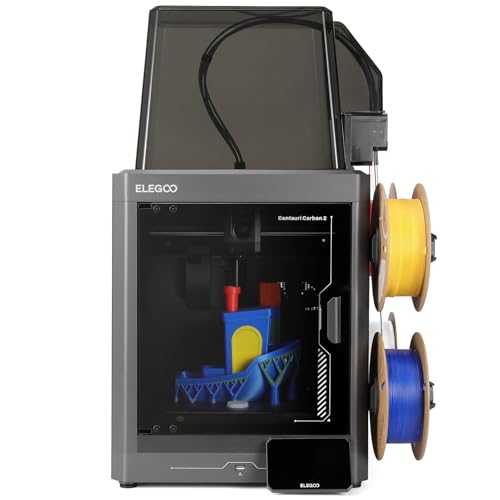
ELEGOO Centauri Carbon 2 Combo 3D Printer
Best for: fast small multicolor prints
- Build Volume
- 256x256x256mm
- Max Print Speed
- 500mm/s
- Printing Technology
- CoreXY
- Multicolor Capacity
- 4-color
- Bed Leveling
- 1-click auto leveling
- Printing Speed
- 500 mm/s
The ELEGOO Centauri Carbon 2 Combo is a 4-color CoreXY 3D printer designed for high-speed output. It reaches a maximum print speed of 500 mm/s with 20,000 mm/s² acceleration. The build volume is 256x256x256mm. You get 1-click auto leveling and smart filament detection for hassle-free multicolor printing. This rigid aluminum frame model suits users who need fast, reliable results across various materials.
- 500 mm/s max print speed
- 4-color printing with instant switching
- CoreXY structure for stability
- 1-click auto leveling
- 256mm build volume is smaller than the 600mm/s competitors
- 42.7 pounds weight is heavier than the list average
- You need fast 4-color prints under 256mm
- You want a rigid CoreXY frame
- You prefer automated calibration
- You need a build volume larger than 256mm
- You require speeds over 500 mm/s
- You prefer a lighter machine
Verdict: ELEGOO Centauri Carbon 2 Combo delivers high-speed multicolor printing for small to medium projects. It fits users who prioritize speed and stability over large build volumes.

Bambu Lab A1 Mini Combo Multi-Color 3D Printer
Best for: Beginners wanting compact multi-color printing
- Multicolor Capacity
- Multi-Color
- Bed Leveling
- Full-Auto
- Features
- Multi-Color Printing
- Target Audience
- Beginners
- Dimensions
- 16.8 × 14.8 × 19.5 inches
- Weight
- 22 pounds
The Bambu Lab A1 Mini Combo brings multi-color printing to beginners with a compact footprint. It features 10,000 mm/s² acceleration and full-auto calibration for precise, fast results. The included AMS lite enables vibrant multi-color output. Weighing 22 pounds, it fits smaller workspaces. This setup simplifies your first print with a 20-minute setup and quiet operation under 48 dB.
- 10,000 mm/s² acceleration for high-speed precision
- Full-auto calibration including Z-offset and bed-leveling
- AMS lite included for multi-color printing
- Active flow rate compensation for smooth prints
- Quiet operation at ≤48 dB
- Smaller build volume compared to competitors with 500mm or 600mm ranges
- Heavier at 22 pounds than lighter entry-level options
- Limited to 4-color multi-color printing via AMS lite
- You want a beginner-friendly ecosystem with minimal manual setup
- You need multi-color printing in a compact desktop footprint
- You value quiet operation for home or office use
- You require large-format prints exceeding its build volume
- You need more than 4 colors for complex multi-material projects
- You prefer a lighter, more portable machine for frequent transport
Verdict: Bambu Lab A1 Mini Combo is ideal for beginners seeking reliable multi-color prints in a small space. Its auto-calibration and speed make it a strong starter choice for those prioritizing ease of use over large build volume.

Anycubic Kobra X Multicolor 3D Printer
Best for: Fast multi-color printing with remote monitoring
- Build Volume
- 260 x 260 x 260 mm
- Max Print Speed
- 600 mm/s
- Printing Technology
- FDM
- Multicolor Capacity
- 4-color (expandable to 19 colors)
- Bed Leveling
- LeviQ 3.0 (Automatic)
- Connectivity
- Dual-band Wi-Fi (2.4G/5G), LAN
The Anycubic Kobra X is an FDM printer designed for multi-color projects. It features a 260 x 260 x 260 mm build volume and reaches speeds up to 600 mm/s. The system supports native 4-color printing and expands to 19 colors with additional modules. You get dual-band Wi-Fi, LAN connectivity, and AI monitoring for remote control. This setup suits makers who need fast, versatile printing for home or school use.
- 600 mm/s maximum print speed
- 260 x 260 x 260 mm build volume
- Native 4-color with 19-color expansion
- Dual-band Wi-Fi and LAN connectivity
- LeviQ 3.0 automatic bed leveling
- 260 mm build width is smaller than the 500 mm or 600 mm options on this list
- 20.9 pound weight is heavier than the compact A1 Mini Combo
- 260 mm build depth is narrower than the 500 mm or 600 mm alternatives
- You want fast 600 mm/s printing speeds
- You need native multi-color capability without external add-ons
- You require stable LAN and dual-band Wi-Fi connectivity
- You need a build volume larger than 260 mm
- You prefer a lighter printer under 15 pounds
- You want a more compact footprint than 23 inches wide
Verdict: Anycubic Kobra X Multicolor 3D Printer offers high speed and multi-color flexibility for users who prioritize print velocity and connectivity over maximum build size. It fits makers who need reliable remote monitoring and fast turnaround on medium-sized projects.

Creality K2 Direct-Drive 3D Printer
Best for: High-speed multicolor printing with AI monitoring
- Build Volume
- 260 x 260 x 260 mm
- Max Print Speed
- 600 mm/s
- Multicolor Capacity
- Up to 16 colors
- Bed Leveling
- Auto leveling
- Features
- Auto Leveling, Camera, Multi-Color Printing, Direct Drive Extruder
- Dimensions
- 19.4 × 36 × 20.2 inches
The Creality K2 offers 600 mm/s print speeds and supports up to 16 colors via four CFS units. It features a 260 x 260 x 260 mm build volume and auto leveling. You get smart AI camera monitoring and silent operation. This model suits users who want high-speed multicolor printing with a sturdy frame and step-servo motors for consistent extrusion.
- Max print speed of 600 mm/s
- Supports up to 16 colors with four CFS units
- Smart auto leveling probes only the target area
- Includes AI camera for real-time monitoring
- Uses step-servo motors for quieter operation
- 260 x 260 x 260 mm build volume is smaller than the 500 mm capacity of the ELEGOO Centauri Carbon 2
- Requires separate CFS units for multicolor printing rather than a native integrated toolchanger system
- Dimensions of 36 x 19.4 x 20.2 inches occupy significant desktop space
- You need high-speed printing at 600 mm/s
- You want to print in up to 16 colors
- You prefer auto leveling that targets only the print area
- You require a build volume larger than 260 mm
- You want a native integrated multicolor system without extra units
- You need a more compact footprint than 36 inches wide
Verdict: The Creality K2 3D Printer delivers fast 600 mm/s printing and extensive 16-color capabilities for users prioritizing speed and multicolor output. It fits those who value targeted auto leveling and smart monitoring over larger build sizes.
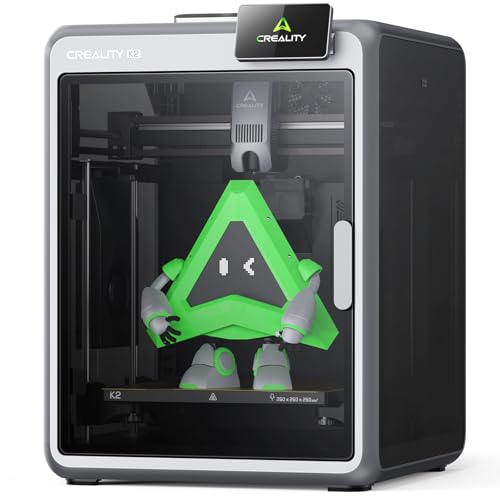
Creality K2 High-Speed 3D Printer
Best for: high-speed printing and precision
- Build Volume
- 260 * 260 * 260mm
- Max Print Speed
- 600mm/s
- Bed Leveling
- Auto Leveling
- Printing Speed
- 600 mm/s
- Features
- Auto Leveling, Camera, Multi-Color Printing, AI Camera, Direct Drive Extruder
- Dimensions
- 19.4 × 36 × 20.2 inches
The Creality K2 offers high-speed printing up to 600mm/s with a 260mm³ build volume. It features auto leveling and an AI chamber camera for monitoring. The direct drive extruder supports engineering-grade filaments. This model suits users who value speed and precision. It is a solid option for multi-color printing with the separate CFS system.
- Prints at speeds up to 600mm/s
- 260 x 260 x 260mm build volume
- Auto leveling for easy setup
- AI chamber camera for failure detection
- Direct drive extruder for reliable feeding
- Smaller 260mm³ build volume than competitors
- CFS multi-color system sold separately
- Heavier die-cast aluminum frame
- You need fast printing speeds up to 600mm/s
- You want auto leveling for convenience
- You prefer a robust metal frame
- You need a larger build volume than 260mm
- You want multi-color printing included in the box
- You prefer a lighter plastic chassis
Verdict: Creality K2 3D Printer delivers high speed and precision for users who prioritize print quality and robust construction. It fits makers who need fast output and do not mind purchasing the multi-color system separately.
Specifications side by side
| Spec | Bambu Lab A1 Combo Multi-Color 3D Printer | Snapmaker U1 4-Toolhead 3D Printer | ELEGOO Centauri Carbon 2 Combo 3D Printer | Bambu Lab A1 Mini Combo Multi-Color 3D Printer | Anycubic Kobra X Multicolor 3D Printer | Creality K2 Direct-Drive 3D Printer | Creality K2 High-Speed 3D Printer |
|---|---|---|---|---|---|---|---|
| Build Volume | – | 270 X 270 X 270 mm | 256x256x256mm | – | 260 x 260 x 260 mm | 260 x 260 x 260 mm | 260 * 260 * 260mm |
| Max Print Speed | – | 500 mm/s | 500mm/s | – | 600 mm/s | 600 mm/s | 600mm/s |
| Printing Technology | FDM | CoreXY | CoreXY | – | FDM | – | – |
| Multicolor Capacity | – | 4-Toolhead | 4-color | Multi-Color | 4-color (expandable to 19 colors) | Up to 16 colors | – |
| Bed Leveling | Automatic | – | 1-click auto leveling | Full-Auto | LeviQ 3.0 (Automatic) | Auto leveling | Auto Leveling |
| Connectivity | – | – | – | – | Dual-band Wi-Fi (2.4G/5G), LAN | – | – |
| Printing Speed | – | – | 500 mm/s | – | 600 mm/s | 600 mm/s | 600 mm/s |
| Features | Multi-Color Printing | Multi-Color Printing | Auto Leveling, Multi-Color Printing, CoreXY Structure | Multi-Color Printing | Camera, Multi-Color Printing, AI Camera | Auto Leveling, Camera, Multi-Color Printing, Direct Drive Extruder | Auto Leveling, Camera, Multi-Color Printing, AI Camera, Direct Drive Extruder |
| Target Audience | Beginners | Beginners | – | Beginners | Beginners | – | – |
| Dimensions | 23 × 21.1 × 16.8 inches | 22.6 × 13 × 14.2 inches | 18.9 × 19.7 × 29.3 inches | 16.8 × 14.8 × 19.5 inches | 23 × 13 × 22 inches | 19.4 × 36 × 20.2 inches | 19.4 × 36 × 20.2 inches |
| Weight | 28.5 pounds | 59.1 pounds | 42.7 pounds | 22 pounds | 20.9 pounds | – | – |
| Size | A1 Combo + LED Kit | – | Centauri Carbon 2 Combo | A1 mini Combo (with AMS lite) | – | Creality K2 | – |
| Color | multicolor | – | Gray | Silver | Grey | black | Black |
| Model | PF002-A+SA005-EU | – | US-EL-3DF-CC2C | PF002-M+SA005-AU | – | K2_1002110086_LOCALUS1 | K2 |
Frequently asked questions
Which multi-color 3D printer is best for beginners?
The Bambu Lab A1 Combo Multi-Color 3D Printer is the top choice for beginners. It features automated calibration and a compact design that fits small spaces. The unit measures 21.1 inches wide and 16.8 inches high. This setup prioritizes ease of use over maximum build volume, making it ideal for new users.
What is the fastest multi-color 3D printer on this list?
The Anycubic Kobra X Multicolor and Creality K2 both offer printing speeds of 600 mm/s. The Anycubic Kobra X includes an AI camera for remote monitoring. The Creality K2 provides extensive 16-color capabilities. Both machines prioritize print velocity and reliability for medium-sized projects over larger build sizes.
Which printer offers the smallest footprint for multi-color printing?
The Bambu Lab A1 Mini Combo is the most compact option. It measures 14.8 inches wide and 16.8 inches long. This model is ideal for beginners seeking reliable multi-color prints in small spaces. Its auto-calibration and speed make it a strong starter choice for those with limited desk area.
How does the Snapmaker U1 differ from the A1 Combo?
The Snapmaker U1 features a 4-toolhead system for multi-color printing. It distinguishes itself by prioritizing minimal waste during color changes. The unit weighs 59.1 pounds and measures 13 inches wide. It fits users who want reliable mixed-material capabilities in a moderately sized footprint with reduced filament waste.
Is there a high-speed option with CoreXY structure?
The ELEGOO Centauri Carbon 2 Combo uses a CoreXY structure for stability. It delivers high-speed multicolor printing at 500 mm/s. The printer weighs 42.7 pounds and includes auto-leveling features. It fits users who prioritize speed and stability for small to medium projects over large build volumes.
Which printer includes an AI camera for monitoring?
The Anycubic Kobra X Multicolor includes an AI camera for remote monitoring. It offers high speed and multi-color flexibility. The unit weighs 20.9 pounds and measures 13 inches wide. It fits makers who need reliable remote monitoring and fast turnaround on medium-sized projects.
Does the Creality K2 support multi-color printing?
Yes, the Creality K2 supports multi-color printing with extensive 16-color capabilities. It delivers fast 600 mm/s printing and features auto-leveling. The unit measures 36 inches wide and 20.2 inches high. It fits users who value targeted auto-leveling and smart monitoring over larger build sizes.
What is the difference between the A1 Combo and A1 Mini Combo?
The A1 Combo is larger, measuring 23 inches long and 21.1 inches wide. The A1 Mini Combo is more compact at 16.8 inches long and 14.8 inches wide. Both offer automated calibration and multi-color printing. The Mini Combo is better for small spaces, while the Combo suits users needing more build volume.